Official listing
Game description
State io Wars is an online strategy game that involves directing your forces to expand your territory. The primary objective is to capture both neutral and enemy territories under your dominion.
Action game
State Wars is an online strategy game where players direct military forces across a contested map to expand their territory. The central challenge requires balancing offense and defense while dispatching units to take over neutral zones and conquer enemy strongholds.
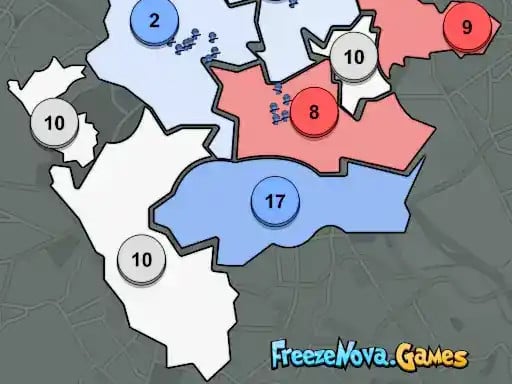
Choose Play now to load the game.
Official listing
State io Wars is an online strategy game that involves directing your forces to expand your territory. The primary objective is to capture both neutral and enemy territories under your dominion.
From the game listing
Left-Click drag Send Troops Touchscreen for Mobile Devices
Open this card to load the gameplay video.
State Wars is an online strategy game where players direct military forces across a contested map to expand their territory. The central challenge requires balancing offense and defense while dispatching units to take over neutral zones and conquer enemy strongholds.
In State Wars, the battlefield is defined by distinct territorial nodes scattered across the map. Players take command of their starting base and work to claim dominion over every region in play. Expanding your footprint involves mobilizing units from controlled strongholds toward unoccupied neutral spaces or rival positions.
The core gameplay loop centers on dynamic tactical positioning and real-time decision-making. As you send forces outward to capture new ground, your active frontline shifts continuously. Success depends on monitoring rival movements across the map, identifying weak expansion targets, and committing troops without leaving your own territories vulnerable to counter-offensives.
The primary objective in State Wars is to capture both neutral and enemy territories under your complete dominion. To achieve a decisive victory, players must systematically outmaneuver opposing forces, claim key strategic hubs, and eliminate all rival presence from the board.
1. Assess the initial map layout to identify your starting territory alongside adjacent neutral zones and rival bases.
2. Click or tap and drag from your controlled territory toward a target destination to send troops into motion.
3. Focus your opening moves on securing nearby neutral territories to broaden your territorial foothold.
4. Watch enemy troop movements to anticipate incoming attacks and reinforce exposed borders.
5. Launch coordinated troop transfers against enemy-held territories to weaken their defenses and claim complete dominion.
On desktop browsers, left-click and drag from your base to a target territory to send troops. On mobile devices, use direct touchscreen drag gestures to direct your forces.
State Wars tests situational awareness, rapid assessment, and decisive tactical timing. The central strategic tradeoff lies in balancing territorial greed against defensive security. Dispatching a massive wave of troops to claim a distant target can rapidly expand your borders, but it also leaves the originating base temporarily drained and vulnerable to opportunistic strikes from adversaries.
Maintaining a steady rhythm of expansion requires players to weigh the cost of claiming passive neutral territories against directly confronting active enemy strongholds. Successful commanders react flexibly, adapting their troop distributions as dynamic frontline pressure shifts across the map.
State Wars supports both desktop and mobile platforms with dedicated input methods. Desktop players can use a standard mouse to left-click and drag troop paths across the 960 by 600 playfield. Mobile users can direct their army using straightforward touchscreen dragging gestures, offering intuitive command over unit routing across various screen sizes.
State Wars blends real-time tactical maneuvers with the accessible pacing typical of modern browser-based action and strategy titles. While traditional strategy games often involve complex resource management and lengthy base building, real-time tactical territory games streamline the experience into pure spatial control and troop routing. Players who enjoy competitive territory expansion will appreciate the emphasis on rapid decision-making, defensive awareness, and clean tactical execution.
For players searching for an engaging State Wars game session or a fast-paced action game online, this title delivers quick tactical rounds that are easy to start directly in any web browser. Its intuitive drag-and-drop mechanics make it well suited for casual strategy practice, allowing players to test different expansion pacing, multi-front defense tactics, and decisive invasion maneuvers without complicated setup.
What is the main goal in State Wars? The main objective is to direct your forces across the battlefield, capturing both neutral territories and enemy bases until your faction holds complete dominion over the entire map.
How do you control and send troops in the State Wars game? You command units by left-clicking and dragging from your controlled territory to your chosen target on desktop, or by using direct touchscreen drag gestures on mobile devices.
Can you play this action game online on mobile devices? Yes, State Wars includes native touchscreen support, allowing mobile players to direct units and capture territories directly in their mobile web browser without requiring a keyboard.
Tell us if the game does not load, the information is wrong or the content needs review.
Report a problemExplore popular games by category, shared tags and site-wide activity.