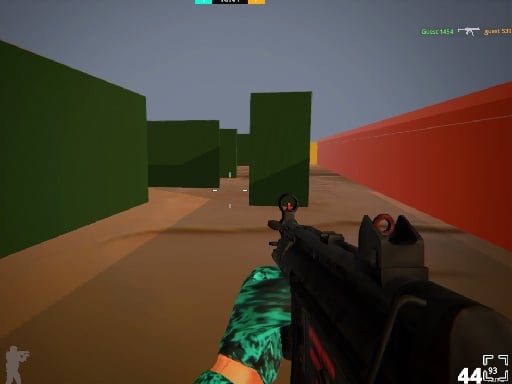
About Star of warfare
Star of Warfare is an online multiplayer first-person shooter that places combatants into fast-paced arenas with distinct battle modes. Players select from three core weapon categories—assault rifles, sniper rifles, and shotguns—to engage opponents across deathmatch, team deathmatch, and capture the flag matches. Quick reflexes, fluid movement, and smart positioning determine who controls the battlefield.
Star of Warfare delivers classic 3D arena gunplay directly within a browser environment using WebGL technology. The game centers on direct tactical shootouts where players join matches across diverse competitive setups. Whether jumping into a solo free-for-all deathmatch, coordinating alongside allies in team deathmatch, or securing objectives in a capture-the-flag format, every encounter emphasizes rapid decision-making and spatial awareness.
Combat centers on three distinct weapon loadouts. The versatile assault rifle handles standard skirmishes, the sniper rifle excels at precision long-range engagements, and the shotgun dominates close-quarters fighting. Players can sprint across maps, duck behind cover, pick up dropped equipment, and swap armaments on the fly to react dynamically to changing threats during combat.
Your goal
The primary goal across matches in Star of Warfare depends on the chosen mode. In deathmatch and team deathmatch, players aim to eliminate opposing combatants and secure more takedowns than rival fighters or enemy squads. In capture the flag, the objective shifts toward seizing flags and defending territory. Across all formats, the continuous goal is refining crosshair placement, weapon switching, and survival positioning.
How to play Star of warfare
1. Launch into a match and choose between available formats like deathmatch, team deathmatch, or capture the flag.
2. Navigate the map using standard movement keys, sprinting to close gaps or crouching to stabilize cover.
3. Select your active firearm using number keys or pick up discovered guns from fallen players around the arena.
4. Engage opponents by aiming down sights with the right mouse button and firing with the left mouse button.
5. Reload your weapon during quiet moments between gunfights to avoid running out of ammunition in combat.
6. If eliminated during an engagement, press the respawn key to jump back into action and support your team.
Controls and device support
Desktop inputs are mapped to standard keyboard and mouse controls: WASD to move, Space to jump, Left Mouse Button to shoot, Right Mouse Button to aim, Shift to run, P to pause, Enter to respawn, F to pick up a gun, R to reload, C to crouch, and keys 1, 2, and 3 to swap weapons.
- Controls: Mouse or touch
- Device support: Browser
- Game frame: 800 x 550
Rules to keep in mind
- Match rules follow the selected game mode, featuring deathmatch, team deathmatch, and capture-the-flag variants.
- Players carry or swap between three primary weapon classes: assault rifles, sniper rifles, and shotguns.
- Pressing the respawn button returns an eliminated player directly back into the live match.
What makes the challenge interesting
Success in Star of Warfare hinges on fluid movement and weapon adaptation. Each available firearm dictates a unique engagement distance: shotguns require aggressive flanking and tight corridor navigation, assault rifles offer balanced mid-range suppression, and sniper rifles demand calm precision and clear sightlines. Mastering the transition between sprinting and aiming down sights ensures you can traverse maps rapidly without being caught unprepared.
The pacing balances active gun battles with map control. Crouching lowers your profile behind battlefield objects, while jumping over obstacles allows for unpredictable entry routes into contested rooms. Understanding when to reload safely behind cover rather than challenging multiple opponents at low magazine capacity is critical to sustaining winning streaks.
Tips for Star of warfare
- Aim down sights with the right mouse button before firing at mid to long distances. Firing blindly while hip-firing often causes bullets to spread wide, reducing damage efficiency against distant opponents.
- Reload during breaks in combat using the reload key rather than waiting for an empty magazine. Getting caught without ammunition mid-skirmish leaves you defenseless against aggressive enemies.
- Match your weapon choice to the environment by switching between assault rifles, shotguns, and snipers. Forcing sniper play into tight hallways usually leads to quick defeats.
- Crouch behind low walls and barricades to reduce your visibility while scanning lanes. Standing fully exposed in open choke points invites easy sniper fire from distant angles.
- Pick up dropped weapons from the arena floor using the interaction key to restock firearms or adapt your combat setup on the fly.
Stages and progression
Progression in Star of Warfare revolves around personal skill mastery across its core multiplayer modes. As players cycle through solo deathmatch, coordinated team deathmatch, and objective-based capture the flag, challenge scales naturally with opponent tactics and positioning.
Rather than fixed story stages, personal growth comes from mastering each weapon category. Refining your sniper aim across long corridors, tightening assault rifle burst control, and perfecting close-quarters shotgun timing provide a structured improvement path across repeated multiplayer sessions.
Playing on different devices
Star of Warfare is designed for desktop browser play using a standard keyboard and mouse arrangement. The mouse provides dedicated controls for aiming and shooting, while keyboard inputs govern full directional movement, jumping, sprinting, crouching, and weapon swapping.
A full physical keyboard ensures quick access to key functions like pressing R to reload or C to crouch without breaking movement rhythm. Playing on a stable desktop browser window allows seamless pointer tracking during high-speed shootouts.
The skills behind the game
As an entry in the shooting and action genre, Star of Warfare emphasizes real-time tactical gunplay, spatial awareness, and quick target acquisition. Browser-based 3D shooters provide instant multiplayer combat without requiring massive client downloads, letting players test their marksmanship and map traversal instantly.
Army and military-themed arena games thrive on balanced weapon archetypes. Star of Warfare captures this by contrasting close-range firepower, steady automatic rifles, and precision long-range rifles, giving players distinct combat roles to explore in competitive multiplayer sessions.
Who will enjoy this game
Players looking for a competitive shooting game online will find Star of Warfare accessible and responsive. Its variety of game modes makes it an attractive destination for practicing FPS fundamentals like flick-aiming, recoil management, and tactical positioning.
For fans exploring sniper game online mechanics, the inclusion of dedicated sniper rifles alongside traditional assault weapons offers ample opportunity to practice long-range marksmanship and sightline control against live moving opponents.
Games with a similar feel
Sniper 3D: While Sniper 3D focuses heavily on mission-based scoped precision and static target takedowns, Star of Warfare integrates sniper rifles into dynamic multiplayer arena combat alongside assault rifles and shotguns, catering to players who prefer active arena firefights over isolated shooting galleries.
Sniper Elite: Sniper Elite emphasizes slow, calculated tactical sniper infiltration across large environments. In contrast, Star of Warfare offers instant, fast-paced browser FPS action featuring deathmatch and team battle modes where quick movement, sprinting, and rapid weapon swapping take center stage.
Frequently asked questions
What weapon classes are available in Star of Warfare? Star of Warfare currently features three core weapon classes: assault rifles, sniper rifles, and shotguns. Players can switch between these arms or collect dropped guns found across the battlefield during matches.
Which game modes can I play in Star of Warfare? The game includes three active multiplayer formats: deathmatch for free-for-all combat, team deathmatch for squad-based warfare, and capture the flag for objective territory play.
How do I reload or swap weapons during a match? Press R on your keyboard to reload your active firearm, and press keys 1, 2, or 3 to swap between your carried guns. You can also press F to pick up weapons from the ground.
What should I do after getting eliminated? When your character is eliminated in combat, press the Enter key on your keyboard to respawn immediately and return to the action.
Something not right?
Tell us if the game does not load, the information is wrong or the content needs review.
Report a problem ›