About Sprunki Puzzles
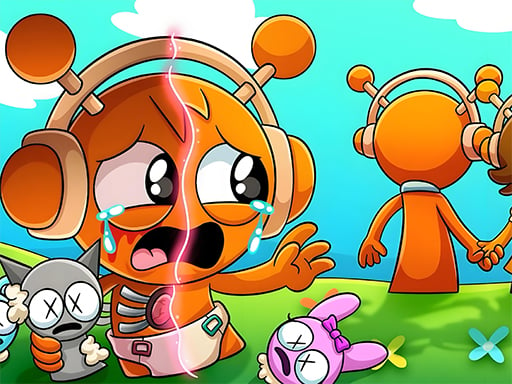
Sprunki Puzzles is an online jigsaw game featuring six distinct character images set around the Sprunki theme. Players can select any illustration and choose among four puzzle piece configurations ranging from 16 to 100 pieces. Designed for casual sessions, the game tasks you with assembling scrambled fragments into complete character artwork using direct mouse controls.
Sprunki Puzzles provides a traditional jigsaw experience centered on Sprunki illustrations. The game includes six individual themed pictures, giving players visual variety across each solving session. Rather than enforcing a single rigid layout, each image can be tackled across four piece counts: 16 pieces for a quick assembly, 36 pieces for moderate difficulty, 64 pieces for deeper sorting, and 100 pieces for a thorough challenge.
The core loop involves selecting an image, setting your preferred piece density, and rearranging the puzzle fragments until the picture is fully reconstructed. Because the entire game runs via mouse interaction within the browser, it offers an approachable way to practice spatial recognition, pattern matching, and piece alignment at your own pace without complex menu layers.
Your goal
Your objective in Sprunki Puzzles is to correctly assemble all six available Sprunki pictures by matching and connecting their scattered jigsaw pieces. Players can test their visual sorting skills by completing each puzzle across the four available piece modes, working up from the basic 16-piece grid to the dense 100-piece board to finish the entire picture set.
How to play Sprunki Puzzles
1. Browse the main gallery and click on one of the six available Sprunki images to begin.
2. Select your desired piece count from the four mode options: 16, 36, 64, or 100 pieces.
3. Use your mouse to pick up and drag individual jigsaw pieces across the board area.
4. Group pieces with straight borders first to build the outer frame of the Sprunki illustration.
5. Match colors, character outlines, and interlocking edges to fill in the central sections until the image is fully assembled.
Controls and device support
Use the mouse to select images, choose difficulty modes, and drag jigsaw pieces into place on the board.
- Controls: Mouse or touch
- Device support: Browser
- Game frame: 1920 x 1080
Rules to keep in mind
- The game contains exactly six selectable images, all centered around the Sprunki theme.
- Every image can be played in four separate piece modes: 16 pieces, 36 pieces, 64 pieces, and 100 pieces.
- Mouse input is used to interact with the game interface and manipulate puzzle pieces.
What makes the challenge interesting
The appeal of Sprunki Puzzles lies in classic visual sorting paired with recognizable character artwork. The primary skill involves breaking down a complete image into recognizable fragments by analyzing edge contours, distinct color patches, and character features. The trade-off between piece counts changes the solving rhythm: smaller boards like 16 pieces allow rapid visual confirmation, whereas 64 and 100-piece configurations require methodical scanning and workspace organization. Players must balance broad color grouping with careful inspection of connector shapes to avoid misplacing similar-looking background sections.
Tips for Sprunki Puzzles
- Sort outer edge pieces before working inward. Establishing the rectangular border provides clear spatial boundaries and prevents cluttering the center with misplaced interior pieces.
- Group fragments by distinct character colors or face details. Isolating key visual accents helps you assemble prominent Sprunki character features much faster than random trial and error.
- Start on the 16 or 36-piece setting when viewing a new image. Learning the full composition on an easier layout reduces confusion when you step up to 64 or 100 pieces.
- Keep your solving area organized by moving loose pieces toward the edges of the board. An overcrowded workspace makes it easy to overlook connecting puzzle tabs.
Stages and progression
Sprunki Puzzles provides six distinct themed pictures and allows players to adjust the difficulty of any image through its four piece-count modes. A practical progression plan is to complete all six images on the introductory 16-piece setting to familiarize yourself with each character's layout. From there, advance systematically through 36, 64, and finally 100 pieces per image. Stepping up piece density gradually trains your visual parsing and gives you a structured challenge across the entire gallery.
Playing on different devices
Sprunki Puzzles is built with desktop mouse control in mind, offering precise click-and-drag handling for picking up and snapping puzzle pieces. The game canvas is designed for a 1920 x 1080 resolution, ensuring clear visibility of puzzle piece contours and vibrant artwork details across standard widescreen displays.
The skills behind the game
As part of the puzzle genre, jigsaw titles emphasize spatial reasoning, pattern recognition, and patient visual organization. Sprunki Puzzles applies these traditional jigsaw mechanics to vibrant character illustrations, offering a relaxed environment where players can solve boards without high-pressure action elements. The availability of multiple piece sizes makes jigsaw games flexible for both short mental warm-ups and longer, focused assembly sessions.
Who will enjoy this game
Players looking for a sprunki puzzles game or an accessible jigsaw puzzle online can use this title for casual practice. The multi-tier piece selection allows users of varying skill levels to enjoy the artwork while adjusting difficulty to match their available time and visual sorting experience.
Frequently asked questions
How many pictures are included in Sprunki Puzzles? Sprunki Puzzles features six distinct jigsaw images, each created around the Sprunki theme.
What difficulty modes can I choose for each picture? Each of the six images can be played in four separate piece counts: 16 pieces, 36 pieces, 64 pieces, and 100 pieces.
What controls are used to play Sprunki Puzzles? The game is played using mouse controls to select options in the menus and drag puzzle pieces across the screen.
How can beginners best approach the higher piece counts? Beginners can start by sorting edge pieces to construct the frame, then grouping fragments by bold colors before attempting the 64 or 100-piece configurations.
Something not right?
Tell us if the game does not load, the information is wrong or the content needs review.
Report a problem ›