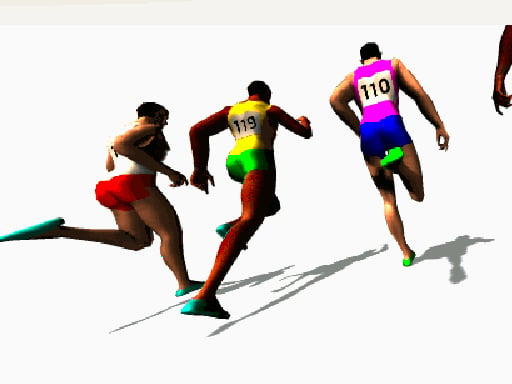
About Sprinter
Sprinter is a classic track-and-field style browser running game originally created by Gamedesign.jp during the Flash era. The core challenge places you in a direct 100-meter sprint where your goal is to beat every opposing runner across the finish line. Success relies on rapidly alternating between the left and right arrow keys to build forward momentum while maintaining a steady rhythm so your athlete does not stumble mid-race.
Set on an athletic running track, Sprinter captures the raw energy of competitive 100-meter dash events. Players line up against rival sprinters and race toward the finish line using keyboard inputs. Rather than managing complex athlete statistics or steering across lanes, the game centers entirely on your speed and mechanical consistency. You tap the left and right arrow keys in rapid succession to propel your runner forward, building momentum with every clean cycle.
The excitement stems from the rising difficulty of each successive sprint. As you advance through heats, opposing competitors become visibly faster, forcing you to accelerate your finger work. However, recklessly mashing keys is risky: inputting commands out of sync can cause your runner to stumble and lose crucial ground. Navigating that delicate balance between explosive speed and controlled cadence forms the heart of the experience.
Your goal
Your primary objective in Sprinter is to defeat every rival runner on the track and cross the finish line first in each 100-meter contest. To accomplish this, you must generate maximum forward momentum through rapid, alternating arrow key presses while maintaining stable coordination so your runner does not stumble. Because your opponents get progressively faster, meeting the objective requires continually pushing your input cadence higher without sacrificing the clean timing necessary to keep your stride upright.
How to play Sprinter
1. Focus the game screen by clicking inside the window to ensure your browser registers arrow key inputs properly.
2. Position two fingers comfortably over the left and right arrow keys before the race begins.
3. Rapidly alternate presses between the left and right arrow keys to start running and build forward speed.
4. Keep a consistent left-right rhythm during the dash to prevent your runner from stumbling on the track.
5. Accelerate your cadence down the stretch to outpace faster opponents and reach the 100-meter finish line first.
Controls and device support
Play using the arrow keys to propel your runner. If the game does not react to your keystrokes immediately, click on the game screen to restore window focus.
- Controls: Keyboard
- Device support: Desktop + mobile
- Game frame: 800 x 600
Rules to keep in mind
- Movement requires alternating left and right arrow key presses to generate running momentum.
- Key tapping must be timed accurately; inconsistent or mistimed inputs can cause the runner to stumble.
- Each race covers a 100-meter distance, and you must outpace your opponents across the finish line to beat them.
- Opponents increase in speed as you progress, requiring faster execution to keep up.
What makes the challenge interesting
The defining appeal of Sprinter lies in the sharp tension between speed and rhythmic discipline. In many keyboard-based athletics titles, players assume that simply mashing buttons as quickly as possible guarantees victory. Here, the mechanic introduces a crucial tradeoff: pressing the left and right arrow keys too erratically can cause your sprinter to stumble, wasting precious seconds while rivals pull ahead.
Mastering this challenge requires settling into an internal cadence rather than succumbing to panic. In the opening stretch of the 100-meter dash, establishing an even alternating tempo lets you build momentum safely. As faster opponents mount pressure beside you, you must increase that tempo incrementally. Developing the fine motor control to accelerate your fingers without scrambling the sequence is what makes the sprint so engaging for fans of classic reflex games.
Tips for Sprinter
- Establish a steady rhythm at the start. Begin the dash with an even alternating cadence between arrow keys before attempting maximum speed, ensuring you build momentum cleanly without risking an immediate trip.
- Use separate hands or dominant fingers. Assigning one finger from each hand or two well-practiced fingers to the left and right arrow keys helps prevent accidental double-taps that disrupt your running stride.
- Listen to your keyboard taps for timing cues. Auditory feedback from mechanical or membrane switches can help you detect uneven pauses, enabling you to smooth out your alternating tempo and avoid fatal stumbles.
- Accelerate progressively rather than violently bursting. Increase your tapping frequency gradually as momentum builds rather than frantically hammering keys, which often leads to chaotic mistimed inputs when pressure mounts.
- Refocus window attention before every race. If inputs feel delayed or unresponsive, promptly click inside the game canvas to make sure your browser window retains keyboard focus throughout the dash.
Stages and progression
Progression in Sprinter revolves around overcoming steadily accelerating competition. In the initial heats, the 100-meter dash gives players room to find their physical rhythm against relatively modest challenger speeds. However, each subsequent race introduces opponents who run significantly faster, closing the margin for error.
Because the opposition accelerates as you advance, players must refine their personal execution with each run. A tapping pace that secured a comfortable victory in an earlier heat will leave you trailing in later rounds. Progression therefore acts as a personal benchmark of motor coordination: you must actively train yourself to sustain higher key-alternation speeds across the full 100 meters while preserving the crisp rhythm needed to remain upright until crossing the line.
Playing on different devices
Sprinter is designed around standard keyboard navigation and runs at a fixed 800 by 600 display resolution. Because the game relies entirely on rapid arrow key inputs, playing on a desktop or laptop setup with a stable physical keyboard provides the most reliable experience. Players should ensure their browser window maintains active focus during play. If the athlete does not react to your keystrokes when the sprint begins, clicking anywhere directly inside the 800 by 600 game canvas will re-engage keyboard control immediately.
The skills behind the game
Rooted in the sports and racing genres, Sprinter strips athletic competition down to its purest mechanical component: cadence-driven velocity. Track-and-field video games have a long history stretching back to early arcade button-mashers, where physical endurance and rapid inputs simulated the exertion of real-world sprinting. Sprinter fits comfortably within this lineage by transforming a short 100-meter dash into a direct test of finger dexterity.
Unlike expansive sports simulations that emphasize managerial strategy, complex team formations, or extensive gear upgrades, this title celebrates the immediacy of head-to-head racing. It captures the essential thrill of racing games—chasing down leaders and crossing the finish line first—through straightforward, accessible controls that anyone can pick up instantly while still offering a rigorous test of timing and motor coordination.
Who will enjoy this game
For players looking for a quick sports game online or exploring retro titles under the sprinter game banner, Sprinter delivers quick, focused sessions that test physical coordination. Many casual gamers turn to sprinting titles during short breaks to practice hand speed, reaction timing, and keyboard rhythm without needing to commit to multi-hour narrative campaigns or complex control layouts.
Its pick-up-and-play format makes it an appealing choice for track enthusiasts, rhythm fans, and competitive players who enjoy striving for personal best performances. Because every race takes only seconds to complete, you can easily use the game for warm-up drills or brief reflex challenges, gradually training your fingers to sustain clean, alternating speeds against increasingly brisk digital competition.
Games with a similar feel
Asphalt: While Asphalt delivers high-octane vehicular racing centered on drifting sports cars through urban streets, Sprinter explores racing through human track athletics. Asphalt emphasizes steering lines, vehicular handling, and nitro management, whereas Sprinter challenges players to generate straight-line speed through alternating keyboard taps. Players seeking expansive car customisation and elaborate multi-track circuits will gravitate toward Asphalt, while those wanting an immediate test of pure finger cadence will prefer Sprinter.
Fall Guys: Both Sprinter and Fall Guys feature competitive races where stumbling poses a constant threat to victory. However, Fall Guys focuses on navigating playful obstacle courses filled with physical hazards, whereas Sprinter narrows the competition to a dedicated 100-meter flat track. Players who enjoy platforming physics and obstacle survival runs will favor Fall Guys, while those who appreciate focused rhythm and finger-tapping speed in a classic sprint format will appreciate Sprinter.
Frequently asked questions
How do you run faster in Sprinter? To run faster, tap the left and right arrow keys in rapid, alternating succession. It is critical to maintain a smooth, even cadence as you increase your tapping speed, because erratic or out-of-sync presses will cause your runner to stumble and lose momentum.
Why is the runner stumbling during the race? Stumbling happens when your arrow key inputs become mistimed or uneven. Sprinter requires a balanced alternation between the left and right arrow keys; hammering one key or tapping erratically disrupts the athlete's running cadence and interrupts forward speed.
What should you do if the arrow keys do not respond? If your runner fails to move when pressing the arrow keys, click anywhere inside the game window. Clicking the screen refocuses your web browser on the canvas so it registers your keyboard inputs properly.
Do opponents get harder as you play? Yes. As you defeat opponents in the 100-meter sprint and progress, your rivals run noticeably faster. You must steadily increase your tapping cadence and maintain clean timing to keep up with the heightened competition.
Something not right?
Tell us if the game does not load, the information is wrong or the content needs review.
Report a problem ›