Official listing
Game description
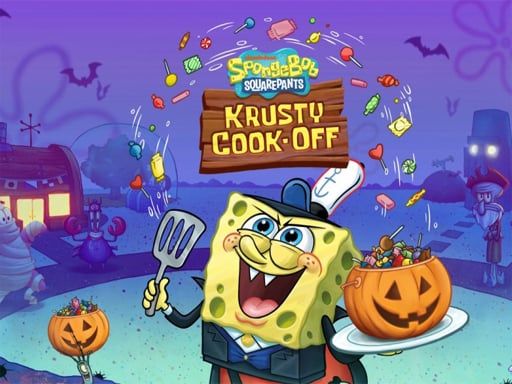
Drag and drop the all picture pieces to their exact locations to complete the pictures of the SpongeBob Halloween. The game comes with 12 pictures and three difficulties: 2x3, 3x4, 4x6.
Puzzles game
SpongeBob Halloween Jigsaw Puzzle is a festive browser puzzle game where players assemble holiday-themed scenes featuring SpongeBob. Drag and drop scrambled jigsaw tiles into their correct positions across twelve distinct illustrations. With three available grid sizes, it provides accessible picture-matching challenges suitable for casual puzzle enthusiasts of all ages.
Choose Play now to load the game.
Official listing
Drag and drop the all picture pieces to their exact locations to complete the pictures of the SpongeBob Halloween. The game comes with 12 pictures and three difficulties: 2x3, 3x4, 4x6.
From the game listing
Mouse
Open this card to load the gameplay video.
SpongeBob Halloween Jigsaw Puzzle is a festive browser puzzle game where players assemble holiday-themed scenes featuring SpongeBob. Drag and drop scrambled jigsaw tiles into their correct positions across twelve distinct illustrations. With three available grid sizes, it provides accessible picture-matching challenges suitable for casual puzzle enthusiasts of all ages.
In SpongeBob Halloween Jigsaw Puzzle, your objective is to reconstruct full holiday images by placing fragmented tiles onto the board. The title includes a gallery of twelve festive pictures celebrating Halloween themes. Each picture can be tackled across three separate grid configurations: a relaxed 2x3 layout (6 pieces), a moderate 3x4 layout (12 pieces), and a detailed 4x6 layout (24 pieces).
The game operates directly in your web browser with simple mouse-driven interactions. Moving jigsaw pieces to their designated positions reveals lively SpongeBob Halloween artwork step by step, allowing players to enjoy self-paced problem solving without high-pressure mechanics.
The primary goal is to successfully complete each of the twelve Halloween pictures by moving every scattered piece to its exact location on the board. Players win by assembling all tiles in their selected grid difficulty, fully restoring the entire festive SpongeBob artwork.
1. Select one of the 12 available Halloween-themed pictures from the puzzle menu.
2. Choose your preferred difficulty setting: 2x3, 3x4, or 4x6 grid sizes.
3. Click and hold the mouse button over any loose puzzle piece to pick it up.
4. Drag the selected piece across the board and release it onto its exact matching position.
5. Continue placing remaining tiles until the entire SpongeBob Halloween picture is fully assembled.
Mouse Left Click + Drag: Select, drag, and drop puzzle pieces into place
Gameplay centers on visual matching, spatial awareness, and piece recognition. Players examine distinctive features such as character outlines, costumes, and background colors to identify where individual segments belong on the puzzle board.
With three separate grid options, the experience scales from a quick six-piece assembly to a more involved twenty-four-piece challenge, making it adaptable for quick play sessions or progressive puzzle solving across all twelve illustrations.
The game provides 12 distinct SpongeBob Halloween pictures. Players can progress through each image at their own pace, replaying individual scenes across the 2x3, 3x4, and 4x6 difficulty settings.
As part of the puzzle game genre, jigsaw titles emphasize visual memory, spatial organization, and relaxing picture assembly. SpongeBob Halloween Jigsaw Puzzle blends accessible drag-and-drop mechanics with seasonal character art, offering a structured puzzle format that appeals to casual players seeking lighthearted logic entertainment.
Players looking for a festive puzzle game online will find an approachable jigsaw puzzle online experience in SpongeBob Halloween Jigsaw Puzzle game. The combination of SpongeBob artwork, Halloween themes, and customizable grid challenges makes it an enjoyable browser pastime.
How many pictures are included in SpongeBob Halloween Jigsaw Puzzle? The game includes 12 different Halloween-themed pictures featuring SpongeBob that players can select and solve.
What difficulty levels are available? You can select from three grid difficulties for each picture: 2x3 (6 pieces), 3x4 (12 pieces), and 4x6 (24 pieces).
What controls are used to play the game? The game is played using a mouse to click, drag, and drop puzzle pieces into their matching positions on the board.
Tell us if the game does not load, the information is wrong or the content needs review.
Report a problemExplore popular games by category, shared tags and site-wide activity.