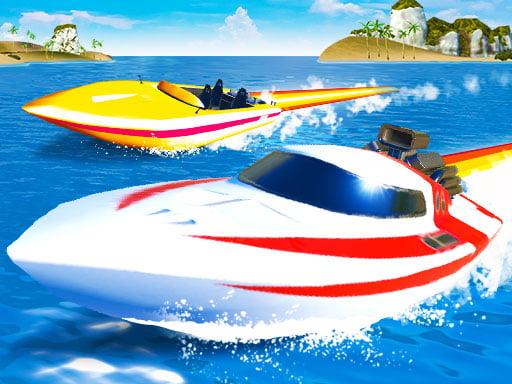
About Speedboat Challenge Racing
Speedboat Challenge Racing is a 3D watercraft simulator that puts players at the helm of super speed boats across open aquatic courses. Offering both competitive Racing heats and open Free Drive stunt sessions, this title lets you navigate challenging waters solo in single-player mode or race head-to-head in two-player mode on a shared screen.
Speedboat Challenge Racing provides fast-paced boat driving with two distinct game formats. Drivers can choose between structured competitive Racing against rivals and open Free Drive mode designed for practicing turns and launching boat stunts. Both formats are playable in single-player and two-player modes.
Piloting your boat requires steady handling, timely nitro boost activation with NOS, and changing camera views to keep your bearing on the water. If your boat flips over or gets pinned against an obstacle during extreme maneuvers, the position reset command puts you right back into the action.
Your goal
The main goal in Speedboat Challenge Racing depends on your chosen mode. In Racing mode, your objective is to steer accurately, trigger your NOS boost, and navigate the course swiftly to finish ahead of competitors. In Free Drive mode, the focus is on exploring open water and pulling off clean stunts without race pressure.
How to play Speedboat Challenge Racing
1. Choose between competitive Racing mode or open Free Drive stunt mode from the main menu.
2. Select either single-player mode to practice solo or two-player mode to play with a friend.
3. Steer and accelerate your boat using the W A S D keys or the Arrow Keys.
4. Press F to ignite your NOS speed boost along open stretches of water.
5. Use C to switch camera perspectives, T to look back, and R to reset your boat if stuck.
Controls and device support
W A S D / Arrow Keys: Move
F: NOS Boost
R: Restart Position
T: Look Back
C: Switch Camera Position
- Controls: Keyboard
- Device support: Browser
- Game frame: 800 x 450
Rules to keep in mind
- Mode selection determines your gameplay structure, shifting between competitive race placement and freeform stunt driving.
- If your speedboat becomes trapped, capsized, or halted, activating the restart position command instantly restores your boat on the water.
What makes the challenge interesting
Speedboat Challenge Racing emphasizes mastering momentum on water surfaces, where steering response and drift feel distinctly different from land vehicles. Successful runs require balancing continuous acceleration with well-timed steering inputs around curves. Engaging NOS boosts on straight sections maximizes top speed, while cycling through camera angles with the C key helps you line up upcoming turns and stunt obstacles. Checking behind your boat with the look back key ensures you maintain positioning over opponents during competitive matches.
Tips for Speedboat Challenge Racing
- Activate your NOS speed boost on straight stretches where boat stability is highest rather than during mid-turn maneuvers.
- Cycle through available camera views using the C key to locate the most comfortable angle for navigating tight water turns.
- Use the rear look-back control frequently during race mode to track opponent positions and defend your racing line.
The skills behind the game
Speedboat Challenge Racing belongs to the 3D racing and simulation genre, highlighting powerboat handling and stunt physics. Water racing titles introduce wider drift lines and fluid momentum compared to land driving games, offering a fresh dynamic for arcade racing and local two-player competition.
Who will enjoy this game
Players looking for a speedboat challenge racing game online get immediate access to powerboat competition in their browser. With straightforward keyboard controls, nitro boosts, and flexible single-player or two-player modes, this title delivers focused 3D watercraft racing and stunt action.
Games with a similar feel
Asphalt: While Asphalt delivers fast-paced arcade racing with street cars on asphalt roads, Speedboat Challenge Racing adapts similar nitro-boosted arcade racing concepts to watercourses with speedboats and open stunt arenas.
Frequently asked questions
Can Speedboat Challenge Racing be played with two players? Yes, the game features a dedicated two-player mode, allowing two players to participate in either races or free drive sessions on the same device.
What modes can I play in Speedboat Challenge Racing? You can choose between Racing mode for competitive powerboat heats and Free Drive mode for practicing stunts and open water navigation.
How do I use nitro boost in the game? Press the F key while driving to activate your NOS boost and gain a burst of extra speed across open water.
Something not right?
Tell us if the game does not load, the information is wrong or the content needs review.
Report a problem ›