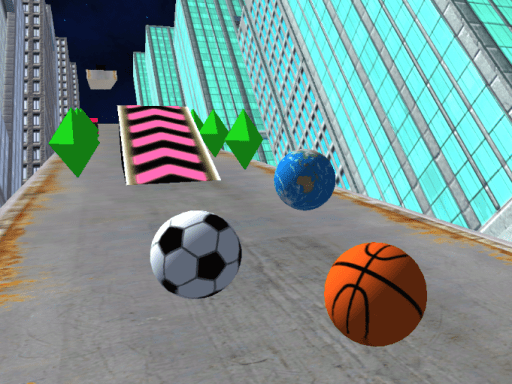
About Slope City 2
Slope City 2 delivers fast-paced ball-rolling action across a redesigned 3D city environment. In this hypercasual skill game, players steer a moving ball along elevated platform tracks while dodging obstacles and gathering diamonds. Use the diamonds you collect throughout each run to purchase special abilities and customize new ball designs in the shop.
Slope City 2 is a 3D obstacle and platform runner featuring an updated cityscape course. Players guide a rolling ball across narrow paths, relying on precise steering to maintain balance and stay on track. As you navigate the course, diamonds appear along the route, serving as the primary resource needed to purchase special abilities. Beyond survival and collection, the game includes a dedicated shop where you can unlock and equip fresh ball designs. With intuitive controls available across both computer keyboards and mobile touchscreens, the game emphasizes quick reflexes and careful maneuvering.
Your goal
The primary objective in Slope City 2 is to steer your ball along the city platforms for as long as possible without hitting obstacles or falling off the edge. Along the way, collect scattered diamonds across the redesigned map to purchase special abilities and unlock new ball designs in the shop.
How to play Slope City 2
1. Launch Slope City 2 on your desktop or mobile browser to start rolling along the redesigned city track.
2. Steer left or right using the A and D keys, arrow keys, or touchscreen swipe gestures.
3. Navigate carefully to avoid obstacles and prevent your ball from falling off the platform edges.
4. Collect diamonds scattered along the platform pathways during your run.
5. Visit the shop to spend your collected diamonds on special abilities and alternative ball designs.
Controls and device support
A / D or Left / Right Arrow Keys: Steer left or right
Swipe finger left or right: Steer left or right
- Controls: Keyboard
- Device support: Desktop + mobile
- Game frame: 800 x 450
Rules to keep in mind
- Crashing into track obstacles or falling off the platform edges interrupts your active run.
- Diamonds collected during gameplay are required to purchase special abilities and ball designs in the shop.
What makes the challenge interesting
Gameplay in Slope City 2 focuses on spatial awareness and responsive steering. Because the ball rolls continuously through 3D platform environments, players must anticipate incoming turns and obstacles well in advance. Balancing risk and reward is essential: veering toward diamond clusters helps you accumulate currency for shop items and abilities, but moving too far from a safe line increases collision risks. Controlled steering inputs help maintain stability and prevent overcorrecting on narrow platform segments.
Tips for Slope City 2
- Apply smooth, controlled steering taps instead of aggressive movements to maintain steady alignment along narrow platform stretches without slipping off.
- Focus primarily on a safe trajectory, picking up diamonds only when you can do so without jeopardizing your survival.
- Visit the shop periodically to invest your collected diamonds into special abilities that support longer survival on the city map.
Stages and progression
Progression in Slope City 2 centers on collecting diamonds during runs across the city map. Players can visit the in-game shop to unlock cosmetic ball designs and purchase special abilities that provide distinct in-game advantages.
Playing on different devices
The game supports desktop play via keyboard keys (A/D or arrows) and mobile browser play using touch swipe gestures for steering.
The skills behind the game
As a hypercasual 3D platform game, Slope City 2 delivers immediate pick-up-and-play mechanics with an emphasis on reflex-driven skill. The hypercasual genre prioritizes clear objectives and straightforward controls, allowing players to jump directly into the action without complex tutorials. Combining classic ball-rolling movement with obstacle avoidance and collection elements creates an engaging loop centered on agility and quick decision-making.
Who will enjoy this game
Fans searching for slope city 2 and the slope city 2 game can enjoy an accessible browser-based 3D runner. The title expands upon classic ball-rolling gameplay by introducing a redesigned city environment, shop customization, and diamond collection mechanics. Its responsive keyboard and touch controls provide a streamlined arcade experience across supported desktop and mobile devices.
Frequently asked questions
How do you control the ball in Slope City 2? On PC, use the A and D keys or the Left and Right arrow keys to steer. On mobile devices, swipe your finger left or right across the screen to steer.
What are diamonds used for in the game? Diamonds gathered across the city map serve as in-game currency. You can spend them in the shop to unlock alternative ball designs and acquire special gameplay abilities.
Can you customize your ball in Slope City 2? Yes, you can access the shop menu to buy new balls and change their visual design using the diamonds you collect during your runs.
Something not right?
Tell us if the game does not load, the information is wrong or the content needs review.
Report a problem ›