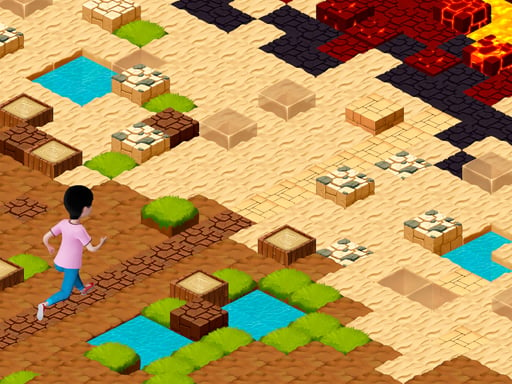
About Sliding Tim: Way to home
Sliding Tim: Way to home is a single-player 2D obstacle runner where players help a lost traveler named Tim navigate a difficult trek back home. Operating on a minimalist hold-and-release mechanic, you press to accelerate forward and release to halt immediately. Surviving each unpredictable stretch requires balancing steady forward speed against sudden hazards across mud, arid desert sand, and dangerous patches of red-hot lava.
In this 2D adventure, the protagonist Tim finds himself stranded far away from his house and must cross treacherous regional biomes to return. Rather than navigating complex multi-button movement systems, movement relies entirely on start-and-stop momentum control. Holding your input sends Tim sprinting along the path, while releasing the control causes him to stop his advance.
The difficulty arises from environmental variance. As Tim progresses across the screen, the road throws diverse hazards directly into his path, shifting from sticky mud sections to desert crossings and scorching lava fields. Because each stretch presents an unpredictable route, players cannot simply hold the run input indefinitely. Successful runs depend on observing oncoming terrain changes, moderating Tim's pace, sliding through open gaps, and stopping in time before contacting lethal terrain.
Your goal
The core goal is to guide Tim safely along the entire course of his difficult journey home without colliding with hazards. Players strive to keep a clean, steady running pace, reading the road ahead to slip through safe windows and brake before crossing dangerous terrain such as mud pits or hot lava. Mastery comes from learning when to sprint boldly and when to bring Tim to a complete standstill.
How to play Sliding Tim: Way to home
1. Start your run by pressing and holding either the Spacebar or the left mouse button to make Tim sprint forward.
2. Keep your eyes focused ahead on upcoming terrain shifts, scanning for mud patches, desert ground, and lava traps.
3. Release your input promptly whenever an obstacle or hazard approaches to stop Tim in his tracks before contact.
4. Resume holding the control to accelerate through clear stretches, slipping past safe intervals as soon as the path is open.
5. Maintain your composure through unpredictable route segments, pacing your movement until Tim successfully completes his route home.
Controls and device support
Movement is controlled by holding down the Spacebar or the Left Mouse Button (LMB) to start running, and releasing the key or mouse button to stop moving.
- Controls: See in-game controls
- Device support: Browser
- Game frame: 960 x 600
Rules to keep in mind
- Holding down the Spacebar or the Left Mouse Button engages continuous forward running.
- Releasing your active input halts Tim's movement immediately, allowing him to wait before dangerous terrain.
- Failing to slow down or stop before encountering environmental hazards like lava, mud, or obstacle paths leads to failure.
What makes the challenge interesting
The primary gameplay tension centers on impulse management and visual foresight. Because Tim moves forward rapidly under sustained input, players are constantly tempted to hold down the button for swift progress. However, unpredictable path layouts punish unchecked speed. Success hinges on a clear tactical trade-off: sprinting full tilt saves time and clears open ground quickly, but releasing early allows you to react cleanly to sudden hazards like mud basins or lava traps.
Developing a rhythmic cadence of brief, deliberate bursts is usually far safer than long continuous runs. By feathering the control input, you give yourself the split-second buffer required to identify incoming obstacles and slip through narrow gaps without mistiming your stopping distance.
Tips for Sliding Tim: Way to home
- Favor controlled micro-bursts instead of holding the button down continuously. Tapping into short runs helps you stop on a dime rather than overshooting straight into a patch of red-hot lava.
- Watch the leading edge of the screen rather than staring directly at Tim. Spotting mud, desert hazards, and obstacles early provides the extra reaction window needed to release the key in time.
- Test both the spacebar and the left mouse button to see which gives you crisper release timing. A mushy key switch can cause delayed stops, leading to accidental collisions on narrow terrain.
- Do not panic when approaching unexpected route shifts. Coming to a full standstill gives you a moment to assess the path layout before committing to your next burst of forward momentum.
Stages and progression
Tim's expedition home takes him through shifting environmental zones, moving from initial trails into tricky terrain types including thick mud, expansive desert expanses, and perilous fields of red-hot lava. While the underlying one-button mechanic remains consistent, the route becomes increasingly demanding as layouts present unpredictable sequences of ground obstacles.
As you advance deeper along the path, your practice plan should focus on refining stop-and-start discipline. Treat early trail sections as calibration for Tim's stopping distance so that when route surprises occur across harsher desert and lava environments, your braking instincts are already tuned.
Playing on different devices
On desktop browsers, players can choose between keyboard input via the spacebar and pointer input through the left mouse button. Players with mechanical keyboards may prefer the tactile spring of the spacebar for quick releases, while those using a responsive mouse may find clicking offers slightly lower actuation travel.
The native game canvas renders in a 960 by 600 window format. Running the game in an unobstructed browser window ensures smooth frame pacing, which is critical for timing rapid stops along dangerous terrain.
The skills behind the game
Positioned within the hypercasual obstacle running space, Sliding Tim: Way to home distills the running genre down to its absolute essentials. Traditional side-scrolling runners frequently demand complex jumping, sliding, and lane-switching inputs across multiple keys. In contrast, this game reduces mechanical friction by focusing exclusively on a single hold-and-release cadence.
This design emphasizes pure timing, environmental reading, and risk assessment over intricate button combos. Players who enjoy accessible pick-up-and-play challenges will appreciate how the game transforms basic forward locomotion into a test of restraint, challenging you to brake before hazards rather than jumping over them.
Who will enjoy this game
Players looking up Sliding Tim: Way to home typically seek a clean, quick-session browser title that tests raw reflexes without requiring tutorials or elaborate configuration. The game delivers an immediate loop where progress is measured by how effectively you navigate unpredictable route segments across harsh terrain.
Approaching the title as a brief reaction-training exercise is an effective way to enjoy it. Because the start-and-stop control system requires total attentiveness, playing a few runs during short breaks provides a satisfying warm-up for hand-eye coordination and braking precision.
Frequently asked questions
How do you control Tim's running speed and stops? Tim runs automatically whenever you hold down either the spacebar or the left mouse button. Releasing the button brings him to an immediate halt, allowing you to regulate pacing along the path.
What hazards should I expect along Tim's journey? The path home crosses multiple environmental obstacles, including muddy ground, open desert sands, and fields of molten red-hot lava that require precise stopping and timing to overcome.
Is it better to use the keyboard or the mouse for controls? Both the spacebar and the left mouse button provide identical hold-to-run functionality. Choose the input device that allows you to release tension most quickly when an obstacle suddenly appears.
Something not right?
Tell us if the game does not load, the information is wrong or the content needs review.
Report a problem ›