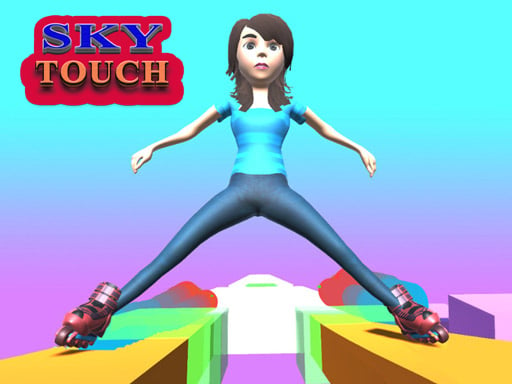
About SKY TOUCH
SKY TOUCH is an action-oriented hyper-casual runner where players guide a skater across dynamic paths. By clicking and holding to adjust your trajectory angle and shift direction, you navigate rapid movement, jumps, rolls, and aerial stunts. Designed for single-player casual sessions, it offers accessible pick-up-and-play mechanics that challenge your reaction timing from the very first move.
SKY TOUCH introduces a focused arcade concept built around angle adjustments and directional shifting. As a hyper-casual 1-player adventure, the game emphasizes streamlined input, allowing you to influence movement seamlessly through simple mouse or keyboard presses. Whether your character is sprinting forward, leaping into the air, rolling under obstacles, or executing airborne stunts on a skateboard, your primary task is managing the angle of motion to maintain momentum. The responsive single-button control scheme strips away complex button combinations, letting players focus entirely on spatial awareness and fast reflexes. Rendered in a tall 400 by 650 play window, the layout highlights vertical clearance and forward vision, making every turn and stunt immediate and engaging.
Your goal
The objective in SKY TOUCH is to successfully steer your skater along the course by continuously adjusting angles and shifting direction. Players aim to execute fluid runs, jumps, rolls, and stunts without losing control. By mastering the timing of your holds and releases, you maintain smooth movement throughout the session to achieve the cleanest and most stylish run possible.
How to play SKY TOUCH
1. Start the game and prepare for your character to begin moving forward along the path.
2. Click and hold the left mouse button, or press and hold the spacebar, to initiate your run.
3. Adjust your active angle while holding the input to shift direction smoothly across turns.
4. Time your inputs to coordinate running, jumping, rolling, and executing skateboard stunts along the route.
5. Release and re-engage the controls as necessary to realign your path and keep your momentum going.
Controls and device support
Left Mouse Button (Click and hold): Hold to adjust angle, shift direction, and control movement
Spacebar: Alternative key to engage controls and steer the runner
- Controls: Mouse or touch
- Device support: Browser
- Game frame: 400 x 650
Rules to keep in mind
- Angle Adjustment: Continuous input via mouse hold or spacebar shifts direction and alters your movement trajectory.
- Action Execution: Forward running, jumping, rolling, and skate stunts depend on active angle and direction management.
- Single-Player Focus: The session runs as a solo casual experience without multiplayer assistance or split-screen play.
What makes the challenge interesting
Gameplay in SKY TOUCH centers on rhythm, timing, and angle discipline. Because directional shifting requires holding down the left mouse button or the spacebar, success depends on understanding when to press, hold, and release. Over-adjusting your angle can throw your skater off alignment, while under-adjusting may leave you unprepared for upcoming jumps, rolls, or stunt opportunities. The core loop demands constant observation of the upcoming path, challenging you to react quickly as momentum builds. Finding the sweet spot between cautious directional adjustments and assertive stunt maneuvers defines the experience, making each play attempt a tight exercise in precision steering.
Tips for SKY TOUCH
- Make gradual angle adjustments rather than holding controls too long, which prevents overshooting your turns or losing control during high-speed runs.
- Test both mouse clicks and the spacebar to discover which input method offers you quicker reaction times during rapid direction shifts.
- Watch the path ahead closely so you can prepare the appropriate angle before entering jumps, rolls, or stunt transitions.
- Reset your trajectory promptly after executing a stunt or roll to maintain balance and avoid veering into dangerous angles.
The skills behind the game
As a hypercasual adventure game, SKY TOUCH embodies the genre's defining principles: instant accessibility, single-action mechanics, and rapid gameplay cycles. Casual runner titles prioritize low barriers to entry, enabling players of any experience level to jump straight into the action without tedious tutorials. By pairing responsive one-button controls with dynamic skateboarding, jumping, and rolling mechanics, SKY TOUCH delivers immediate entertainment tailored for quick gaming breaks.
Who will enjoy this game
When players look for sky touch or search online for a sky touch game, they are typically seeking an approachable browser runner centered on fast reflexes and aerial action. The game captures this expectation by blending casual steering mechanics with stunt-focused movement, allowing enthusiasts of runner and skating genres to experience an engaging single-player challenge straight from their desktop web browser.
Frequently asked questions
How do you control movement in SKY TOUCH? You control movement by clicking and holding the left mouse button or by pressing the spacebar. Holding the input adjusts your angle and shifts your character's direction across the course.
Can you play SKY TOUCH with a keyboard? Yes, you can use the spacebar as an alternative control method to play the game, giving you full ability to adjust angles and shift direction without using mouse clicks.
What types of actions can the character perform? The character can run, jump, roll, and pull off skateboard stunts as you guide their angle and direction across various sections of the course.
Something not right?
Tell us if the game does not load, the information is wrong or the content needs review.
Report a problem ›