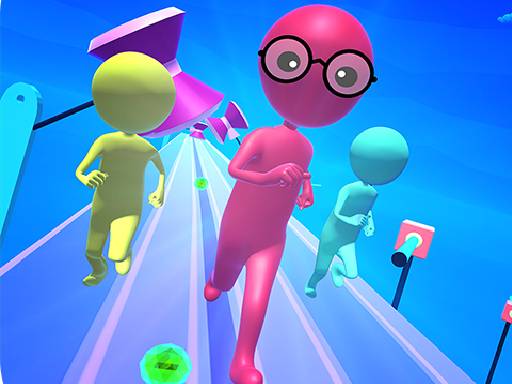
About Sky Race 3D
Sky Race 3D places you in the role of a competitive runner navigating fast-paced footraces across vibrant courses. As an arcade-style running experience, the core challenge centers on maintaining forward momentum and reacting quickly to the path ahead. With straightforward controls designed around running forward with the keyboard, players must concentrate on movement flow and timing to see how smoothly they can sprint through each race.
Sky Race 3D delivers an arcade running experience where players step into competitive sprint events set against vibrant visual backdrops. Built around accessible movement mechanics, the game tasks you with guiding your athlete along elevated courses. Each race tests your ability to sustain speed and react to layout shifts in real time, capturing the energetic feel of footrace competitions without encumbering you with convoluted control schemes.
The central loop revolves around initiating your sprint, monitoring track conditions, and managing forward progression. Because running requires dedicated input via the designated arrow control, your attention remains locked on anticipation and smooth navigation. Whether engaging in quick sessions to sharpen hand-eye coordination or pushing for cleaner runs across repeated attempts, the streamlined format offers straightforward racing action suitable for quick casual play sessions.
Your goal
Your primary objective in Sky Race 3D is to guide your competitive runner through each footrace while maintaining forward momentum across the track. Because the game emphasizes fast-paced competition, your goal is to react cleanly to the course layout, avoid unnecessary pauses, and reach the conclusion of the sprint as efficiently as possible. Success depends on sustaining your run command with steady concentration, minimizing hesitation, and adapting your timing to keep pace with the race's demands.
How to play Sky Race 3D
1. Load the game in your browser window and ensure the canvas is active to register keyboard commands.
2. Locate the Up arrow key on your keyboard, which serves as the primary command to make your runner sprint forward.
3. Press the Up arrow key at the start of the event to initiate your character's forward movement.
4. Keep your gaze focused ahead on the upcoming track environment to anticipate any curves or course changes early.
5. Maintain a steady running cadence through the duration of the contest until you cross the finish line.
Controls and device support
Official game instructions specify using the Up arrow key to run. Additional key bindings or touch screen button mappings are not detailed in the source documentation.
- Controls: Keyboard
- Device support: Desktop + mobile
- Game frame: 960 x 600
What makes the challenge interesting
The gameplay rhythm of Sky Race 3D is defined by continuous attention and timely key activation. In hypercasual running games, the primary skill involves reading the track ahead while preserving forward stride. Rather than managing complex multi-button combinations, the player balances steady movement against dynamic path layouts. The central tension lies between maintaining uninterrupted sprint input and assessing when subtle pauses or pacing adjustments might be needed to stay on course. This creates an immediate, pick-up-and-play arcade experience where visual clarity and fast reflexes determine how cleanly your runner handles each race. Because the control scheme is intentionally minimal, any delay in reaction directly impacts your running line, encouraging players to stay focused on track flow from start to finish.
Tips for Sky Race 3D
- Keep your eyes fixed several strides ahead rather than directly beneath your avatar. Looking ahead lets you register upcoming track turns early, preventing frantic, late reactions that disrupt forward sprint momentum.
- Establish a comfortable finger position over the Up arrow key before the countdown concludes. Being physically prepared at the outset eliminates early hesitation, ensuring your runner accelerates right as the race begins.
- Avoid abruptly releasing your movement key unless track conditions demand a momentary pause. Choppy running inputs shed speed unnecessarily, making it harder to establish a fluid racing rhythm throughout the course.
- Stay centered along the running path whenever possible. Hugging edges increases the risk of misjudging turns, whereas a central lane position gives you maximum margin to react to sudden track adjustments.
Playing on different devices
Sky Race 3D is formatted at a standard canvas resolution of 960 by 600 pixels. While documented as a mobile-style racing title in source descriptions, its official input instructions specifically designate the Up arrow key for movement. When playing on desktop browsers, ensure your browser window maintains focus so that arrow key presses register immediately. For touchscreen devices, players should check if virtual touch zones emulate keyboard inputs, though using a physical keyboard remains the explicitly documented control method.
The skills behind the game
Sky Race 3D falls under the casual, hypercasual, and arcade racing genres, drawing on classic athletic sprint traditions. Arcade runners distill competition down to its purest elements: rapid forward motion, instant restarts, and clear visual tracks. By stripping away heavy simulation mechanics like gear shifting or extensive vehicle tuning, hypercasual runners allow players to engage immediately with raw timing and reflex challenges. This streamlined design philosophy makes the genre appealing for quick leisure breaks while preserving the genuine excitement of sprinting toward the finish line across elevated tracks.
Who will enjoy this game
Players seeking a Sky Race 3D game generally look for immediate, unencumbered arcade racing that runs smoothly within a web browser. Titles in the Sky Race 3D style cater to gamers who want fast-action running contests without extensive tutorials, heavy installations, or steep learning curves. Engaging in repeated sprint runs provides an enjoyable way to test personal reaction speed and fine-tune timing habits. Whether spending a few minutes between tasks or practicing track navigation runs to achieve seamless sprint flow, the title offers an accessible outlet for competitive casual play.
Frequently asked questions
How do you control your character in Sky Race 3D? According to the official game instructions, you press the Up arrow key to make your runner sprint forward along the course. Its responsive single-key input makes it straightforward to pick up and play immediately.
What is the primary objective in the Sky Race 3D game? Your objective is to participate as a competitive runner and navigate through fast-paced race tracks. You aim to maintain uninterrupted forward momentum, react smoothly to the course, and reach the finish line successfully.
Can beginners easily play Sky Race 3D? Yes, Sky Race 3D features intuitive controls and accessible hypercasual mechanics designed for players of all skill levels. You only need to master the timing of running forward with the Up arrow key.
What should you focus on to improve your running performance? Focus on anticipating the track layout ahead rather than watching your feet. Keeping a steady finger on the run key and avoiding hesitant, jerky starts helps you preserve maximum forward velocity throughout the event.
Something not right?
Tell us if the game does not load, the information is wrong or the content needs review.
Report a problem ›