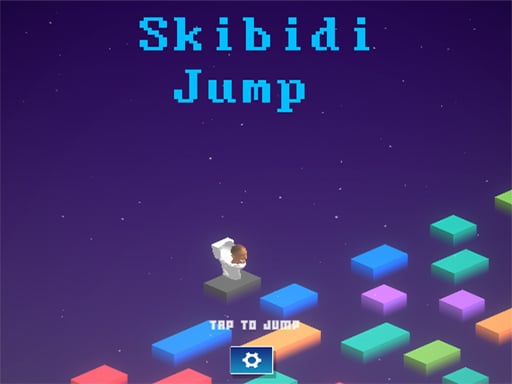
About Skibidi Jumping
Skibidi Jumping is a 3D browser-based arcade title focused on rapid visual assessment and rhythmic precision. Players monitor moving platforms traveling horizontally left and right, aiming to trigger jumps exactly when a solid surface aligns directly in front of their cube character. The primary challenge centers on testing your reaction speed under continuous movement.
In Skibidi Jumping, the action takes place in a three-dimensional space where platforms continually glide across the screen from left to right and back again. The core loop revolves around observing these shifting ledges and judging the exact moment of alignment before making your move.
The entire experience is built around straightforward single-action inputs, making it easy to pick up instantly on both desktop browsers and mobile touchscreens. Because the platforms remain in constant motion, success depends on maintaining visual concentration and establishing a steady jumping cadence rather than navigating complex control schemes.
Your goal
Your objective in Skibidi Jumping is to successfully advance your cube forward by landing cleanly on successive moving platforms. To improve your overall performance, aim to react promptly each time a platform crosses directly in front of your position, sustaining your run through sharp timing and steady focus.
How to play Skibidi Jumping
1. Launch the game in your browser window and prepare for incoming platform movement.
2. Observe the speed and horizontal path of the moving platforms in front of your cube.
3. Wait until an incoming platform aligns directly with your cube's forward trajectory.
4. Click your mouse or tap your touch screen to initiate a jump onto the aligned ledge.
5. Repeat your timed inputs on subsequent moving platforms to keep extending your run.
Controls and device support
Mouse click or tap to play.
- Controls: Mouse or touch
- Device support: Desktop + mobile
- Game frame: 300 x 600
Rules to keep in mind
- Platforms continuously travel horizontally to the left and right across the field.
- A jump input must be made when a platform is positioned in front of your cube.
- Input is registered via a standard mouse click or touchscreen tap.
What makes the challenge interesting
The defining skill in Skibidi Jumping is visual timing and reaction under rhythmic pressure. Because the platforms oscillate laterally across the field of view, players must anticipate the intersection point rather than reacting after the platform has already reached the center.
This creates an engaging tradeoff between rapid action and disciplined patience. Clicking too hastily leads to mistimed jumps before the ledge arrives, while waiting too long causes the platform to slide out of reach. Developing a consistent visual scan helps you time each tap accurately.
Tips for Skibidi Jumping
- Track the platform's rhythm across several back-and-forth passes before jumping. Rushing your input on the first glance often leads to mistimed leaps.
- Focus your gaze slightly ahead of your cube rather than directly on it. This gives your eyes extra milliseconds to process the incoming platform position.
- Use short, deliberate clicks or taps instead of frantic repeated tapping. Controlled single presses prevent accidental double inputs during critical alignment moments.
- Maintain a calm hand position and avoid tensing up during rapid sequences. Staying relaxed helps preserve consistent reaction speed throughout extended attempts.
Stages and progression
Skibidi Jumping tests your reaction consistency over continuous jumping sequences. When building your personal practice routine, treat each attempt as an opportunity to steady your timing cadence. Start by focusing on clean, deliberate landings during early sequences rather than rushing your jumps.
As you become more comfortable anticipating platform trajectories, aim to maintain a steady jumping rhythm across longer stretches without losing focus during consecutive shifts in lateral movement.
Playing on different devices
Configured with a vertical display resolution of 300 by 600 pixels, Skibidi Jumping is well suited for both mobile portrait viewing and compact desktop browser windows. On touch-enabled devices such as Android phones or iPhones, light taps anywhere on the screen register your jump actions smoothly. On desktop computers, a standard mouse click delivers crisp, responsive input.
The skills behind the game
Listed under clicker and arcade categories, Skibidi Jumping offers immediate, bite-sized entertainment focused on single-button reflex challenges. Unlike complex resource-management clickers, it emphasizes real-time physical timing and visual precision.
This accessible design makes it appealing for players looking for quick reaction drills during short breaks, delivering instant feedback on every jump without complicated rule sets.
Who will enjoy this game
Players looking for a skibidi jumping game or casual clicker game online will find an approachable reaction challenge built for quick gameplay sessions across modern desktop and mobile browsers.
Because the title requires zero complex setup, it functions well as an unhurried visual reflex exercise for casual gamers of all skill levels.
Frequently asked questions
What kind of game is Skibidi Jumping? Skibidi Jumping is a 3D timing game where players control a cube and jump across moving platforms traveling horizontally left and right to test their reaction speed.
How do you control your character in Skibidi Jumping? You control your jumps using a single primary action: click the mouse button on desktop or tap the screen on mobile devices whenever a platform lines up in front of your cube.
Can I play Skibidi Jumping on mobile devices? Yes, Skibidi Jumping runs in HTML5 web browsers on mobile operating systems like Android and iOS, supporting direct touchscreen taps for all jump inputs.
How can I improve my reaction timing in Skibidi Jumping? Try watching the horizontal movement pattern of each platform before committing to a jump. Aligning your click with the platform's center path prevents mistimed leaps.
Something not right?
Tell us if the game does not load, the information is wrong or the content needs review.
Report a problem ›