Official listing
Game description
Pets Sever is game which you will like for sure its a game of puzzles kind. The game goal is to drew a box that had your pet from getting attacked by bees each level is harder than the one before of it.
Puzzles game
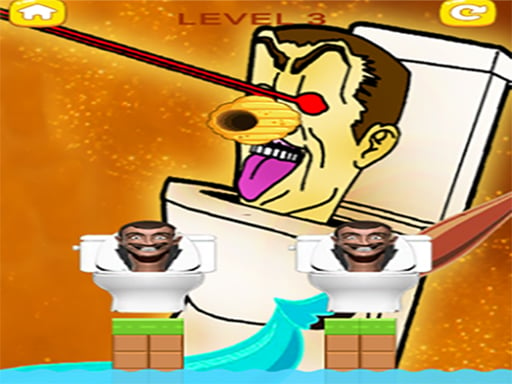
Save My Skibidi is a physics-informed puzzle game where your main task is to shield your character from an aggressive swarm of bees. By drawing a custom protective enclosure or barrier with your cursor or finger, you must keep incoming threats at bay. Each stage presents a fresh layout, demanding quick spatial assessment and practical construction to ensure your character remains completely protected.
Choose Play now to load the game.
Official listing
Pets Sever is game which you will like for sure its a game of puzzles kind. The game goal is to drew a box that had your pet from getting attacked by bees each level is harder than the one before of it.
From the game listing
Mouse click or tap to play
Open this card to load the gameplay video.
Save My Skibidi is a physics-informed puzzle game where your main task is to shield your character from an aggressive swarm of bees. By drawing a custom protective enclosure or barrier with your cursor or finger, you must keep incoming threats at bay. Each stage presents a fresh layout, demanding quick spatial assessment and practical construction to ensure your character remains completely protected.
Save My Skibidi builds its core challenge around barrier drafting and environmental protection. The character is placed directly in the danger zone of swarming bees, and it is up to the player to draw a surrounding shape or barricade that blocks every attack vector. Because incoming bees exert force against your drawn structure, simply drawing a single flat stroke might not always hold up against pressure from multiple directions.
The game tasks players with evaluating open space, anchoring points, and character position before committing to a design. Success relies on creating closed or well-balanced outlines that do not collapse, slide away, or leave gaps through which bees can squeeze. As you advance through successive levels, the environmental arrangements grow increasingly demanding, requiring tighter planning and cleaner drawing executions.
The main objective in Save My Skibidi is to successfully protect your pet character from being reached or attacked by bees by drawing an effective barrier box or defensive shell. To complete each stage, your sketched enclosure must stay intact and withstand the incoming assault until the defense sequence is resolved.
1. Examine the layout of the screen to identify where your character is placed and the origin points of the incoming bees.
2. Plan a continuous defensive outline or box shape that encloses the character or shields exposed angles.
3. Click and drag your mouse or touch and drag your finger across the display to draw the protective structure.
4. Release your click or lift your finger to finalize the drawn structure and initiate the attack phase.
5. Observe how the bees collide with your barrier to confirm that no gaps allow them to reach the character.
6. Move on to the subsequent level once the defense holds, preparing for a more demanding puzzle layout.
The game uses mouse click or touch tap inputs to interact and draw defensive lines directly onto the play area.
The primary skill in Save My Skibidi centers on geometry, stability, and spatial problem-solving. When you draw a line in a physics puzzle environment, the structure is subjected to movement and external forces. A barrier that appears sturdy in concept can topple or roll away if it lacks stable support on surrounding surfaces or ground anchors.
Players face an ongoing tradeoff between drawing broad, generous cages versus compact, snug enclosures. A larger enclosure provides a safety buffer around the character but has a wider surface area for bees to push against, whereas a tight shape might leave little room for error if the barrier shifts. Finding a balanced shape that stays firmly seated while fully sheltering the target is essential for steady progress.
Progression in Save My Skibidi operates across a sequence of levels where each stage is designed to be harder than the one before it. As you advance, stage configurations require more thoughtful barrier engineering to withstand increasing pressure.
When approaching higher stages, players should focus on refining their line precision and structural stability rather than relying on hurried sketches. Taking a moment to assess the geometry of new obstacles before drawing leads to more consistent clears.
Save My Skibidi runs in a vertical aspect ratio of 300 by 600, making it naturally suited for portrait screens on mobile devices such as iPhone and Android handsets. Touchscreen input allows for intuitive drawing directly beneath your fingertip.
On desktop web browsers, the game operates seamlessly using standard mouse clicks and drags. Using a mouse can offer fine line control when creating complex geometric enclosures within the compact vertical window.
Positioned within the puzzle and brain teaser genres, Save My Skibidi emphasizes constructive problem-solving over raw reflexes. Players are encouraged to think methodically about spatial relationships and structural integrity before drawing.
Unlike standard tile-matching or sliding puzzles, drawing-based protection games test a player's ability to create freeform solutions tailored to irregular environments. This blend of creative drawing and mechanical logic makes the genre widely accessible for casual sessions.
Players looking for Save My Skibidi or seeking an engaging puzzle game online will find a focused experience centered on barrier creation and hazard avoidance. The straightforward drawing mechanic allows newcomers to start solving levels immediately without lengthy tutorials.
For those who enjoy quick casual practice, the Save My Skibidi game provides bite-sized stages that can be played in short bursts. Each stage offers a neat exercise in geometry and defensive sketching that challenges your spatial reasoning.
What is the primary goal in Save My Skibidi? The main goal is to protect your pet character from attacking bees by drawing a solid defensive box or barrier around it.
How do controls work across different devices? You interact with the game using mouse clicks and drags on desktop computers, or tap and drag gestures on touchscreen mobile devices.
Does the game increase in difficulty as you clear stages? Yes, each progressive level is designed to be harder than the preceding one, challenging you to construct more effective defenses.
Tell us if the game does not load, the information is wrong or the content needs review.
Report a problemExplore popular games by category, shared tags and site-wide activity.