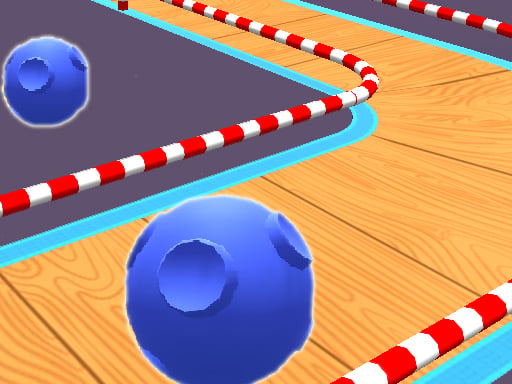
About Roll Ball 3D
Roll Ball 3D is an agile rolling ball game where players navigate three-dimensional courses filled with demanding hazards. Steering requires quick reflexes and careful line selection to overcome obstacles and reach the goal. With responsive directional handling, the challenge revolves around maintaining forward speed while staying on track to set new records and unlock fresh arenas.
In Roll Ball 3D, you take control of a sphere rolling across dynamic 3D tracks designed to test your spatial awareness and reaction speed. While the basic input scheme is immediately approachable, traversing the intricate paths demands deliberate maneuvering and steady concentration. Each run invites players to negotiate complex layouts, bypass sudden hazards, and preserve momentum across every sector.
The core gameplay loop centers on continuous movement, hazard evasion, and course completion. As you sharpen your steering precision, you can strive for faster completion times to improve your personal record. Along the way, players work toward unlocking new arenas with fresh challenges and expanding their roster by gathering rare collectible balls.
Your goal
The main objective in Roll Ball 3D is to guide your ball safely across the finish line of each course by overcoming every obstacle in your path. Players aim to refine their steering efficiency, beat personal records, unlock new arenas featuring escalating track layouts, and collect distinctive rare ball designs as they advance.
How to play Roll Ball 3D
1. Start the run and get accustomed to the steering sensitivity on your keyboard or touchscreen controls.
2. Look ahead down the 3D track to anticipate upcoming turns, barriers, and moving obstacles.
3. Adjust your trajectory smoothly to slip past hazards without colliding or losing control.
4. Maintain high velocity through open stretches while staying centered during narrow passages.
5. Cross the finish line to complete the course, establish a better record, and unlock further arenas.
Controls and device support
On desktop computers, use the WASD keys or the Arrow keys to steer your ball. On mobile devices, use the on-screen joysticks to direct movement.
- Controls: WASD + arrow keys
- Device support: Browser
- Game frame: 800 x 600
Rules to keep in mind
- Obstacle Clearance: Players must successfully steer past track hazards to avoid disruptions and reach the finish line.
- Arena Access: Advancing through the game unlocks additional arenas featuring unique environmental layouts and new challenges.
- Ball Collection: Rare ball variants can be gathered throughout your playtime as you pursue higher records.
What makes the challenge interesting
The primary appeal of Roll Ball 3D lies in the delicate balance between rapid pacing and exacting micro-adjustments. Because the ball gathers speed naturally, players cannot rely solely on reactive twitches; they must read the track geometry several seconds in advance. Every curve and hazard requires choosing an optimal line: turning too early risks clipping interior walls, while turning too late sends the ball sliding wide.
This creates an engaging rhythm where players continually weigh risk against reward. Pushing maximum speed yields stronger finish times, but controlled moderation often provides the stability needed to survive tricky obstacle clusters. Mastering this balance is essential for securing clean runs across unfamiliar arenas.
Tips for Roll Ball 3D
- Look at the horizon rather than directly beneath your ball. Focusing far down the track gives you extra time to react to approaching obstacles instead of making panicked steering corrections.
- Apply gentle, rhythmic steering taps instead of holding directional keys down continuously. Oversteering frequently causes wide skids that make recovering alignment difficult on tight pathways.
- Prioritize track survival over reckless velocity when entering unfamiliar arenas. Learning the layout at a manageable pace prevents repeated collisions and sets a reliable baseline record.
- Aim for the middle of track lanes during straight segments. Riding near boundaries reduces your margin for error when unexpected hazards suddenly require a fast evasive maneuver.
Stages and progression
Progression in Roll Ball 3D is driven by conquering course hazards, unlocking new arenas, and assembling a collection of rare balls. As players refine their control and improve their completion records, newly unlocked arenas present distinct track architectures and testing obstacles. Players can structure their practice by first focusing on consistent track completion before pushing for top-speed efficiency on mastered courses.
Playing on different devices
Roll Ball 3D accommodates both desktop and mobile playstyles with dedicated control schemes. On computer browsers, directional steering is handled through either the WASD or Arrow key clusters, offering crisp digital inputs for quick adjustments. On mobile phones and tablets, the game provides on-screen virtual joysticks, allowing smooth analog steering across the 3D playfield.
The skills behind the game
While listed under the sports category, Roll Ball 3D blends athletic precision with fast-paced hypercasual mechanics. Ball-rolling titles appeal to players who enjoy physics-based movement, spatial orientation, and fine steering control. Navigating three-dimensional courses provides an immediate test of timing and dexterity that casual game enthusiasts can pick up instantly for quick sessions.
Who will enjoy this game
Players looking for an engaging 3D rolling challenge will find Roll Ball 3D well-suited for brief reflex training or extended record-chasing runs. The responsive keyboard and joystick handling make it an accessible browser title for anyone seeking straightforward obstacle navigation, collectible goals, and progressive track mastery without complicated barrier to entry.
Frequently asked questions
What are the primary controls for playing Roll Ball 3D? On desktop setups, you can steer using either the WASD keys or the standard Arrow keys. On touch-enabled mobile devices, use the virtual joysticks displayed on your screen to guide the ball.
How do you unlock new arenas in Roll Ball 3D? You unlock additional arenas by maintaining focus and speed while overcoming obstacles across available courses, earning access to new environments with distinct layouts.
Can I collect different ball styles during gameplay? Yes, Roll Ball 3D includes rare collectible balls that players can gather as they progress, improve their records, and master various courses.
What is the best way to handle difficult obstacle sections? Scan the track ahead to spot hazards early, use short directional taps rather than holding keys, and focus on clean lane positioning rather than chasing reckless top speed.
Something not right?
Tell us if the game does not load, the information is wrong or the content needs review.
Report a problem ›