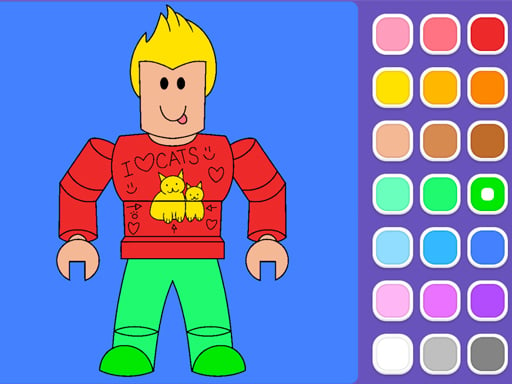
About Roblox Coloring Game
Roblox Coloring Game is a relaxed digital art activity designed for players who enjoy creative customization and character-themed art. The game gives you access to 12 distinct coloring pages and 3 varied drawing modes, letting you fill in shapes, trace outlines, or set off vibrant fireworks. You can also personalize every completed sheet using a massive collection of decorative stickers.
Roblox Coloring Game provides an accessible, browser-friendly art canvas tailored for casual creativity. Rather than demanding rapid reflexes or high scores, the experience centers entirely on self-expression and relaxed design. Players explore a collection of 12 distinct coloring pages filled with stylized character patterns and engaging illustrations.
The core loop revolves around experimenting with the game's 3 drawing modes. You can color in defined sections to produce bright compositions, carefully trace outlines for deliberate linework, or activate dynamic fireworks effects to add festive flair. To finalize each picture, the title provides hundreds of decorative stickers that can be placed across the canvas, allowing you to turn each sheet into a customized showcase.
Your goal
The main goal in Roblox Coloring Game is to explore all 12 illustration sheets and bring each piece of line art to life using your choice of tools. Players aim to practice color coordination, test all 3 creative modes, and design balanced decorative layouts using the wide sticker library. Your success is measured by personal artistic satisfaction rather than timers or performance rankings.
How to play Roblox Coloring Game
1. Browse the gallery of 12 coloring pages and select a pattern that catches your interest.
2. Choose one of the 3 available drawing modes to start coloring in, outlining, or creating fireworks effects.
3. Click or drag with your mouse on PC, or tap and swipe with your finger on touchscreens, to apply colors.
4. Open the decoration catalog and select from hundreds of available stickers to embellish your finished artwork.
5. Review your completed illustration and transition to another sheet to try a fresh visual style.
Controls and device support
On PC, use mouse clicks and drag motions to color and position items. On mobile devices, tap or drag with your finger across the touchscreen.
- Controls: Mouse or touch
- Device support: Desktop + mobile
- Game frame: 504 x 800
Rules to keep in mind
- The game includes 12 individual coloring pages available for customization.
- Art tools are divided into 3 distinct functional modes: coloring in, outlining, and setting off fireworks.
- Players can place decorative elements chosen from a library containing hundreds of stickers.
What makes the challenge interesting
The charm of Roblox Coloring Game lies in its peaceful pacing and versatile toolkit. Because there are no countdown clocks, failing states, or compulsory steps, players can focus entirely on fine motor practice and color experimentation. The primary gameplay decision centers on how you combine the 3 creative modes.
Standard coloring allows for broad visual fills, while outline mode encourages steady tracing and edge control. Introducing the firework tool adds spontaneous movement and spectacle to the canvas. Balancing these distinct techniques against a backdrop of hundreds of potential sticker accents encourages players to establish their own visual rhythm and refine their digital coloring habits across every session.
Tips for Roblox Coloring Game
- Establish your base colors first before adding fireworks or stickers so the underlying character art remains clearly visible and well balanced.
- Test the outline mode on smaller details to keep boundaries neat, avoiding the mistake of rushing broad strokes over narrow lines.
- Browse multiple sticker categories before placing them, preventing canvas clutter and ensuring decorative accents fit your chosen color scheme.
- Work through all 12 sheets progressively to experiment with different shading approaches on each character layout.
Stages and progression
Progression in this title is self-guided across the 12 included coloring pages. Instead of locking stages behind star ratings or challenge thresholds, the catalog allows players to freely explore different drawings at their own pace.
A satisfying practice route involves tackling a simple page first to master the drag-and-click controls, experimenting with outline precision on the next, and finally incorporating complex sticker collages and fireworks on later illustrations. Re-visiting earlier pages with new color combinations provides plenty of continuous creative variety.
Playing on different devices
Roblox Coloring Game operates inside a portrait-oriented window measuring 504 by 800 pixels, making it well-suited for both handheld mobile browsers and desktop displays. Desktop users navigate using mouse clicks and continuous cursor drags to color lines smoothly.
On smartphones and tablets, intuitive single-finger tapping and dragging handle all coloring, tool selection, and sticker placements. The vertical aspect ratio naturally fits mobile screens, offering a seamless touchscreen art experience without requiring specialized hardware.
The skills behind the game
Classified under drawing and educational casual games, Roblox Coloring Game highlights creative motor skills and relaxed visual design. Digital coloring titles offer an approachable way for players of all ages to practice hand-eye coordination, explore color harmonies, and develop artistic confidence without messy cleanups.
By blending classic page coloring with dynamic animated elements like fireworks and sticker placement, the genre bridges traditional activity books and interactive browser entertainment, making it an enjoyable creative outlet for short or extended breaks.
Who will enjoy this game
Players looking for a fun roblox coloring game or engaging coloring game online will appreciate the straightforward accessibility offered here. With zero setup required, you can launch the activity directly in your browser and jump straight into designing vibrant character art.
Whether you want a calm digital space to unwind after school or work, or an entertaining tool to practice touchscreen drawing precision, the combination of 12 distinct pages and hundreds of stickers caters to a wide range of casual art enthusiasts.
Games with a similar feel
Happy Color: While Happy Color focuses on structured color-by-number mechanics where players fill predetermined numbered regions, Roblox Coloring Game emphasizes open-ended creativity across 12 pages with 3 distinct drawing modes and freeform sticker decoration. Players seeking rigid puzzle-like coloring will prefer numbered apps, whereas those wanting personal styling freedom will enjoy this game's expressive tools.
Frequently asked questions
How many coloring pages are available in the game? The game includes 12 distinct coloring pages featuring different character illustrations and patterns ready to be colored and decorated.
What drawing modes can I use while playing? There are 3 creative modes available: you can color in solid sections, outline character shapes, or activate interactive fireworks across your canvas.
Can I decorate my artwork with accessories? Yes. The title offers hundreds of stickers that you can select and position onto any page to personalize your finished art piece.
Is Roblox Coloring Game playable on mobile devices? Yes. The game supports touchscreens, allowing you to color, trace, and place stickers using simple finger taps and drag gestures on mobile browsers.
Something not right?
Tell us if the game does not load, the information is wrong or the content needs review.
Report a problem ›