About Rescue The Wolverine
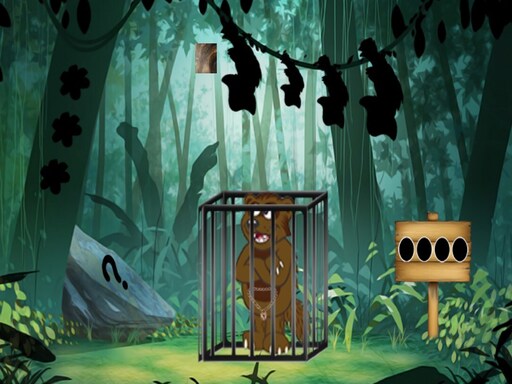
Rescue The Wolverine is a point-and-click escape puzzle game developed by 8B Games and Games2mad. Set in a quiet forest grove, the scenario places you in front of a locked cage holding a trapped wild animal. Your primary task is to explore the immediate woods, locate hidden items, interpret subtle environmental clues, and solve sequential brainteasers until you discover how to open the cage and set the wolverine free.
The adventure unfolds across an outdoor wilderness backdrop where an unfortunate wolverine has been caught and locked inside an iron cage. Rather than testing quick reflexes or complex movement, Rescue The Wolverine centers entirely on careful observation and methodical deduction. Every section of the forest can hold potential tools, concealed compartments, pattern codes, or scattered components needed to make headway.
As you navigate the scene, your cursor serves as your primary tool for examining interactive elements among the trees, stones, and structures. The core gameplay loop involves identifying anomalies in the scenery, picking up concealed items, and figuring out where those objects fit into nearby locks or puzzle contraptions. By solving each micro-puzzle in sequence, you gradually gather the key items or mechanisms required to unlock the cage latch.
Your goal
Your overarching objective is to open the cage and successfully release the trapped wolverine. Achieving this goal requires finding all relevant hidden objects scattered around the forest environment and completing every intermediate riddle or code lock that blocks access to the final unlocking mechanism.
How to play Rescue The Wolverine
1. Scan the initial forest area thoroughly with your mouse pointer to discover interactive hotspots, containers, or marked surfaces.
2. Collect visible items, tools, and odd trinkets tucked away behind foliage, tree hollows, or forest fixtures.
3. Inspect environmental markings such as number sequences, color patterns, or geometric shapes carved or painted in the scene.
4. Apply collected tools to matching puzzle locks or socket mechanisms to reveal secondary clues and opening keys.
5. Use the final key or release sequence on the cage lock to open the door and liberate the trapped wolverine.
Controls and device support
The game operates via direct mouse interaction. Left-click to inspect scenery, pick up items, select tools, and manipulate puzzle dials or interactive mechanisms on the screen.
- Controls: Mouse or touch
- Device support: Browser
- Game frame: 800 x 480
What makes the challenge interesting
Rescue The Wolverine emphasizes visual acuity and logical synthesis over dexterity. In classic point-and-click escape fashion, progress hinges on a player's ability to spot slight visual discrepancies against natural textures like bark, moss, and stone. The essential challenge lies in linking an abstract pattern discovered in one corner of the forest with a locked panel located elsewhere.
The pacing is deliberate and self-directed, rewarding systematic exploration. A common hurdle in hidden object games is clicking aimlessly when stumped; success here comes from taking a step back, cataloging unresolved puzzles in your mind, and carefully reviewing every visual clue until the proper combination or item match reveals itself.
Tips for Rescue The Wolverine
- Sweep your mouse slowly across textured areas like bushes and tree trunks. Cursor shape shifts often reveal tucked-away tools that blend easily into the background artwork.
- Note down unusual symbols, color orders, or digit sequences as soon as you spot them. Trying to memorize multiple lock codes across different scenes frequently leads to confusion.
- Match found items against open sockets or mechanisms immediately. Clearing resolved items from your attention lets you focus strictly on genuine unsolved puzzles.
- Revisit previously checked clearings whenever you open a new compartment. Early scenes often house dormant panels that only become active once you possess the appropriate gadget or clue.
Playing on different devices
The game is formatted for a native 800 x 480 display resolution and runs via standard desktop mouse controls. Playing on a desktop or laptop monitor offers crisp visual separation between tiny hidden objects and the surrounding forest art.
Because the interface relies on precise pointing and clicking to trigger small puzzle switches, using a dedicated computer mouse is generally smoother and less prone to accidental clicks than operating on a compact laptop trackpad.
The skills behind the game
Classified under puzzles and tagged as an escape and point-and-click title, Rescue The Wolverine represents a classic subgenre of browser room-escape experiences. Instead of navigating an indoor manor or locked dungeon, players explore an open-air forest clearing that uses natural scenery to camouflage clues and locks.
Escape titles in this lineage test spatial reasoning and visual memory rather than fast reflexes. By distributing puzzle keys, dials, and inventory items across multiple fixed view screens, the genre challenges players to organize disparate pieces of information into a coherent problem-solving chain.
Who will enjoy this game
Players looking for a lightweight puzzle game online or a calm hidden object game will find Rescue The Wolverine well suited for a focused mental break. Because the experience requires no rapid keyboard inputs or high-pressure countdowns, it provides an accessible exercise in visual inspection and deductive reasoning.
Fans searching specifically for the Rescue The Wolverine game generally seek the distinct satisfaction of cracking multistep environmental locks. Approaching the title with a patient mindset—treating every curious pattern or out-of-place color as a deliberate clue—offers an enjoyable casual escape puzzle session.
Frequently asked questions
What kind of game is Rescue The Wolverine? It is an online browser-based point-and-click escape game where players search for hidden items and solve environmental riddles to open a cage holding a wild wolverine.
How do you control and navigate the game? You interact entirely with your mouse. Left-clicking allows you to inspect objects, gather tools into your inventory, and manipulate puzzle dials across the screen.
What should I do if I get stuck on a puzzle? Take a careful look back through each area of the forest to check for missed wall markings, hidden items camouflaged in the trees, or puzzle panels you could not open earlier.
Are there hidden object searches included in the game? Yes, locating concealed items and matching them to corresponding puzzle locks forms a central part of the challenge needed to unlock the animal's cage.
Something not right?
Tell us if the game does not load, the information is wrong or the content needs review.
Report a problem ›