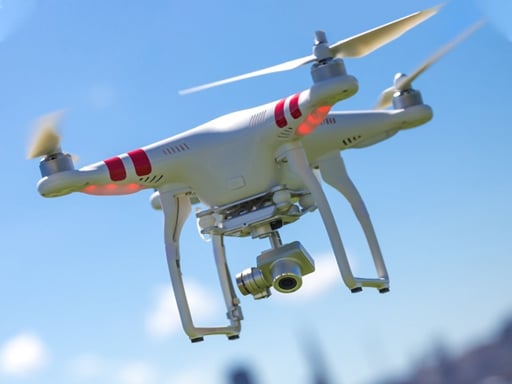
About Real Drone Simulator
Real Drone Simulator is a 3D flight simulation game where players take the controls of various remote aerial crafts across multiple operational scenarios. Balancing directional momentum, altitude adjustment, and steady turning, you navigate structured environments to scan designated building structures or navigate through sequential flight checkpoints across three distinct game modes.
Real Drone Simulator delivers a dedicated virtual piloting environment built around 3D art animations and realistic multi-axis aerial movement. Rather than relying on simple arcade physics, flying a quadcopter or aerial drone requires coordinating forward travel, lateral drifting, elevation changes, and yaw rotation simultaneously.
Players have access to a selection of different drones and can test their piloting across three separate game modes. Flight objectives revolve around precision tasks such as inspecting and scanning specific building sections or steering smoothly through mid-air checkpoints to practice steady flight paths.
Your goal
The primary objective in Real Drone Simulator is to pilot your selected drone through designated mission parameters without losing positional control. Depending on your chosen mode, you must systematically locate and scan building parts or steer directly through consecutive aerial checkpoints, refining your handling and flight stability across varied drone models.
How to play Real Drone Simulator
1. Launch the simulator and select an available drone and one of the three available play modes from the main menu.
2. Use the Up and Down arrow keys to manage your altitude, lifting your drone off the ground and settling at a workable hovering height.
3. Apply the WASD keys to move in your four cardinal horizontal directions while monitoring surrounding 3D structures.
4. Tap the Left and Right arrow keys to rotate and align your drone toward upcoming flight targets or structural inspection points.
5. Navigate smoothly into designated checkpoints or position close enough to scan targeted building components to fulfill mission goals.
Controls and device support
Fly horizontally in four directions using the WASD keys. Adjust elevation using the Up and Down arrow keys to fly high or low, and use the Left and Right arrow keys to turn your drone left and right.
- Controls: WASD + arrow keys
- Device support: Browser
- Game frame: 1334 x 750
Rules to keep in mind
- Drones must be navigated through space using combined directional thrust, altitude control, and yaw rotation.
- Flight objectives include scanning specified building parts or steering through designated waypoint checkpoints.
- Pilots can select between multiple available drone models and operate across three distinct flight modes.
What makes the challenge interesting
The defining gameplay challenge in Real Drone Simulator is multi-axis spatial coordination. Unlike fixed-wing aircraft or standard ground vehicles, a multi-rotor drone requires constant awareness of both vertical clearance and horizontal inertia. Adjusting altitude with the vertical arrow keys while steering horizontally with WASD creates a dynamic flight profile where abrupt turns can easily drift off course.
A crucial skill tradeoff involves balancing flight speed against positional accuracy. Rushing toward a checkpoint or building facade at full throttle makes precise rotational adjustments difficult, especially when aligning to scan narrow architectural features. Developing a measured rhythm of short directional taps and steady altitude holds ensures cleaner approaches and reliable maneuvering.
Tips for Real Drone Simulator
- Establish a stable cruising altitude using Up and Down arrows before applying forward WASD thrust to prevent unexpected ground collisions during early acceleration.
- Rotate your drone with Left and Right arrow keys well ahead of turns so that forward WASD propulsion drives you naturally along your intended trajectory.
- When approaching building parts for scanning, reduce directional speed and rely on gentle altitude adjustments to maintain an unobstructed line of sight.
- Avoid holding multiple directional inputs simultaneously until you have mastered how each drone model responds to inertia and rotational drift.
- Experiment across the different available drones to identify which model provides the handling balance best suited for checkpoint runs versus architectural inspection.
Stages and progression
Progression in Real Drone Simulator is centered on exploring its three selectable modes and mastering the varied roster of aerial drones. Because flight tasks alternate between dynamic checkpoint navigation and deliberate building scanning, players can structure their progression around mastering core flight stability before taking on complex spatial routes.
As you become comfortable with basic keyboard flight inputs, transitioning between different drone models provides fresh handling challenges, demanding finer throttle and yaw management to complete course objectives consistently.
Playing on different devices
Real Drone Simulator is configured for dual-handed keyboard play on desktop platforms, utilizing WASD for horizontal movement and the arrow keys for elevation and rotation. Placing your left hand on WASD and your right hand on the arrow cluster allows simultaneous control over all flight axes.
The skills behind the game
Within the simulation and action game genres, drone piloting titles emphasize three-dimensional spatial control and vehicle handling over fast-paced combat or reflex shooting. Players must navigate continuous momentum and account for three independent movement axes: lateral translation, altitude, and heading rotation.
By combining structural inspection tasks with aerial checkpoint routing, Real Drone Simulator provides a structured environment for players who enjoy vehicle maneuvering, spatial navigation challenges, and flight control mastery.
Who will enjoy this game
Players looking for a dedicated real drone simulator experience online often seek accessible flight physics that mimic real-world multi-rotor handling without requiring complicated flight controller hardware. A desktop browser format makes it easy to practice aerial orientation, turning angles, and elevation control directly from a keyboard.
Whether jumping in for quick checkpoint runs or testing different flight profiles in a real drone simulator game, focusing on steady throttle inputs and coordinated steering provides a satisfying practice loop for flight simulation enthusiasts.
Frequently asked questions
How do you control elevation and flight height in Real Drone Simulator? Altitude is controlled directly with the Up and Down arrow keys. Pressing the Up arrow commands the drone to fly higher, while the Down arrow lowers your altitude.
What tasks can you perform during drone flight missions? Players can engage in scanning specific building parts or flying through sequenced waypoint checkpoints across three different flight modes.
Are there different drones to fly in the simulator? Yes, Real Drone Simulator includes multiple different drone models for players to select and pilot across its game modes.
How do you steer and turn your drone during flight? Horizontal directional movement is handled with the WASD keys, while the Left and Right arrow keys allow you to turn the drone left and right to adjust your heading.
Something not right?
Tell us if the game does not load, the information is wrong or the content needs review.
Report a problem ›