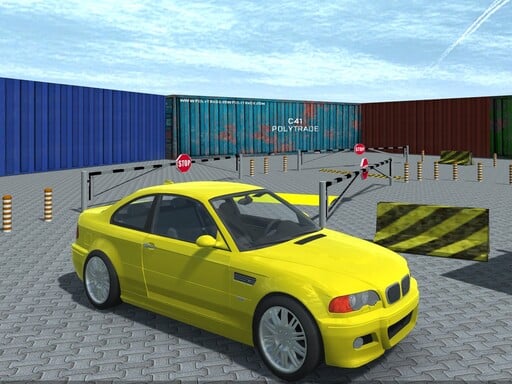
About RCC Car Parking 3D
RCC Car Parking 3D is a 3D driving game featuring 100 unique levels where players must steer carefully to reach designated parking spots. Using the on-screen minimap for guidance, your objective is to navigate around walls, barriers, and other obstacles without crashing. Completing parking runs awards XP that can be used to unlock fresh paint colors and new cars.
In RCC Car Parking 3D, players tackle precision vehicle handling across a series of structured parking challenges. Each stage tests your ability to maneuver through tight corridors, avoid solid boundaries, and guide your vehicle safely toward the target finish zone shown on your minimap. Hitting walls, barriers, or surrounding objects interrupts your attempt, making steady control more valuable than reckless speed. As you successfully complete courses across the 100 available levels, you earn XP. This earned experience allows you to customize your vehicle with new paint colors or purchase new cars with distinct driving physics. Whether adjusting your trajectory around narrow corners or finding the right angle into a final stall, the gameplay emphasizes careful spatial awareness and consistent driving technique.
Your goal
The primary objective is to maneuver your car to the designated finish area without striking any walls, barriers, or road obstacles. Check the minimap to locate your destination, follow the path smoothly, and park cleanly in the marked zone to clear the level, secure XP rewards, and work toward unlocking vehicle customization options and new cars.
How to play RCC Car Parking 3D
1. Use the WASD keys to steer, accelerate, and reverse your vehicle across the course.
2. Consult the minimap on your screen to identify the route and find the target finish location.
3. Drive carefully around walls, barriers, and environmental hazards without causing any collisions.
4. Bring your car into the designated parking spot to complete the stage and earn XP.
5. Press Tab, Esc, or P at any time to open the in-game menu.
Controls and device support
WASD: Drive car
TAB / ESC / P: Show menu
- Controls: See in-game controls
- Device support: Browser
- Game frame: 800 x 600
Rules to keep in mind
- Avoid colliding with walls, barriers, and other stage obstacles during your drive.
- Reach the marked finish location indicated on the minimap to complete each level.
- Completing a level successfully awards XP used for vehicle colors and new cars.
What makes the challenge interesting
RCC Car Parking 3D centers on careful steering, spatial navigation, and collision avoidance rather than high-speed racing. Because contact with barriers or walls halts a run, success relies on measuring distances accurately and taking tight turns at controlled speeds. The minimap serves as an essential navigational aid, pointing out your exact destination amidst winding layouts. Managing vehicle momentum and aligning properly with tight parking spaces demands patience. As you progress and accumulate XP, testing newly purchased cars introduces updated physics, rewarding players who adapt their handling to different vehicle dynamics.
Tips for RCC Car Parking 3D
- Watch the minimap early in each run to plan your driving route before entering narrow passages lined with obstacles.
- Maintain a steady, controlled pace rather than rushing forward, since hitting any barrier or wall will ruin your parking attempt.
- Save the XP gained from completed runs to invest in new cars with updated physics and fresh paint colors.
Stages and progression
The game features 100 unique levels that test parking precision across varying layouts. Finishing levels grants XP, which players can save and spend in the garage to purchase new paint colors for their car as well as entirely new physics-based vehicles.
The skills behind the game
Categorized under 3D racing and parking games, RCC Car Parking 3D emphasizes precision maneuvering over straightforward lap speed. Unlike standard sprint racing where rapid acceleration takes priority, parking simulations challenge drivers to negotiate tight confines, avoid collision hazards, and align vehicles neatly within specified target zones using structured 3D environments.
Who will enjoy this game
For players seeking a focused car parking game or a solo racing game online, RCC Car Parking 3D offers 100 dedicated obstacle stages. The 3D layout and keyboard controls provide an engaging test of spatial judgment, making rcc car parking 3d game sessions rewarding for fans of technical vehicle maneuvering.
Games with a similar feel
Car Parking Multiplayer: RCC Car Parking 3D shares the core objective of tight obstacle navigation found in Car Parking Multiplayer. However, while that title incorporates broader open environments and multiplayer driving, RCC Car Parking 3D focuses strictly on single-player, level-based obstacle runs across 100 structured courses.
Frequently asked questions
How do you control your car in RCC Car Parking 3D? You drive and steer your vehicle using the WASD keys on your keyboard. If you need to pause or view the game options, press Tab, Esc, or P to open the in-game menu.
What should you avoid while driving to the parking spot? You must avoid hitting walls, barriers, and any other course objects. Driving carefully and keeping clear of obstacles is necessary to reach the finish area shown on the minimap and complete the stage.
What rewards do you earn by completing levels? Finishing parking levels successfully awards you XP. You can spend this accumulated XP to buy new color options for your vehicle as well as unlock new cars featuring distinct physics.
Something not right?
Tell us if the game does not load, the information is wrong or the content needs review.
Report a problem ›