About Racing Island
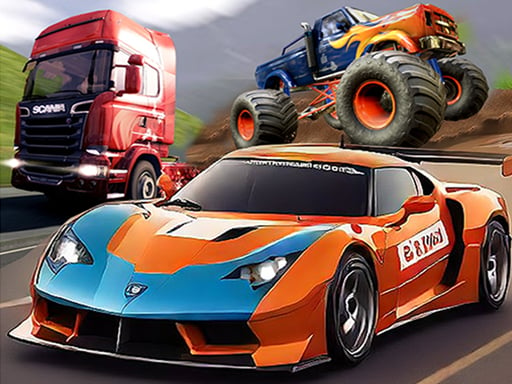
Racing Island is a 3D driving game where players take the wheel of cars and monster trucks across diverse environments. Featuring dedicated race, freeride, and stunt modes, the game challenges you to balance high-speed acceleration with responsive steering. Whether competing for position or freely exploring each stage, the core experience centers on vehicle control and discovering what each level has to offer.
In Racing Island, players navigate three-dimensional courses designed for varied driving styles. The experience splits across three primary activities: structured race challenges where you push for top placements, freeride sessions that let you tour the open layout at your own pace, and specialized stand or stunt scenarios that reward acrobatic maneuvering.
The vehicle roster features distinct machines, including standard cars and heavy monster trucks, each bringing different handling characteristics to the terrain. Driving demands continuous modulation between full-throttle speed, tight steering angles, timely braking, and tactical nitro activation. As you advance through the levels, you encounter new vehicle opportunities and layout discoveries.
Your goal
Your main objective in Racing Island is to demonstrate driving mastery by completing course challenges, exploring open stages, and achieving leadership across the featured race, freeride, and stunt modes. Success involves maintaining vehicle stability at high speeds, using nitro boosts along straightaways, and smoothly clearing corners without losing momentum as you work through each level.
How to play Racing Island
1. Select your desired gameplay mode from race, freeride, or stand mode depending on whether you want structured competition, exploration, or stunt driving.
2. Accelerate forward using the W key or Up Arrow to build initial speed off the starting line.
3. Steer through turns using the A and D keys or the Left and Right Arrows, adjusting your trajectory smoothly to avoid drifting off track.
4. Apply the brakes using the S key or Down Arrow before entering sharp turns or when approaching hazardous obstacles.
5. Press the Shift key to activate nitro boost on long straight stretches or when you need an immediate burst of velocity.
6. Progress through levels to discover additional unique vehicles, testing out different handling profiles across the courses.
Controls and device support
Drive using standard keyboard bindings: W or Up Arrow to accelerate, A/D or Left/Right Arrows to steer left and right, S or Down Arrow to brake or reverse, and Shift to trigger the nitro boost.
- Controls: WASD + arrow keys
- Device support: Browser
- Game frame: 800 x 450
Rules to keep in mind
- Choose between race, freeride, and stand modes to suit your preferred driving objective and playstyle.
- Steering and braking inputs directly influence vehicle stability; uncontrolled high-speed turns can cause your vehicle to skid or lose alignment.
- Nitro boosts provide a rapid surge of acceleration when the Shift key is engaged.
- Advancing through individual levels opens up discoveries and showcases different vehicles across the game.
What makes the challenge interesting
The central appeal of Racing Island lies in managing momentum across diverse vehicle formats and course layouts. Monster trucks and cars respond differently to turns and acceleration, meaning drivers must adapt their braking points and steering cadence. The core tactical tradeoff involves when to unleash your nitro boost: firing it too early near a sharp turn can cause you to overshoot the racing line, while saving it for open straights lets you maximize pure straight-line speed without sacrificing control.
Tips for Racing Island
- Tap the brake key briefly before entering sharp corners rather than sliding full-throttle, helping keep your vehicle centered on the track.
- Reserve your nitro activation for clear straight paths where you can accelerate without needing immediate steering adjustments.
- Spend time in freeride mode to learn track contours, ramps, and obstacle locations before attempting competitive runs.
- Pay attention to vehicle weight and height differences, especially when transitioning from standard cars to taller monster trucks.
Stages and progression
Progression in Racing Island unfolds across sequential levels that present new vehicles and course discoveries. As you advance through the game, experimenting with different machines across race, freeride, and stunt modes will help you refine your throttle timing and cornering precision.
Playing on different devices
Racing Island is designed around desktop keyboard inputs, supporting both WASD and directional arrow clusters for steering and acceleration. Using your primary hand on directional controls and your pinky or thumb on the Shift key allows for comfortable nitro activation without interrupting steering flow.
The skills behind the game
As part of the 3D racing and vehicle driving genre, Racing Island combines immediate arcade mechanics with flexible exploration. Racing titles appeal to players who enjoy mastering vehicle physics, timing tight apexes, and experimenting with high-horsepower machines like monster trucks across diverse terrain.
Who will enjoy this game
Players looking for an accessible racing game online or searching for a casual racing island game can use the title's multiple modes to practice throttle control and track navigation. The option to switch between competitive races and casual freeriding provides a low-pressure way to enjoy 3D car handling directly in a web browser.
Games with a similar feel
Asphalt: Like the popular Asphalt franchise, Racing Island emphasizes rapid arcade car driving with dedicated nitro boosting. While high-end franchise racers center heavily on licensed supercar collections and elaborate urban drift circuits, Racing Island provides a direct, accessible browser experience featuring varied vehicles like monster trucks across open freeride and stunt environments.
Frequently asked questions
What game modes are available in Racing Island? Racing Island offers three main play modes: race mode for competitive course runs, freeride mode for open exploration, and stand mode for stunt-focused maneuvers.
How do I activate the nitro boost in the game? You can trigger nitro acceleration at any time by pressing the Shift key on your keyboard, giving your car an immediate burst of forward speed.
What types of vehicles can I drive? The game features a variety of unique vehicles across its stages, including standard racing cars and heavy monster trucks.
Something not right?
Tell us if the game does not load, the information is wrong or the content needs review.
Report a problem ›