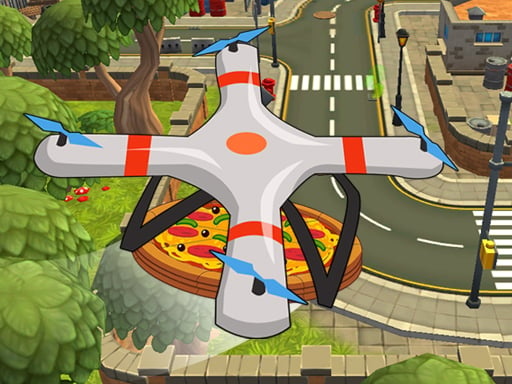
About Quadcopter FX Simulator
Quadcopter FX Simulator is a 3D drone flight simulation game where you take control of an aerial quadcopter tasked with delivering pizza cargo across various stages. Your main mission is navigating through open airspace to reach marked drop-off positions on time, balancing steady directional movement with subtle control inputs to safely transport goods.
In Quadcopter FX Simulator, players step into an aerial delivery role handling advanced pizza-quadcopter transport missions. The simulation places your multi-rotor craft in structured 3D environments where steady maneuvering and careful throttle management are essential for navigating from takeoff to the destination.
Each level challenges you to pilot your quadcopter to designated drop points while keeping track of delivery timing. With dedicated movement inputs and subtle on-screen control buttons, the game focuses on mastering smooth flight dynamics, hovering stability, and clean landings on marked targets.
Your goal
The primary objective across all levels is to transport pizza items and deliver them to the marked position on time. Achieving consistent results requires planning clear flight paths, managing your speed to avoid overshooting drop zones, and executing stable landings directly onto designated markers.
How to play Quadcopter FX Simulator
1. Start the level and observe the location of the marked delivery position within the 3D environment.
2. Use the WASD keys to guide horizontal movement and directional flight toward your target.
3. Engage the available control buttons to adjust altitude, tilt, and fine-tune your quadcopter handling.
4. Transport your pizza cargo across the course while keeping an eye on your delivery time.
5. Descend carefully over the marked zone to complete the drop-off and finish the mission.
Controls and device support
Use WASD to move your quadcopter and tap the available on-screen control buttons for subtle flight adjustments.
- Controls: Mouse or touch
- Device support: Desktop + mobile
- Game frame: 1134 x 750
Rules to keep in mind
- Transport pizza items to the designated marked position on each level.
- Deliver the cargo on time to successfully clear the active stage.
- Maintain proper control over your quadcopter using directional movement and dedicated control buttons.
What makes the challenge interesting
The core appeal of Quadcopter FX Simulator lies in the delicate balance of aerial navigation and timing. Unlike standard ground driving games, maneuvering a 3D quadcopter introduces multi-axis momentum where sudden inputs can cause drifting or destabilization. Players must balance speed against precision, ensuring they cover distance swiftly enough to meet delivery goals while maintaining sufficient control to land accurately on the target marker.
Fine control is central to the gameplay loop. Learning to make subtle button taps rather than heavy, continuous inputs helps maintain steady flight lines. This creates a satisfying practice rhythm where smoother handling directly translates into quicker and cleaner deliveries.
Tips for Quadcopter FX Simulator
- Apply gentle, pulsed taps to the directional keys instead of holding them down continuously. This prevents excessive forward momentum and keeps the drone stable during transit.
- Begin slowing your approach well before reaching the marked landing point. Decelerating early prevents overshooting the delivery marker and saves time on repositioning.
- Stabilize your quadcopter into a steady hover before initiating descent. Dropping altitude while drifting horizontally often results in misaligned landings.
- Plan a direct aerial route toward the marked position right after liftoff. Taking a clear, uninterrupted trajectory helps ensure your pizza delivery arrives on time.
Stages and progression
Quadcopter FX Simulator features structured levels where players manage pizza-quadcopter transport tasks. As you advance through different stages, each course presents a distinct flight path toward the marked drop-off position.
To improve your overall performance across all levels, focus on building a consistent piloting routine. Practicing clean takeoffs, smooth en-route cruising, and calm final approaches will help you complete each timed delivery with greater reliability.
Playing on different devices
On desktop browsers, keyboard input using WASD handles directional movement, while on-screen buttons offer additional control options. For touchscreen and mobile setups, the tap interface allows players to manage flight adjustments directly on the screen.
The game runs in a 1134 x 750 window resolution, providing an expansive view of the 3D airspace to help spot delivery targets and track drone orientation clearly.
The skills behind the game
Categorized under action and 3D simulation, Quadcopter FX Simulator combines vehicle maneuvering mechanics with mission-oriented delivery gameplay. Rather than focusing on combat or high-speed racing, it emphasizes aerial spatial awareness, steady throttle handling, and precision parking at designated target zones.
Fans of parking and flight simulation titles will appreciate the requirement to balance punctual arrival times against careful landing finesse, testing hand-eye coordination in full 3D space.
Who will enjoy this game
Players looking for a quadcopter fx simulator or action game online will find an engaging blend of casual piloting and cargo transport. The game serves as an accessible browser-based drone flight exercise, suitable for quick casual sessions or practicing gentle maneuvering techniques.
By focusing on steady navigation from start to finish, the game provides a focused drone handling experience without complex setup, offering straightforward entertainment for aviation and simulation enthusiasts.
Frequently asked questions
What is the main goal in Quadcopter FX Simulator? Your goal is to pilot a delivery quadcopter carrying pizza items and reach the designated marked position on time across every level.
How do you control the quadcopter during flight? You guide movement using the WASD keys on desktop and tap the on-screen buttons to make subtle flight adjustments.
Can I play Quadcopter FX Simulator on mobile devices? Yes, the game supports mobile setups with tap-based touch controls to operate the quadcopter in your browser.
How can I improve my landing accuracy at the delivery zone? Slow down before reaching the target, level out into a stable hover above the marker, and descend steadily using gentle button taps.
Something not right?
Tell us if the game does not load, the information is wrong or the content needs review.
Report a problem ›