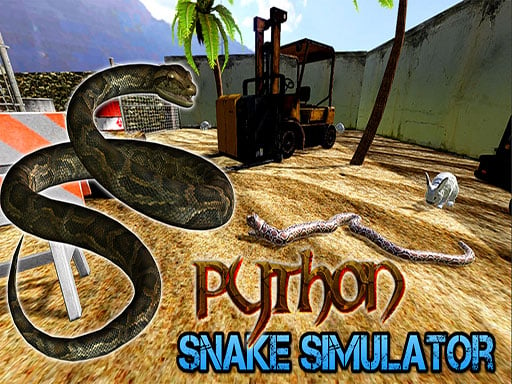
About Python Snake Simulator
Python Snake Simulator places you in control of a python navigating daily survival tasks to escape from a mine. As you slither through diverse mission environments, you hunt prey like bunnies, gather food for survival, and navigate obstacles. Featuring physics-based movement, distinct chapter objectives, and boss encounters like crocodiles and wolves, the game delivers a structured journey toward a climactic finale.
In Python Snake Simulator, players experience life as a subterranean serpent striving to navigate out of an underground mine setting. Each in-game day introduces specific survival chores, requiring you to actively hunt bunnies, collect essential sustenance, and clear paths past hazardous terrain. The core experience blends responsive movement physics with environmental navigation as you explore each daily stage.
Beyond routine foraging, the overarching storyline progresses across multiple chapters, challenging players to overcome specialized hurdles and confront powerful boss creatures such as wolves, bears, and crocodiles. Managing your snake's posture and camera view allows you to survey the surrounding terrain, track agile prey, and prepare for encounters with aggressive AI adversaries guarding the path ahead.
Your goal
The primary objective in Python Snake Simulator is to survive daily routines and successfully escape the mine across a multi-chapter campaign. To achieve this, you must complete each day's designated mission—such as capturing prey and foraging for resources—while keeping your serpent safe from environmental hazards and defeating dangerous boss opponents, culminating in the final confrontation that concludes the storyline.
How to play Python Snake Simulator
1. Move your python across the terrain using the WASD keys or arrow keys while adjusting the camera view with your mouse to survey the area.
2. Raise your serpent's head using Space or Left Mouse Button, or toggle your raised posture with E or Shift to better spot prey and obstacles.
3. Track down required targets such as bunnies and gather food items scattered across the environment to fulfill your daily survival tasks.
4. Navigate past environmental hurdles and obstacles within each daily mission layout to unlock further progress.
5. Engage and defeat unique AI bosses, including wolves, bears, and crocodiles, as you advance through the story chapters.
6. Use the pause menu (P) to assess your situation or restart the current mission (R) if you need a fresh attempt at clearing the day.
Controls and device support
Official instructions specify moving with WASD or Arrow Keys and steering the camera with mouse movement. Raise the snake's head with Space or Left Mouse Button, toggle the raised head stance with E or Shift, pause the menu with P, and restart with R.
- Controls: WASD + arrow keys
- Device support: Browser
- Game frame: 960 x 600
Rules to keep in mind
- Complete each day's assigned mission objectives, such as hunting bunnies and gathering food, to survive and progress through the chapters.
- Overcome environmental obstacles and hurdles present in each distinct daily environment.
- Defeat chapter boss encounters, ranging from wild animals like wolves and crocodiles to the final boss, to conclude the story.
What makes the challenge interesting
Python Snake Simulator centers on managing slithering movement and spatial awareness in an adventure framework. Unlike classic grid-based snake games, navigation relies on physical snake dynamics that affect how you turn, pursue moving targets, and maintain momentum over uneven mine terrain. A key tactical consideration is stance management: lifting your snake's head improves line of sight for tracking elusive bunnies and spotting distant boss threats, but traversing terrain smoothly requires balanced movement. Adapting your approach to distinct daily mission constraints—shifting between cautious foraging and combat maneuvering against hostile predators—defines the core rhythm of play.
Tips for Python Snake Simulator
- Elevate your head using Space or the toggle key when scanning wide areas. Raising your perspective makes it easier to spot small prey like bunnies against dark mine backgrounds before they flee.
- Adjust your camera smoothly with the mouse while cornering. Keeping your view aligned with your serpent's trajectory prevents you from running blindly into obstacles or ambush zones.
- Study boss movement patterns carefully before closing in for an attack. Powerful enemies like crocodiles or wolves possess distinct AI behaviors that reward patient positioning over reckless charging.
- Use the instant restart key (R) if an encounter goes awry early in a chapter. Resetting quickly allows you to refine your routing and approach without lingering in a compromised state.
Stages and progression
Progression in Python Snake Simulator unfolds day by day across structured chapters. Each in-game day introduces a unique mission and setting, transitioning from routine survival tasks such as food collection and rabbit hunting to challenging encounters with formidable animal bosses, including wolves, bears, and crocodiles. Players advance through a complete storyline that culminates in an epic confrontation with the final boss, rewarding steady mastery of movement physics and tactical hunting across the entire campaign.
The skills behind the game
As an adventure title infused with animal simulation and action elements, Python Snake Simulator departs from traditional puzzle-centric serpent games. Instead of trapping players within a confined boundary where self-collision is the main hazard, this adventure emphasizes open-ended exploration, predatory survival tasks, and objective-based chapter progression. By combining physics-driven creature handling with combat against diverse wildlife adversaries, the experience appeals to fans of third-person animal adventures who enjoy narrative progression alongside survival mechanics.
Who will enjoy this game
Players seeking an engaging python snake simulator or a free adventure game online will find a focused balance of narrative missions and wildlife survival here. The game caters to those who enjoy simulation-style creature control combined with goal-oriented challenges like hunting prey and overcoming environmental hazards. Whether playing in short daily mission bursts or working through the full story across multiple sessions, players can practice camera tracking, deliberate movement pacing, and tactical positioning against hostile boss encounters.
Games with a similar feel
slither.io: While slither.io focuses on multiplayer arena competition where players steer a growing snake to trap opponents and consume glowing orbs, Python Snake Simulator delivers a structured single-player adventure. Python Snake Simulator emphasizes narrative chapter progression, daily hunting tasks, and AI boss battles within an underground mine, appealing to players who prefer objective-based storytelling over free-for-all multiplayer survival.
Frequently asked questions
What is the main goal in Python Snake Simulator? The goal is to survive daily tasks—such as hunting rabbits and collecting food—while advancing through story chapters to defeat hostile bosses and escape the mine.
How do you control the snake's view and posture? Use mouse movements to steer the camera view. Press Space or Left Mouse Button to raise your head, or press E or Shift to toggle the raised head stance.
What kinds of enemies do you fight in the game? As you progress through chapter missions, you will confront unique AI bosses including wolves, bears, and crocodiles, culminating in a climactic final boss battle.
Can you restart a mission if you make a mistake? Yes, pressing the R key instantly restarts your current level, while pressing P opens the pause menu to let you review your situation.
Something not right?
Tell us if the game does not load, the information is wrong or the content needs review.
Report a problem ›