About Puppetman: Ragdoll Puzzle
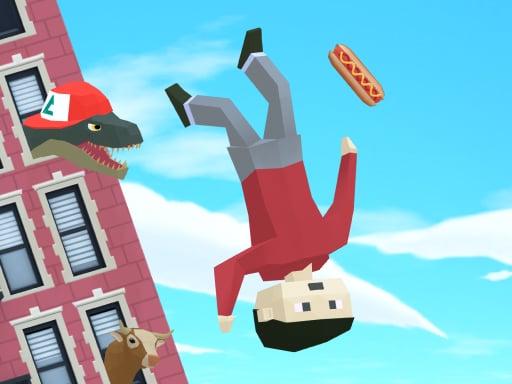
Puppetman: Ragdoll Puzzle is a physics-based logical puzzle game where players guide a floppy character named Poly down to solid ground. By interacting with surrounding environmental objects, you manipulate the drop path to prevent harsh impacts. Balancing deliberate object activation with unpredictable ragdoll momentum turns every descent into an entertaining mechanical challenge.
In Puppetman: Ragdoll Puzzle, your central mission is to navigate the protagonist, Poly, from elevated structures down to the floor while minimizing physical harm. The play area presents interactive obstacles and supporting apparatuses that alter Poly's trajectory, cushion falls, or clear the way downward. Because character physics react dynamically to every environmental collision, each puzzle demands careful evaluation of how objects shift under Poly's weight.
The experience merges logic problem-solving with lighthearted ragdoll animations. Success relies on observing the layout, anticipating how Poly will tumble when supports disappear or pivot, and activating the right mechanisms at the right moment. Whether playing on a desktop setup or mobile device, the streamlined inputs keep the focus squarely on puzzle geometry and kinetic timing.
Your goal
The primary objective is to bring Poly down to the ground with as little damage as possible. Players achieve this by solving spatial puzzles and triggering stage objects in an order that softens the descent, prevents dangerous high-velocity drops, and lands the ragdoll safely at the base of each setup.
How to play Puppetman: Ragdoll Puzzle
1. Survey the starting layout to identify where Poly is perched and where the safe landing zone on the ground is located.
2. Examine the surrounding interactive items and determine which ones can be activated using on-screen buttons or keyboard keys.
3. Trigger environmental mechanisms in sequence to alter ramps, remove barriers, or cushion Poly's descent path.
4. Watch the ragdoll physics unfold in real time and prepare follow-up inputs to control subsequent momentum.
5. Settle Poly onto the floor with minimal impact force to complete the puzzle cleanly.
Controls and device support
Interact with puzzle elements by pressing on-screen buttons or by using keyboard keys A, B, and C.
- Controls: Keyboard
- Device support: Browser
- Game frame: 800 x 600
Rules to keep in mind
- Poly must reach the ground surface to successfully resolve the descent challenge.
- Puzzles require interacting with environmental objects that physically shift, redirect, or support the character.
- Minimizing collision trauma and impact damage to Poly is the benchmark for clean completion.
What makes the challenge interesting
The core gameplay tension centers on managing momentum against fragile stability. Because Poly is simulated as a loose ragdoll, sudden drops can result in excessive tumbling and severe collision damage. Players must balance speed with caution: activating an item too early might drop Poly past a safety ledge, while waiting too long can leave the hero stranded on an awkward perch.
Success comes from treating each puzzle as a controlled sequence of kinetic transfers. Rather than relying on frantic inputs, the most satisfying solutions emerge from predicting how surrounding objects tip, slide, and react to gravity before initiating the first action.
Tips for Puppetman: Ragdoll Puzzle
- Scan the entire vertical drop before triggering any switch. Tracing Poly's theoretical bounce path helps you avoid dropping the character directly onto hard corners or hazardous geometry.
- Stagger your button presses instead of activating everything at once. Releasing platforms one step at a time lets you control falling velocity and limits severe impact damage.
- Use intermediate platforms as rest stops whenever possible. Breaking a tall descent into shorter drops preserves stability and keeps ragdoll limbs from flailing out of control.
- Observe how surrounding props react under weight. Some structures tilt or bounce upon contact, offering an extra cushion if timed accurately to catch Poly mid-fall.
Stages and progression
As you tackle successive physics layouts, puzzle arrangements introduce more intricate combinations of moving apparatuses, narrower landing buffers, and tighter trigger sequences. Developing a consistent practice approach helps you master these increasingly delicate setups over time.
When attempting to refine your puzzle performance, aim for steadier descents on earlier stages before speeding up your inputs. Reviewing where Poly absorbs heavy hits teaches you to anticipate kinetic rebounds, turning haphazard drops into graceful, low-impact landings across future puzzles.
Playing on different devices
On desktop browsers, players can utilize physical keyboard keys A, B, and C to trigger interactive puzzle mechanisms swiftly. This tactile layout allows for precise timing without covering the visual field with cursor movements.
When playing on touch-enabled screens or mobile browsers, dedicated on-screen buttons provide direct touch access to corresponding stage mechanisms. Keeping your hands near the screen edges ensures an unobstructed view of Poly's descent.
The skills behind the game
Within arcade and casual physics puzzles, ragdoll mechanics have long offered an engaging mix of logical calculation and unpredictable comedy. Unlike rigid tile puzzles, games centered on simulated physical bodies introduce gravity, momentum, and collision angles into every decision.
Puppetman: Ragdoll Puzzle fits squarely into this casual tradition by offering quick, bite-sized scenarios where understanding structural balance and timing is just as essential as planning several moves ahead. It rewards experimental problem-solving and patient observation.
Who will enjoy this game
Players looking for a puppetman: ragdoll puzzle experience typically appreciate accessible browser titles that test spatial reasoning without requiring complex control schemes. The straightforward interaction model makes it an ideal pick for casual mental warmups or quick relaxation sessions between tasks.
Enjoying an arcade game online with simulated physics offers a refreshing break from repetitive reflex tests. By practicing careful sequencing and studying how kinetic forces affect Poly's descent, players can enjoy steadily mastering the physics sandbox at their own pace.
Frequently asked questions
Who is the main character in Puppetman: Ragdoll Puzzle? You control the descent of a ragdoll hero named Poly, aiming to bring him safely down to the ground across varied puzzle stages.
What keys are used to play on a desktop browser? On desktop keyboards, players can press the A, B, and C keys or click the on-screen buttons to interact with puzzle apparatuses.
How do you achieve the best outcome in each puzzle? Focus on lowering Poly to the floor with the lowest possible impact damage by timing object activations to cushion his vertical drop.
Something not right?
Tell us if the game does not load, the information is wrong or the content needs review.
Report a problem ›