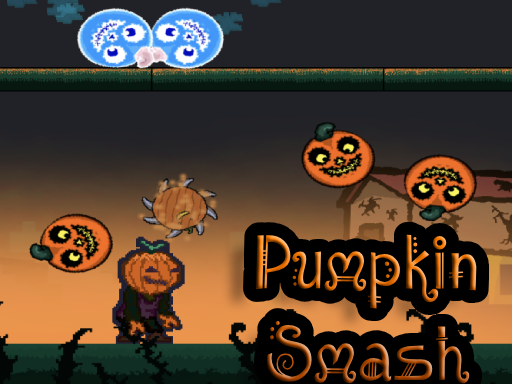
About Pumpkin Smash
Pumpkin Smash is an autumn-themed casual action game that places players in pumpkin-filled seasonal adventures. Using direct keyboard movement and responsive mouse-driven weapon targeting, you navigate your character across the playfield, leaping over obstacles and striking targets. It offers straightforward arcade entertainment designed for quick sessions celebrating the harvest and Halloween atmosphere.
Pumpkin Smash invites players into a vibrant fall environment centered on seasonal motifs and pumpkin-related challenges. The game blends basic platform navigation with real-time combat inputs, requiring players to control both position and attack angles simultaneously.
At its core, the experience emphasizes accessible arcade pacing. Players explore seasonal terrain by running and jumping while aiming their equipped weapon via cursor direction. Striking with primary attacks lets you engage with targets across the screen, creating an active loop that fits right into the casual and hypercasual browser genre.
Your goal
The primary goal in Pumpkin Smash is to navigate your character through the seasonal environment while effectively directing your weapon and attacking targets along the way. Players work to refine their spatial awareness, jumping across ledges or obstacles cleanly while maintaining steady aim to clear upcoming threats and complete their pumpkin-themed outing.
How to play Pumpkin Smash
1. Load into the session and orient yourself with the arena layout within the 960 by 600 display area.
2. Use the WASD or Arrow keys to maneuver your character across the ground.
3. Press the Space bar to jump over gaps, hazards, or elevated terrain.
4. Move your mouse cursor across the screen to orient the direction of your weapon toward incoming targets.
5. Click the left mouse button to unleash your attack and smash obstacles or targets in your path.
Controls and device support
Navigate using WASD or Arrow keys to move your character, and press Space to jump. Use mouse movement to aim your weapon direction and left mouse click to perform attacks.
- Controls: WASD + arrow keys
- Device support: Browser
- Game frame: 960 x 600
What makes the challenge interesting
The defining mechanical balance in Pumpkin Smash rests between agile footwork and precise weapon alignment. Because movement is managed on the keyboard while weapon trajectory relies on mouse tracking, players must coordinate both hands independently. Jumping adds vertical variability, allowing you to reposition quickly when confronting clustered targets.
This setup rewards players who keep their cursor fluidly ahead of their avatar's trajectory. Instead of standing stationary, successful runs benefit from dynamic movement where leaping and striking occur in tandem, capturing the brisk tempo common to classic arcade hunting adventures.
Tips for Pumpkin Smash
- Keep your mouse cursor slightly in front of your character's movement path. This lets you align your weapon quickly before closing the distance to a target.
- Time your jumps with the Space bar early when approaching elevated ledges to prevent falling short or getting trapped in tight spaces.
- Avoid mashing the left mouse click aimlessly. Align the reticle or weapon pointer intentionally with your target first to ensure your strike connects.
- Alternate between WASD and Arrow key configurations during your opening minute to discover which hand position feels most natural alongside mouse aiming.
- Maintain active movement rather than staying in a single corner, using the full breadth of the screen space to maneuver around obstacles.
The skills behind the game
Pumpkin Smash sits at the intersection of casual arcade platforming and hypercasual seasonal action. The inclusion of Halloween and hunter tags points to a themed experience where direct interactions take priority over complex progression trees. Players looking for straightforward seasonal fun can pick up the title instantly thanks to clear movement rules and immediate combat engagement.
Within the wider scope of browser-based casual titles, games emphasizing simple movement and mouse-aimed striking offer accessible low-barrier entertainment. Whether enjoyed during seasonal autumn events or as a quick diversion, the game delivers rapid tactile interaction without demanding deep onboarding.
Who will enjoy this game
When browsing for a pumpkin smash game online, players typically look for lightweight, fall-themed action featuring intuitive mechanics and quick rounds. The blend of harvest aesthetics and active smashing provides accessible fun for casual gaming sessions.
Engaging with Pumpkin Smash offers an entertaining opportunity to practice hand-eye coordination across twin-input layouts. Coordinating directional keys for movement while steering weapon angles with the mouse fosters smooth motor control useful across the broader arcade and action genre.
Frequently asked questions
What are the primary controls for playing Pumpkin Smash? Players use the WASD or Arrow keys to move, the Space bar to jump, the mouse to aim weapon direction, and the left mouse click to attack.
What type of game is Pumpkin Smash? It is an arcade-style casual adventure title featuring an autumn and Halloween theme centered on pumpkin-smashing action.
Can you jump while attacking targets? Yes, jumping is mapped to Space while attacking relies on the mouse click, allowing players to coordinate aerial strikes and evasive maneuvers.
What display resolution is Pumpkin Smash built around? The official game dimensions are formatted for a 960 by 600 viewport, making it well-suited for standard desktop browser windows.
Something not right?
Tell us if the game does not load, the information is wrong or the content needs review.
Report a problem ›