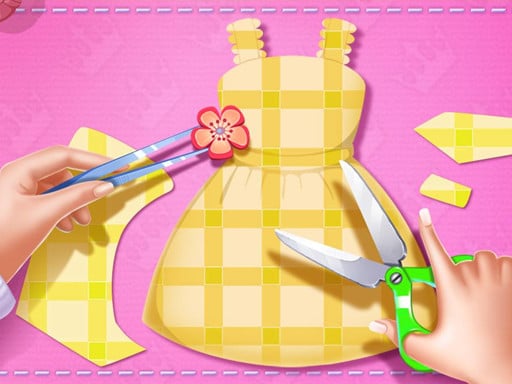
About Princess Tailor Shop
Princess Tailor Shop puts you in the role of a creative fashion designer crafting bespoke garments for royalty. In this charming casual title, players operate a sewing machine, assemble stylish clothing pieces, and apply custom decorations across multiple levels. Whether you enjoy crafting intricate dress patterns or experimenting with creative accents, the game provides an accessible, step-by-step styling experience suitable for creative minds of all ages.
Princess Tailor Shop invites players into a colorful boutique environment where fashion design takes center stage. Taking on the duties of an in-house tailor, you work through the complete process of creating custom garments, from assembling basic patterns to operating a sewing machine and adding final decorative flourishes. The experience emphasizes hands-on clothing creation rather than simply choosing pre-made sets from a static wardrobe.
The game features multiple levels that guide players through distinct dressmaking challenges. Across each session, you can experiment with varied garment designs and decorative accessories to assemble polished dresses. The straightforward point-and-click or tap interface allows players to focus entirely on visual presentation, crafting neat seams, and personalizing royal outfits at their own pace.
Your goal
The primary objective in Princess Tailor Shop is to craft complete, beautifully tailored dresses by successfully navigating each stage of the design and stitching process. Players aim to assemble clean garments using the sewing machine, apply harmonious decorations, and advance through the available tailoring levels while refining their aesthetic choices and creative styling technique.
How to play Princess Tailor Shop
1. Launch Princess Tailor Shop and select an active level or design challenge from the main screen.
2. Select your desired garment pattern pieces and fabric elements using simple click or tap inputs.
3. Operate the tailor sewing machine by interacting with the on-screen prompts to stitch the clothing together.
4. Personalize the completed dress by browsing and applying colorful decorative trims, ribbons, or accessories.
5. Review your finished royal outfit and proceed forward to tackle new design projects in subsequent levels.
Controls and device support
Princess Tailor Shop uses mouse clicks on desktop and touchscreen taps on mobile devices to interact with tools, fabric pieces, and decoration menus.
- Controls: Mouse or touch
- Device support: Desktop + mobile
- Game frame: 504 x 800
What makes the challenge interesting
The core appeal of Princess Tailor Shop lies in its focused simulation of the dressmaking craft. Rather than overwhelming players with intense time limits or complex management systems, the gameplay centers on the satisfying tactile rhythm of garment assembly. Players experience each sequential step of clothing creation, combining precise stitching interactions with artistic freedom during the decoration phase.
A key creative tradeoff involves balancing elaborate decorative elements with cohesive overall outfit styling. Selecting complementary patterns, matching accent colors, and placing embellishments thoughtfully can transform a basic dress into a standout royal showpiece, encouraging players to practice visual coordination and creative experimentation.
Tips for Princess Tailor Shop
- Plan your color palette before applying decorative elements. Choosing accessories that contrast or harmonize neatly with the main fabric ensures a balanced, eye-catching final dress.
- Follow on-screen sewing prompts steadily. Taking your time during the stitching phase helps avoid rushed clicks and ensures smooth progression through the crafting sequence.
- Experiment with different decorative combinations across stages. Trying varied trims and accents on each new level keeps your tailoring portfolio fresh and distinct.
- Avoid overcrowding garments with too many conflicting accessories. Focusing on two or three well-placed decorative pieces often yields a cleaner, more elegant royal design.
Stages and progression
Princess Tailor Shop is structured across multiple levels, offering players a series of distinct tailoring projects to complete. Each stage presents a fresh opportunity to work with new dress styles, sewing tasks, and decorative options, providing a steady sense of creative accomplishment as you advance through the shop's catalog.
As you move from one project to the next, consider challenging yourself to create contrasting themes—such as shifting from ornate, heavily decorated ballgowns to minimalist, modern dresses. This self-guided practice helps players explore the full variety of decorative tools available across the game's levels.
Playing on different devices
Princess Tailor Shop runs directly in web browsers with a vertical canvas resolution of 504 by 800 pixels. This portrait orientation makes the title particularly natural to play on mobile smartphones and tablets, where vertical screen alignment provides direct, full-screen touch control over sewing and styling actions.
On desktop computers and laptops, the game displays in a centered mobile-style frame operated entirely via mouse clicks. Both input methods offer accurate responsiveness for navigating menus, activating the sewing machine, and dragging decorative accents onto dresses.
The skills behind the game
Fitting comfortably within casual fashion, design, and simulation categories, Princess Tailor Shop offers an engaging creative outlet centered on garment construction. Rather than passive viewing, simulation games in this space emphasize direct interaction with the tools of the craft, giving players a hands-on sense of how fabrics, stitches, and accessories combine into finished attire.
For players who enjoy visual styling, makeover themes, and decorative crafts, the title provides accessible entertainment without high-pressure fail states. Its cheerful presentation and straightforward mechanics make it an inviting introductory experience for younger audiences and casual hobbyists alike.
Who will enjoy this game
Players looking for a delightful princess tailor shop game often seek creative titles that go beyond basic wardrobe selectors to offer interactive clothing design. Crafting outfits from scratch appeals to anyone who enjoys tailoring mechanics, hands-on sewing steps, and detailed accessory customization.
Whether you are practicing visual styling in a dress up game format or exploring creative color combinations between daily tasks, this lightweight browser game delivers relaxing, self-paced entertainment that can be enjoyed in quick casual sessions across any modern device.
Games with a similar feel
Love Nikki-Dress UP Queen: Like Love Nikki-Dress UP Queen, Princess Tailor Shop focuses on fashion creativity and garment styling. While Love Nikki emphasizes extensive wardrobe coordination and themed outfit evaluations, Princess Tailor Shop offers a streamlined browser experience centered on the tactile steps of stitching and decorating individual dresses.
Project Makeover: Both Princess Tailor Shop and Project Makeover engage players who enjoy styling and visual transformation. However, Project Makeover combines character makeover themes with broader narrative and puzzle elements, whereas Princess Tailor Shop stays focused purely on the hands-on process of sewing and decorating dresses in a boutique studio.
Frequently asked questions
What kind of gameplay does Princess Tailor Shop feature? Princess Tailor Shop is a casual simulation and dressmaking game where players cut, stitch, and decorate custom royal dresses using interactive tools such as a sewing machine across multiple progressive levels.
Can I play Princess Tailor Shop on mobile phones? Yes. The game features responsive tap controls and a 504x800 portrait layout, making it fully playable on mobile touchscreen devices as well as desktop browsers.
How does this differ from standard dress up games? While standard dress up titles focus primarily on picking finished garments from a closet, Princess Tailor Shop guides you through the active process of sewing fabrics together and applying custom decorations.
Something not right?
Tell us if the game does not load, the information is wrong or the content needs review.
Report a problem ›