Official listing
Game description
Precision Online is a multiplayer shooter game in which you can compete with your friends!
Multiplayer game
Precision Online is a 3D multiplayer shooter designed for quick browser-based action where you can jump straight into firefights and compete with your friends. The game combines familiar first-person movement, responsive mouse aiming, and real-time weapon handling with an active text chat system, creating a competitive arena environment focused on spatial awareness, fast reflexes, and disciplined tactical shooting.
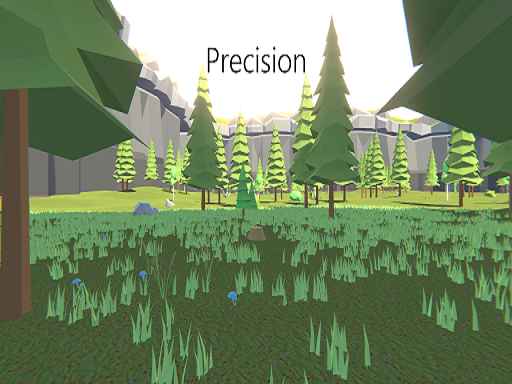
Choose Play now to load the game.
Official listing
Precision Online is a multiplayer shooter game in which you can compete with your friends!
From the game listing
WASD Space to Move Mouse to Shoot Aim Switch Weapon R to Reload T to Chat
Open this card to load the gameplay video.
Precision Online is a 3D multiplayer shooter designed for quick browser-based action where you can jump straight into firefights and compete with your friends. The game combines familiar first-person movement, responsive mouse aiming, and real-time weapon handling with an active text chat system, creating a competitive arena environment focused on spatial awareness, fast reflexes, and disciplined tactical shooting.
Set within a 3D combat arena, Precision Online delivers a straightforward competitive shooter loop where players enter matches to test their marksmanship against human opponents. The core gameplay loop centers on maneuvering around the map, acquiring targets with your crosshairs, managing your ammunition, and engaging other players across varying ranges. Communication is integrated directly into the lobby experience through a dedicated chat function, allowing participants to coordinate or trade friendly banter during battle.
Matches demand balanced play between offensive aggression and defensive positioning. As you navigate the environment using standard directional movement and jumping, you must continually monitor sightlines, switch between available weapons to match combat distances, and time your reloads safely behind cover. Because every player shares the same real-time battlefield, maintaining smooth movement while lining up precise shots forms the heart of the experience.
The primary objective in Precision Online is to outshoot and outmaneuver opposing players in live multiplayer skirmishes. To succeed, you aim to maximize your combat efficiency by landing accurate shots on targets, conserving your weapon clips during heated engagements, and maintaining superior positioning across the 3D map while minimizing the damage you take from rivals.
1. Join an active match and get your bearings by observing the layout and cover points within the 3D arena.
2. Navigate across the arena floor and jump over obstacles using standard directional keyboard controls to establish good positioning.
3. Scan the environment and use mouse movement to track opponents and line up accurate crosshair shots.
4. Switch between your available weapons depending on whether you are fighting at close quarters or across open distances.
5. Trigger manual reloads when ducking into safety to ensure your weapon is fully loaded before the next shootout.
6. Use the integrated text chat key to communicate with friends and fellow competitors during the match.
Movement is handled via WASD with Space to jump. Use the mouse to aim, fire, and switch weapons. Press R to reload your active firearm, and press T to open the text chat window.
Precision Online emphasizes the fundamental mechanics of classic online arena combat: crosshair discipline, movement rhythm, and timely resource management. Success hinges on a player's ability to balance steady target tracking against constant physical repositioning. Standing still makes aiming simpler but turns you into an easy target for opponents, while excessive jumping and erratic movement can disrupt your own shot accuracy. Mastering the cadence of ducking behind cover to reload, cycling weapons to suit engagement ranges, and anticipating rival movements represents the primary skill ceiling.
Precision Online is built around standard desktop inputs, requiring smooth mouse tracking for aiming and full keyboard accessibility for WASD movement, jumping, reloading, and typing. A physical mouse with a comfortable sensitivity setting provides the best control over fine crosshair adjustments, while playing in an unzoomed browser window ensures clear visibility across the 3D battlefield.
As part of the 3D multiplayer shooter category, Precision Online offers players an accessible, low-friction entry point into competitive first-person action. Without demanding heavy installations or complex configuration menus, web-based shooters emphasize immediate arena engagements where core aiming fundamentals, reflexes, and positioning decide the outcome. These titles attract players looking for quick multiplayer sessions, friendly rivalries, and fast-paced gunplay that can be enjoyed directly inside any standard desktop browser.
Players searching for Precision Online or a casual precision online game are typically seeking browser-friendly first-person shooters that deliver direct multiplayer competition. This title caters to casual gamers and shooter fans who want to jump into live combat without extensive setup. It serves as an enjoyable platform for practicing mouse-aiming coordination, tracking moving targets, and having fun in social shootouts alongside friends.
DOOM: Like the classic shooter DOOM, Precision Online revolves around energetic 3D combat movement, steady weapon aiming, and active navigation through hostile encounter spaces. However, while DOOM is famous for its labyrinthine solo campaigns and atmospheric demon battles, Precision Online focuses entirely on lightweight browser multiplayer skirmishes against live friends and online competitors.
Can I play Precision Online with friends? Yes, Precision Online is designed as a multiplayer shooter where you can join matches alongside friends and use the in-game text chat to communicate.
How do I switch weapons and reload during combat? You switch weapons using the mouse controls and reload your active firearm by pressing R on your keyboard.
What inputs are needed to move and jump in the arena? Movement is controlled with the WASD keys for directional walking and the Space bar for jumping across obstacles.
Tell us if the game does not load, the information is wrong or the content needs review.
Report a problemExplore popular games by category, shared tags and site-wide activity.