About Pong Ball Game
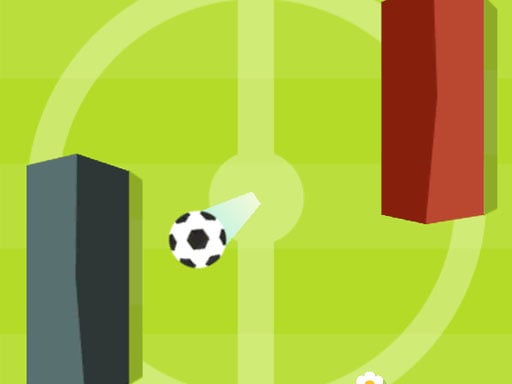
Pong Ball Game turns ping-pong into a soccer-style duel: guard your gates, swipe to redirect the ball, and keep the AI from scoring. Classic mode keeps the familiar pong-ball rally, while arcade mode adds rocks and coins for a less predictable match. It is easy to start but rewards timing and angle control.
Pong Ball Game is a soccer-themed pong game where your job is to protect your gates and send the ball back toward the opponent. The official description highlights two ways to play: a default classic ping pong soccer mode and an Arcade Soccer Pong mode selected through Options and the Game Mode tab. Arcade play can place rocks on the field as obstacles and can show coins that the ball must hit to collect, making rallies more unpredictable and challenging while still keeping the same basic deflection idea.
Your goal
The main objective is to stop the enemy from scoring a goal by moving your gates up or down and deflecting the ball with a useful direction. In arcade mode you can also choose a higher-risk style by adding rocks and coins, aiming for the best score when the ball strikes coins during play.
How to play Pong Ball Game
1. Open Options and visit the Game Mode tab to choose between the original pong-ball mode and the arcade flavor.
2. Leave the default classic mode selected if you want the familiar ping pong soccer rally without extra field objects.
3. Pick arcade mode if you want to adjust whether rocks appear on the field, how many there are, and whether coins are shown for collection.
4. During play, put your finger on the left side of your phone screen where your gates are and swipe up or down to move them.
5. Time each swipe so the ball is deflected away from your goal and toward a path that makes the AI miss; in arcade mode, let the ball hit coins when you want to collect them.
Controls and device support
The source describes phone touch control only; no keyboard, mouse, or gamepad input is stated.
Finger on the left side of the phone screen: Swipe up or down to move your gates and deflect the ball
- Controls: See in-game controls
- Device support: Browser
- Game frame: 800 x 600
Rules to keep in mind
- Classic is the default mode; arcade is selected separately in the Game Mode tab.
- In arcade mode, rocks act as field obstacles and make the ball's path less predictable.
- Coins are collected only when the ball hits them, so coin routes must fit into normal deflection play.
What makes the challenge interesting
The focus is defensive positioning plus controlled rebound direction. You are not steering a player around a pitch; you are guarding gates on the left side and using vertical swipes to meet the ball at the right moment. A good deflection both prevents a goal and changes where the ball travels next, which can trick the AI. Arcade options add decisions: rocks can disrupt clean angles, while coins tempt you to send the ball toward specific spots instead of only playing safe.
Tips for Pong Ball Game
- Use small, early swipes when possible; the source emphasizes easy up or down movement, so controlled positioning is safer than frantic last-second reaches.
- Think about the rebound, not only the block. A deflection that also sets the ball's next direction is what can trick the AI.
- In arcade mode, treat coins as a bonus route, not a reason to open your gates; protect the goal first, then let the ball clip coins on a safe line.
- If rocks are enabled, expect strange bounces and keep your gates centered until you read the new angle.
The skills behind the game
The listing is tagged Soccer, but the facts describe a pong-ball interpretation of soccer: gates, goals, and defensive deflection rather than passing a squad downfield. That makes it useful for players who want a soccer-flavored arcade rally with simple touch movement and optional obstacles.
Who will enjoy this game
Natural phrases for this page include pong ball game and soccer game online because the title is Pong Ball Game and the supported facts combine ping-pong deflection with soccer-style gates and goals. These phrases should be read as descriptive language, not as measured demand or ranking evidence.
Games with a similar feel
EA SPORTS FC: EA SPORTS FC shares the broad soccer idea of controlling play and scoring goals, but Pong Ball Game is much smaller and more abstract: you defend gates with pong-style swipes, optional rocks, and coin hits rather than managing a realistic football match.
Frequently asked questions
How do I move in Pong Ball Game? Place your finger on the left side of your phone screen where your gates are, then swipe up or down. That movement helps block the ball and choose the direction it flies after deflection.
What does arcade mode add? Arcade Soccer Pong can add rocks as obstacles on the field and can show coins for collection. The description says this makes play more unpredictable and challenging while preserving the pong-ball idea.
How are coins collected? Coins are collected when the ball hits them, so you need a deflection path that reaches the coin without leaving your own gates exposed.
Something not right?
Tell us if the game does not load, the information is wrong or the content needs review.
Report a problem ›