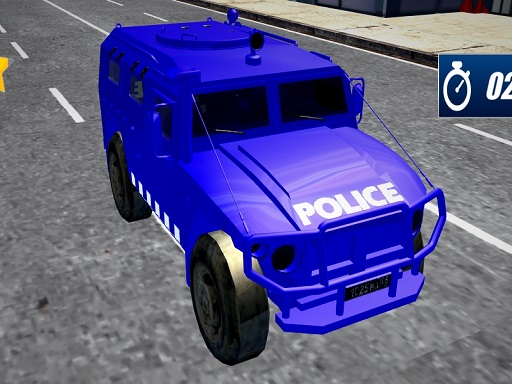
About Police Driving Vehicles Simulator
Police Driving Vehicles Simulator puts you behind the wheel of distinct emergency response units across sprawling urban grids and rugged backroads. Your central challenge revolves around balancing raw acceleration with fine vehicle handling while patrolling roads, chasing down suspects, and completing tactical assignments. Whether steering a nimble cruiser or steadying a heavy tactical truck, success depends on maintaining control through sharp turns and changing road conditions.
Set across both built-up city streets and uneven off-road terrain, Police Driving Vehicles Simulator tasks drivers with high-stakes law enforcement operations. Players engage in active urban patrols, pursue fleeing targets, and respond to varied mission calls throughout open-style driving zones.
The core loop highlights the mechanical differences between vehicle classes. Swift patrol cars allow rapid acceleration and sharp cornering during quick chases, whereas larger tactical options, such as SWAT trucks, emphasize weight management, momentum, and steady spatial awareness during transit. Negotiating tight street corners, avoiding obstacles, and managing braking distances provide a grounded driving experience for players who enjoy vehicle simulation challenges.
Your goal
Your objective is to complete assigned law enforcement missions, pursue fleeing vehicles effectively, and successfully navigate varied roadways without losing vehicular control. Alongside chasing down suspects and patrolling sectors, players aim to refine steering accuracy, smooth out braking lines, and safely park or position heavy emergency machinery in dense areas.
How to play Police Driving Vehicles Simulator
1. Launch the simulator in your browser and allow the WebGL game window to load fully.
2. Review your active mission briefing to identify whether your assignment involves a city patrol, suspect pursuit, or off-road deployment.
3. Select or board the required law enforcement vehicle, taking note of its handling profile from swift cruisers to heavy trucks.
4. Use the standard WASD keyboard controls to accelerate, steer, and brake your vehicle along urban streets or rough dirt paths.
5. Follow target markers or patrol routes carefully, maintaining pursuit speed while avoiding roadside obstacles.
6. Bring the vehicle to a clean stop or secure target objectives to complete the mission successfully.
Controls and device support
Official game instructions specify using the WASD keyboard layout to steer, accelerate, and reverse the police vehicle.
- Controls: See in-game controls
- Device support: Browser
- Game frame: 800 x 600
What makes the challenge interesting
The defining gameplay challenge in Police Driving Vehicles Simulator lies in balancing rapid transit with vehicular inertia. High-speed pursuits tempt players to keep the throttle pinned, yet narrow city intersections and unpaved off-road paths demand measured throttle input and early deceleration. Different law enforcement vehicles accentuate this trade-off: lightweight cruisers provide rapid directional response but can slide out when turned abruptly, whereas tactical trucks carry substantial mass that requires wide turning radiuses and prolonged stopping distances.
Developing a consistent rhythm between straightaway acceleration and controlled cornering forms the backbone of clean mission runs. Drivers who master vehicle weight transfer and road surface transitions can navigate congested streets reliably without collisions, keeping suspect vehicles firmly in sight.
Tips for Police Driving Vehicles Simulator
- Brake before initiating sharp corners rather than sliding through them mid-turn. This prevents your vehicle from spinning out into buildings or barriers and preserves your exit speed during high-speed chases.
- Adjust your driving habits whenever switching between patrol cars and SWAT trucks. Heavier vehicles require earlier braking distances and wider steering lines to avoid colliding with roadside street furniture.
- Ease up on acceleration when transitioning from paved city avenues onto unpaved off-road trails. Reducing speed slightly stabilizes your tires on uneven ground and prevents sudden loss of directional control.
- Keep a steady buffer distance behind fleeing vehicles during pursuit missions. Tailgating too closely leaves little reaction time if the target maneuvers suddenly or stops short at an intersection.
Stages and progression
Progression in Police Driving Vehicles Simulator centers around taking on diverse mission types spread across urban and off-road territories. Players start by establishing basic vehicle handling on open paved avenues, gradually engaging in more demanding high-stakes suspect chases and tactical runs that require switching into heavier service vehicles like SWAT trucks.
As mission assignments shift from straightforward patrols to urgent intercept operations over variable terrain, success relies on refining personal driving precision rather than relying on sheer top speed. Adapting cleanly to distinct vehicle weights and managing unpredictable road layouts marks your growth across consecutive deployments.
Playing on different devices
Built on the Unity WebGL framework with an 800 by 600 default display viewport, the game runs directly inside standard desktop web browsers. A physical keyboard is recommended to utilize the WASD control scheme smoothly without key-ghosting during simultaneous turning and braking maneuvers.
The skills behind the game
Positioned within browser action and driving genres, Police Driving Vehicles Simulator merges the responsive vehicle handling of 3D motor titles with objective-oriented law enforcement themes. Unlike standard closed-circuit racing games that focus solely on lap times, police-themed driving titles emphasize directional control, reaction speed, and spatial awareness within varied environments.
The addition of precision parking elements and off-road terrain challenges introduces a deliberate pace alongside high-speed pursuits. Players must balance aggressive acceleration with careful braking to handle heavy machinery like utility trucks and SWAT vans in tight spaces.
Who will enjoy this game
Players looking for a dedicated police driving vehicles simulator game often search for titles that combine freeform navigation with structured mission goals. Whether your interest centers on casual car parking game practice or fast-paced action game online challenges, the dual focus on agile cruisers and heavy utility vehicles caters to varied driving styles.
Engaging with varied urban patrols provides an accessible way to hone keyboard driving reflexes. Practicing controlled acceleration and line discipline helps drivers appreciate the contrasting dynamics between light pursuit vehicles and heavy tactical machinery.
Frequently asked questions
What vehicles can you drive in Police Driving Vehicles Simulator? The game features diverse law enforcement machinery, ranging from agile high-response patrol cars suited for rapid city pursuits to rugged, heavy SWAT trucks built for high-stakes tactical deployments.
What controls are used to drive the police vehicles? You pilot your vehicle using the WASD keyboard keys, which control steering, forward acceleration, and reverse maneuvers across both city and off-road driving courses.
Does the game feature parking and precision maneuvering challenges? Yes, alongside high-speed criminal pursuits and regular city patrols, the game incorporates spatial maneuvering and parking elements across both tight urban streets and varied road environments.
Something not right?
Tell us if the game does not load, the information is wrong or the content needs review.
Report a problem ›