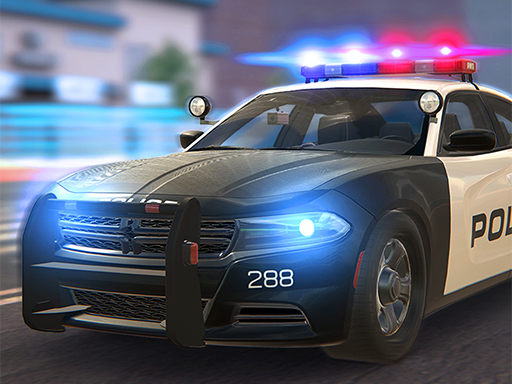
About Police Car Simulator
Police Car Simulator puts players behind the wheel of a law enforcement vehicle in a 3D driving simulation. Designed for fans of realistic vehicle handling and police themes, the game invites you to navigate roads and experience driving from a patrol officer's perspective using responsive keyboard and mouse controls.
Police Car Simulator is a 3D vehicle driving simulation built for players who enjoy realistic automotive environments and law enforcement themes. Designed to capture the experience of being behind the wheel on patrol duty, the game emphasizes immersive graphic details and active road navigation. Players steer a police vehicle through virtual roadways, managing acceleration, turning lines, and drifting maneuvers. Powered by Unity3D and WebGL technology, the title runs smoothly in desktop web browsers at a native 960 by 540 resolution, giving car enthusiasts an accessible platform to practice precision driving and vehicle control.
Your goal
The primary objective in Police Car Simulator is to maneuver your patrol vehicle smoothly across the road environment while maintaining steady vehicle stability. Players aim to practice realistic driving techniques, navigate turns and drifts effectively, and experience the responsibilities of operating a police car without crashing into obstacles or losing control of the vehicle during their drive.
How to play Police Car Simulator
1. Open Police Car Simulator in your desktop browser to load the 3D driving simulation environment.
2. Use the arrow keys on your keyboard to accelerate forward, steer left and right, and brake or reverse.
3. Move or click the mouse as needed to adjust your viewpoint and interact with the game interface.
4. Manage your speed around curves and practice drifting to maintain balance across different driving sections.
5. Continue patrolling the roadway to explore the realistic environment and refine your driving technique.
Controls and device support
Arrow keys: Drive, steer, accelerate, brake, and reverse
Mouse: Adjust viewpoint and interact with game interface
- Controls: Keyboard
- Device support: Browser
- Game frame: 960 x 540
What makes the challenge interesting
Gameplay in Police Car Simulator centers on vehicle handling, road awareness, and realistic car physics. Operating a simulated police car requires players to balance speed with careful steering inputs. Drifting around sharp turns and maintaining road position test your reaction time and coordination. The title emphasizes visual fidelity in 3D graphics, creating an authentic atmosphere for players interested in law enforcement driving. By combining straightforward keyboard controls with responsive vehicle dynamics, the simulation offers an engaging driving experience centered around precision road navigation.
Tips for Police Car Simulator
- Ease into acceleration when navigating tight turns to prevent your police car from spinning out or losing grip on the road surface.
- Combine gentle steering taps with steady braking before approaching sharp corners to execute smoother drifting lines without colliding into obstacles.
- Use the mouse to adjust your perspective regularly so you can anticipate approaching curves and road changes well ahead of time.
The skills behind the game
Police Car Simulator belongs to the racing and driving simulation genre, which focuses on vehicle physics, realistic handling, and open navigation. Unlike traditional competitive track racers that emphasize laps and finish lines, driving simulators often prioritize the sensory experience of operating specialized vehicles like police cruisers, allowing players to explore roads and practice handling dynamics at their own pace.
Who will enjoy this game
Players searching for a police car simulator game or online racing games often look for realistic 3D vehicle control and drifting mechanics. Police Car Simulator addresses these interests by combining responsive keyboard-based driving with detailed police car visuals, offering an accessible browser-based drifting and simulation experience without demanding high-end hardware or complex installations.
Games with a similar feel
Asphalt: Like Asphalt, Police Car Simulator lets players experience responsive car driving and high-speed road maneuvering. However, while Asphalt focuses on fast-paced arcade racing tournaments and nitro boosts, Police Car Simulator centers on law enforcement vehicle simulation and realistic handling.
Need for Speed: Both Police Car Simulator and Need for Speed highlight the appeal of police-themed driving and vehicle cornering. While Need for Speed features expansive pursuit storylines and racing careers, Police Car Simulator provides a direct, browser-based driving sandbox focused on single-car control.
Frequently asked questions
What controls are used to drive in Police Car Simulator? Police Car Simulator is played on desktop browsers using the arrow keys for steering and throttle control, alongside the mouse for perspective and interface interactions.
Does Police Car Simulator require any downloads to play? No extra downloads are required. The game is built with Unity3D and WebGL technology, enabling it to load and run directly inside any compatible modern desktop web browser.
What makes Police Car Simulator realistic? The game features 3D graphics and detailed vehicle physics designed to simulate the authentic look and driving feel of operating a police patrol car on the road.
Something not right?
Tell us if the game does not load, the information is wrong or the content needs review.
Report a problem ›