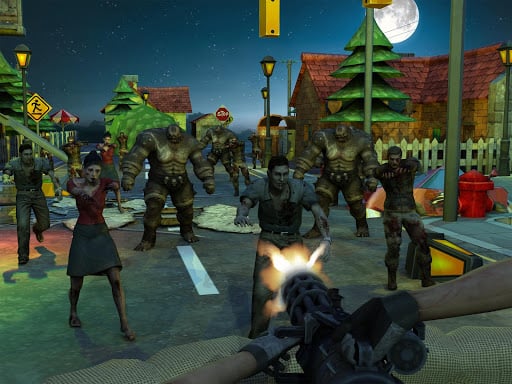
About Player vs Zombie
Player vs Zombie is a 3D single-player action shooter where you control a lone operative across two hostile battlegrounds. Fight through 10 soldier missions and 10 zombie combat levels that unlock sequentially with rising difficulty. Defeat hostile waves to earn money, then access game settings to restock your first-aid kits and defensive grenades.
In Player vs Zombie, combat unfolds across two distinct operational maps divided into two dedicated campaign tracks. One track challenges you across 10 progressive stages against armed soldiers, while the second pits you against 10 stages of relentless zombies. As you clear each encounter, succeeding missions unlock gradually, introducing steeper opposition that tests your maneuvering and shooting accuracy.
Success on the battlefield rewards in-game currency for every cleared stage. Between sorties, players can enter the game settings menu to invest accumulated earnings into vital consumables, specifically high-yield grenades and restorative first-aid kits. Managing your tactical supplies and switching between available armaments ensures you stay prepared for tougher skirmishes ahead.
Your goal
Your objective is to complete all 20 combat levels across both the soldier and zombie campaigns. Eliminate all opposing hostiles on each map, survive the escalating waves, collect your monetary stage rewards, and utilize store supplies to overcome the final missions.
How to play Player vs Zombie
1. Navigate your fighter across the map using the WASD keys and hold Left Shift to sprint away from danger.
2. Cycle through available weaponry using Tab or drop unneeded items by pressing K.
3. Engage targets while utilizing Space to jump over obstacles and C to crouch behind cover.
4. Press R to reload your active firearm, throw a defensive explosive with G, or restore health with E when carrying medical kits.
5. Clear the mission to receive cash rewards, then open game settings to buy more grenades and first-aid kits.
Controls and device support
WASD: Move
Left Shift: Run
Space: Jump
C: Crouch
Tab: select weapon
R: Reload weapon
- Controls: See in-game controls
- Device support: Browser
- Game frame: 800 x 600
Rules to keep in mind
- Levels unlock sequentially, requiring you to successfully beat the current stage before unlocking the next tier of difficulty.
- Completing missions awards money that can only be spent on extra first-aid kits and grenades through the in-game settings.
- Deploying first-aid kits (E) and grenades (G) requires that you have purchased them in advance with level earnings.
What makes the challenge interesting
The core gameplay loop centers on dynamic positioning and resource management across two battlefield maps. When facing armed soldiers, using crouch cover and steady weapon swaps helps counter ranged fire. When facing zombie encounters, utilizing sprint and timely jumps keeps fast-moving swarms from surrounding you. Because difficulty scales across each of the 20 levels, spending earned cash on a reliable stockpile of medical kits and grenades becomes essential to sustaining long survival runs.
Tips for Player vs Zombie
- Reload your weapon during quiet moments between hostile waves so you never get caught empty-handed during sudden ambushes.
- Save your purchased grenades for dense clusters of zombies or heavily entrenched soldier squads to maximize area damage.
- Use Left Shift to sprint into open space if enemies corner you, then hit E to trigger a medical kit.
Stages and progression
Progression spans 20 total levels divided evenly between 10 soldier missions and 10 zombie missions across two playable maps. Completing each mission unlocks the subsequent stage with increased combat difficulty, while earning money you can reinvest into supplies.
The skills behind the game
As an action title built around 3D arena battles, Player vs Zombie provides high-tempo solo combat where mobility and inventory management dictate survival. Players test tactical reflexes against diverse military and undead enemy types.
Who will enjoy this game
Fans seeking an action game online can jump into the player vs zombie game experience to tackle multi-tier shooting stages across varied maps with full keyboard control support.
Frequently asked questions
How do I unlock new levels in Player vs Zombie? Levels unlock gradually in sequential order as you clear preceding stages across both the soldier and zombie campaigns.
Where can I buy more grenades and first-aid kits? You can purchase first-aid kits and grenades inside the game settings using money earned from completing combat levels.
What keys switch weapons and heal my character? Press Tab to select your weapon, K to drop an item, and press E to activate a purchased medical kit.
Something not right?
Tell us if the game does not load, the information is wrong or the content needs review.
Report a problem ›