About Pick & Go!
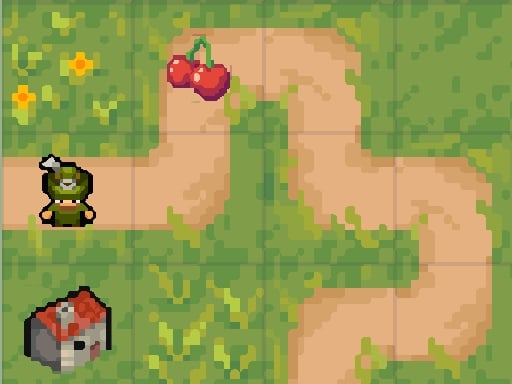
Pick & Go! is a top-down pathfinding puzzle game set across serene meadow landscapes. Players navigate each stage by dragging their character through winding routes, gathering scattered fruits while working around obstacles. Along the way, helpful items like scissors allow you to clear tangled pathways and deal with pesky bugs standing in your path across a massive progression journey.
In Pick & Go!, each stage presents a fresh layout filled with collectibles, tight pathways, and natural hazards. The setting emphasizes a calm meadow backdrop, but every stage requires careful spatial thinking to solve efficiently. Your character moves through direct drag interactions, making it easy to steer around turns and line up item pickups.
Rather than wandering aimlessly, success depends on planning your movement route from start to finish. Tools placed throughout the meadows, such as pairs of scissors, serve essential utility by clearing blocked paths and removing bugs. Balancing tool acquisition with fruit collection creates an engaging loop where every move contributes to clearing the stage and maximizing your star rating.
Your goal
The primary objective in Pick & Go! is to collect all target fruits strategically on each board while clearing blockages and bugs using available tools. Beyond basic completion, your goal is to optimize your movement and path planning to earn the full three-star rating across all 200 available levels.
How to play Pick & Go!
1. Survey the top-down meadow layout to identify fruit placements, obstacle locations, and roaming or stationary bugs.
2. Click and drag with your mouse on desktop or drag directly on your touchscreen to steer your character along the open pathways.
3. Pick up tools such as scissors when they appear in your route to prepare for blocked pathways.
4. Use your acquired tools to eliminate pesky bugs and cut through obstructions blocking access to key areas.
5. Gather all remaining fruits across the board and aim to finish the stage to secure up to three stars.
Controls and device support
Mouse Drag or Touch Drag to move character across the playfield.
- Controls: Mouse or touch
- Device support: Desktop + mobile
- Game frame: 600 x 800
Rules to keep in mind
- Movement is controlled by dragging the character continuously through accessible meadow paths.
- Fruits must be collected strategically across each board to complete the stage.
- Tools such as scissors must be utilized to clear pathways and eliminate pesky bugs.
- Each of the 200 levels offers up to three stars for thorough and efficient completion.
What makes the challenge interesting
The core appeal of Pick & Go! lies in route prioritization and spatial navigation. Because bugs and blocked paths can cut off entire sections of the meadow, you cannot simply dash directly toward the nearest fruit. Instead, you need to recognize the correct sequence: reaching the scissors first, using them to open obstructed corridors or eliminate bug hazards, and then sweeping through the remaining fruit clusters. This loop tests your foresight and pathing efficiency without introducing convoluted inputs.
Tips for Pick & Go!
- Map out your entire route before dragging your character. Rushing toward the closest fruit often leaves you trapped behind an obstacle that requires a specific tool first.
- Prioritize grabbing tools like scissors early in the run. Securing them ensures you can handle bug encounters immediately rather than having to backtrack through narrow paths.
- Maintain steady, smooth drag motions rather than frantic swipes. Controlled steering prevents unintended detours into danger zones or corners.
- Revisit completed boards to refine your routing if you missed earning all three stars on your first attempt.
Stages and progression
Pick & Go! features a long-form campaign spanning 200 distinct levels. As you advance through the meadow stages, puzzle arrangements become more intricate, demanding sharper path planning and disciplined tool usage. Each stage grades your performance on a three-star scale, giving players a clear benchmark to replay earlier boards and master every route.
Playing on different devices
Designed with a vertical 600 by 800 display resolution, Pick & Go! adapts smoothly to both mobile screens and desktop browser windows. On desktop devices, mouse dragging offers fine pointer accuracy when navigating tight corners. On mobile phones and tablets, direct touch dragging provides an intuitive, tactile feel for steering across the meadow.
The skills behind the game
Belonging to the casual puzzle and hypercasual categories, Pick & Go! emphasizes straightforward, single-player pathfinding mechanics with clean top-down visibility. Rather than requiring complex button inputs, top-down puzzles of this nature challenge spatial awareness, order of operations, and route optimization in bite-sized sessions.
Who will enjoy this game
Players looking for a relaxing yet thoughtful puzzle game online will find Pick & Go! well suited for quick brainteasers or extended problem-solving runs. The drag-to-move mechanic makes the Pick & Go! game accessible for players of all ages who enjoy clearing obstacles, collecting items, and perfecting their star ratings across hundreds of stages.
Frequently asked questions
What is the main goal in Pick & Go!? Your goal is to guide your character through meadow boards, strategically collecting all fruits and using tools like scissors to clear pathways and remove bugs across 200 levels.
How do you control your character in Pick & Go!? You move your character by dragging with a mouse on desktop or dragging your finger across the touchscreen on mobile devices.
What do the scissors do in the game? Scissors serve as an essential tool to cut through blocked routes and eliminate pesky bugs that obstruct your path through the meadow.
How many stages are available to play? The game includes 200 levels, each offering the opportunity to earn up to three stars based on your puzzle-solving performance.
Something not right?
Tell us if the game does not load, the information is wrong or the content needs review.
Report a problem ›