About Phone Case Diy 5
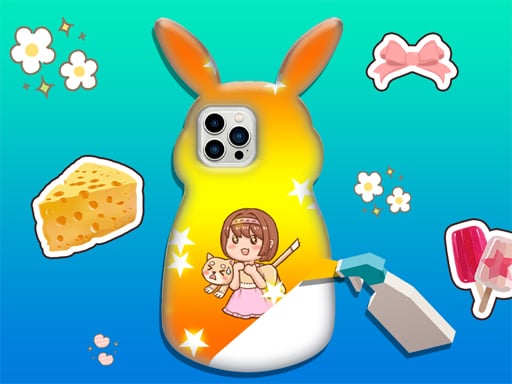
Phone Case Diy 5 is a casual 3D crafting and art game where players personalize custom smartphone covers. Using a virtual workshop setup, you choose from an array of patterns, decorative accents, and colorful stickers to style each piece. Once you finish your custom design, the built-in album feature lets you store and review your completed creations whenever you like.
Phone Case Diy 5 brings hands-on decorative crafting into a browser-friendly 3D environment. Moving beyond flat two-dimensional styling, the updated presentation showcases the contours of each phone model so you can inspect surface details from multiple angles as you apply new artistic touches.
The core gameplay loop centers on open-ended creativity. Players select an aesthetic direction, layer background patterns, and position unique stickers and accessories across the case. Because the title features an integrated album, every completed project can be archived, giving crafters a visual portfolio of their customized phone covers over time.
Your goal
The main goal in Phone Case Diy 5 is to design visually pleasing phone cases by combining patterns, stickers, and decorative elements to your liking. Players aim to explore different artistic combinations, refine their design sensibilities across the 3D surface, and build a diverse gallery of finished projects in the in-game album.
How to play Phone Case Diy 5
1. Start a new project to bring up a blank 3D phone case model ready for custom decoration.
2. Browse the available design options and select a base pattern or color scheme for the cover.
3. Choose decorative accents and stickers to place onto specific areas of the phone case surface.
4. Review your finished design from different angles in the 3D view to ensure every element looks balanced.
5. Save your finalized craft directly into the in-game album to view your collection at any time.
Controls and device support
Use mouse clicks on desktop or screen taps on mobile devices to select patterns, apply stickers, navigate menus, and save finished designs to your album.
- Controls: Mouse or touch
- Device support: Desktop + mobile
- Game frame: 720 x 1280
What makes the challenge interesting
Phone Case Diy 5 emphasizes creative expression, color coordination, and spatial balance rather than high-speed reactions or rigid puzzles. The main engagement comes from experimenting with how different textures, decorative attachments, and sticker themes work together on a three-dimensional curved surface.
Because there are no high-pressure countdowns described, players can take their time evaluating artistic tradeoffs. Deciding whether to create a minimalist layout with subtle patterning or an expressive collage filled with stickers lets you tailor every project to your preferred personal aesthetic.
Tips for Phone Case Diy 5
- Establish a distinct base color or pattern first before adding stickers. Placing background textures early makes it much easier to coordinate matching decorative accents.
- Avoid overcrowding the phone case with too many competing stickers. Leaving negative space around key decorative items creates a cleaner, more intentional presentation.
- Take full advantage of the 3D perspective to check the placement of decorations along the edges and corners before finalizing your project.
- Always save your completed pieces to the album. Regularly browsing your past work can give you fresh ideas for new color schemes on subsequent crafting sessions.
Stages and progression
Progression in Phone Case Diy 5 is centered around expanding your personal design portfolio. Rather than advancing through strict numerical stages or mandatory score thresholds, you build creative momentum by trying distinct aesthetic styles across consecutive projects and archiving each finished piece into the built-in album.
Playing on different devices
With a vertical 720 x 1280 resolution layout, the game is naturally optimized for portrait-oriented screens. Mobile players can tap directly on tools and stickers using responsive touch controls, while desktop players can navigate the interface with straightforward mouse clicks.
The skills behind the game
Categorized alongside drawing, styling, and art games, Phone Case Diy 5 focuses on accessible design principles and hands-on creativity. Instead of testing rapid manual dexterity or competitive timing, it provides a relaxed crafting environment where players can explore aesthetic concepts, experiment with visual themes, and enjoy casual decorative projects at their own pace.
Who will enjoy this game
Players searching for phone case diy 5 or a casual phone case diy 5 game are typically looking for an easy-to-play creative crafting experience. The game satisfies this intent by offering immediate access to customizable 3D phone models, an intuitive selection of decorations, and a persistent album system that supports casual artistic experimentation on both mobile and desktop browsers.
Frequently asked questions
What is the main objective in Phone Case Diy 5? Your goal is to decorate and customize 3D smartphone cases using a selection of patterns, decorative accessories, and stickers, then save your finished work into an album.
Can I view previously customized phone cases? Yes. The game includes a dedicated album feature that allows you to store your completed phone case designs and review your saved artwork whenever you want.
How do you control the tools in Phone Case Diy 5? You can interact with every menu, pattern option, and decoration item by clicking with your mouse on desktop or tapping directly on touchscreen displays.
Something not right?
Tell us if the game does not load, the information is wrong or the content needs review.
Report a problem ›