About Paint Island
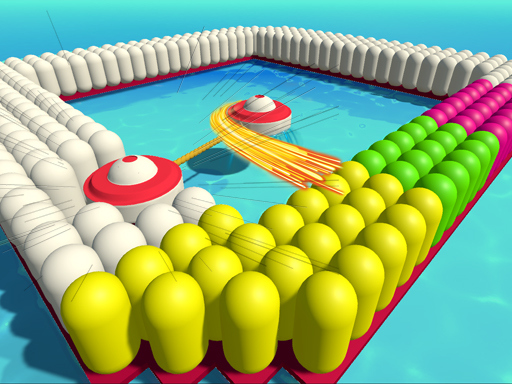
Paint Island is a casual 3D browser game where your main task is to coat every capsule on the screen in bright color. Using a simple pivot mechanic, each click anchors one side of your character while the free arm swings around to paint nearby surfaces. It offers an accessible, easy-to-learn puzzle loop centered on spatial coverage, deliberate movement, and steady rhythm.
In Paint Island, players navigate a vibrant 3D space filled with unpainted capsules waiting for a fresh coat of color. The central character features a dual-arm structure that functions like a compass or walking pivot. Rather than moving forward in a straight line, pressing the mouse button fixes one arm securely in place while the opposing arm begins sweeping in an arc around it. As this moving arm passes over nearby capsules with its paintbrush, it instantly colors them.
The continuous loop revolves around timing your clicks so your painter steps across the environment from one cluster of capsules to the next. Because each input changes which arm acts as the stationary anchor, moving cleanly across the board requires anticipating the circular path of the swinging arm. The result is a relaxing hypercasual experience where systematic planning and responsive clicking come together to transform a plain arena into a colorful completed board.
Your goal
The primary objective in Paint Island is straightforward: paint every single capsule in the arena. You accomplish this by guiding your character across the full layout, anchoring and rotating one arm at a time so your paintbrush passes over every uncolored target. Success means leaving no bare capsules behind as you sweep across the entire play area.
How to play Paint Island
1. Observe the starting position of your character and note which arm is currently anchored to the surface.
2. Identify nearby uncolored capsules scattered around your immediate swinging radius.
3. Click the left mouse button to lock one arm in place and allow the opposite arm to swing in an arc.
4. Watch the moving paintbrush pass directly over the capsules to apply fresh color to each one.
5. Click again when the swinging arm reaches your desired landing spot to swap the anchor and pivot toward the next group.
6. Continue pivoting across the entire stage until every capsule on the board is fully painted.
Controls and device support
Controls rely on Left Mouse Click: each time you press the left mouse button, one arm of the character anchors in place while the other arm rotates and paints the capsules around it.
- Controls: Mouse or touch
- Device support: Browser
- Game frame: 800 x 450
Rules to keep in mind
- The stage goal requires coloring all capsules by making contact with your character's paintbrush.
- Pressing the left mouse button fixes the active pivot arm and causes the alternate arm to swing around it to cover surrounding capsules.
What makes the challenge interesting
The central appeal of Paint Island lies in mastering its distinctive rotational locomotion. Because you cannot steer freely in standard cardinal directions, every movement is an arc determined by your current anchor point. Players must balance steady forward progression with complete surface coverage, learning to read the circular reach of each swing before committing to the next click.
This creates an engaging visual rhythm where patience and spatial awareness take priority over raw speed. Clicking too rapidly might cause your swinging arm to stop short before it sweeps across an adjacent capsule, requiring extra steps to double back. Developing a steady tempo allows you to clear wide clusters efficiently while enjoying the tactile satisfaction of covering the 3D board in color.
Tips for Paint Island
- Let the swinging arm complete its full arc across a cluster before clicking again. Rushing your next click can leave stray capsules untouched, forcing you to turn around later.
- Plan your anchor spots near the center of dense capsule groups. Placing a pivot in the middle maximizes the number of targets your swinging arm can brush in a single rotation.
- Work systematically across the arena from one side to the other. Wandering erratically across the board makes it easy to overlook isolated capsules stranded near outer edges.
- Use full 180-degree swings when moving across open gaps. Alternating wide swings helps you maintain steady forward movement while keeping your trajectory predictable.
The skills behind the game
While categorized broadly as a clicker and casual title, Paint Island stands out from standard idle experiences by centering on direct mechanical interaction. Rather than clicking purely to increment a background counter, every mouse input in this 3D game translates into immediate spatial movement. The satisfaction comes from watching clean geometric patterns fill with bright color as your character sweeps systematically across the board.
Who will enjoy this game
Players looking for an engaging online coloring game or a low-stress clicker puzzle will find Paint Island easy to pick up. Its one-button pivoting mechanic provides an accessible entry point for casual web gaming, making it ideal for quick relaxation breaks or practicing hand-eye coordination and spatial route planning.
Games with a similar feel
Cookie Clicker: Cookie Clicker focuses on accumulating automated resources and purchasing exponential production upgrades through repeated tapping. In contrast, Paint Island uses clicking as a physical navigation tool to pivot a character and paint targets in real time, making it a tactile spatial puzzle rather than an incremental management game.
Happy Color: Happy Color provides a static coloring book experience where players tap numbered regions to fill pre-drawn illustrations. Paint Island approaches the coloring theme through active arcade movement, requiring players to physically guide a rotating brush across 3D capsules rather than filling stationary outlines.
Frequently asked questions
How do you move your character in Paint Island? Movement happens through pivoting. Each left mouse click fixes one arm to the floor, causing the second arm to rotate around that fixed point until you click again to swap anchors.
What is the main goal in Paint Island? The objective is to paint all of the capsules on the board by sweeping your character's paintbrush over them until every target is completely colored.
Is Paint Island suitable for quick casual gaming sessions? Yes. Built as a hypercasual web browser title with one-button mouse controls, it is designed to be accessible and straightforward for players of all age groups.
Something not right?
Tell us if the game does not load, the information is wrong or the content needs review.
Report a problem ›