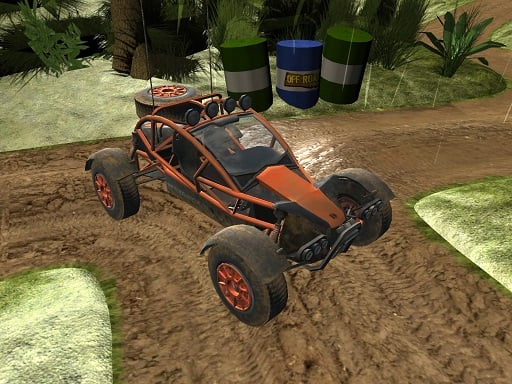
About Offroad Vehicle Explorer
Offroad Vehicle Explorer is a 3D driving simulator that puts you behind the wheel of powerful 4x4 machines across rugged terrain. Players can test drive five distinct modified buggies and trucks on muddy offroad courses. Your primary mission is to steer through challenging trails, dodge obstacles like trees, and guide your vehicle safely to the finish line.
Offroad Vehicle Explorer lets players experience the challenge of offroad navigation behind the wheel of massive four-wheel-drive vehicles. Built with Unity3D and WebGL technology, this single-player 3D driving title delivers an engaging test of handling skills on unpaved ground. You get the opportunity to test drive five different 4x4 vehicles, ranging from modified buggies to heavy trucks.
As you navigate the muddy tracks, you must carefully control your speed and direction across bumpy ground. Steering powerful engines and massive wheels requires precision, especially when winding paths present hazards such as trees. Reaching the course finish line without crashing is the core test of your driving ability.
Your goal
The primary objective in Offroad Vehicle Explorer is to pilot your chosen 4x4 vehicle across demanding muddy offroad terrain and successfully reach the finish line. Throughout each run, you must maintain vehicle balance over uneven ground, steer clear of hazardous trees, and keep your powerful machine under control until you safely complete the trail.
How to play Offroad Vehicle Explorer
1. Press the Tab key to open the in-game menu and choose among the five available 4x4 vehicles.
2. Use the W, A, S, and D keys to accelerate, steer left or right, and reverse your vehicle.
3. Press the Spacebar whenever you need to brake quickly to avoid crashing into trees or losing control on mud.
4. Press the G key to reset your car if your vehicle flips over, gets stuck, or becomes immobilized.
5. Steer along the muddy trails and navigate past terrain obstacles until you cross the finish line.
Controls and device support
WASD: Drive
Space: Brake
Tab: Menu
G: Reset car
- Controls: See in-game controls
- Device support: Browser
- Game frame: 800 x 600
Rules to keep in mind
- Obstacle Avoidance: Players must avoid collisions with trees and natural hazards while traversing the muddy course.
- Finish Line Requirement: To complete a test run, your 4x4 vehicle must travel across the track and reach the designated finish line.
- Vehicle Resetting: If a vehicle rolls over, gets trapped in mud, or goes off-track, the G key can be pressed to reset its position.
What makes the challenge interesting
Gameplay in Offroad Vehicle Explorer centers on realistic offroad handling and hazard management across rugged ground. Driving with massive wheels and high-torque engines across slippery mud introduces responsive physics where reckless speed can easily lead to spinouts or collisions. Players must balance throttle control with timely braking, especially when approaching sharp turns flanked by dense trees. Testing all five 4x4 vehicles allows players to evaluate distinct handling profiles and find the optimal buggy or truck for conquering the offroad terrain.
Tips for Offroad Vehicle Explorer
- Apply brakes early with the Spacebar before taking tight turns on mud, as carrying excessive speed makes steering around trees difficult.
- Try out each of the five available 4x4 vehicles from the menu to discover which buggy or truck suits your driving style best.
- Use the G key immediately if your vehicle overturns or gets jammed against an obstacle to reset your run without restarting the entire browser.
The skills behind the game
Offroad Vehicle Explorer belongs to the racing and driving simulator category, where the emphasis shifts from paved speedways to challenging all-terrain navigation. In traditional racing games, high top speeds on smooth asphalt dominate, but offroad simulation titles challenge players to manage traction, momentum, and hazardous terrain features like mud and trees. This focus on vehicle control and rugged obstacles offers a skill-testing driving experience.
Who will enjoy this game
For players seeking an engaging offroad vehicle explorer game, this 3D simulator delivers authentic 4x4 action directly in the web browser. As a single-player racing game online built with WebGL, it provides immediate access to muddy trail driving without requiring downloads. The variety of five drivable buggies and trucks gives fans of offroad vehicle explorer challenges multiple ways to test their vehicle control skills.
Frequently asked questions
How many vehicles can you drive in Offroad Vehicle Explorer? Offroad Vehicle Explorer features five distinct 4x4 vehicles, including modified buggies and trucks, allowing players to test drive each machine on muddy offroad terrain.
What should you do if your car gets stuck or flips over? If your car becomes stuck in mud or flips over during your run, press the G key on your keyboard to instantly reset the vehicle back on the track.
What are the main controls for driving and stopping? Use the WASD keys to steer and drive your vehicle forward or backward, and press the Spacebar to apply the brakes whenever you need to slow down or stop.
Something not right?
Tell us if the game does not load, the information is wrong or the content needs review.
Report a problem ›