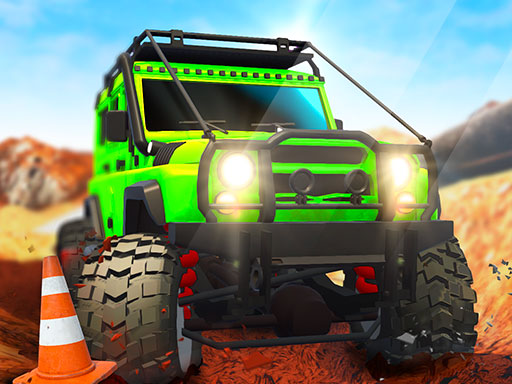
About Offroad Life 3D
Offroad Life 3D puts players behind the wheel of heavy vehicles designed for harsh mountain wilderness and uneven trails. Featuring both solo exploration and a shared-screen two-player format, the game challenges drivers to navigate diverse global regions across changing seasons, from crisp autumn slopes to dry summer trails.
Offroad Life 3D focuses on rugged cross-country driving across mountainous environments. Rather than racing along flat urban circuits, players guide large-wheeled machines across unpredictable terrain set in distinct locations around the world. As you advance through journeys spanning different seasonal settings from autumn to summer, each landscape presents varied topographical contours that test your steering balance and momentum management.
The game provides multiple offroad vehicle selections and wheel setups to tackle these environments. In addition to a dedicated single-player drive, the experience features a local two-player mode on the same keyboard, allowing friends to explore new areas together or test their handling skills side by side.
Your goal
The primary goal is to successfully navigate your chosen 4x4 vehicle through demanding outdoor trails without losing control on steep inclines and uneven paths. Players aim to discover new global areas, adapt to seasonal environmental changes, and outdrive their partner when competing in the head-to-head two-player mode.
How to play Offroad Life 3D
1. Select whether you want to drive solo in single-player mode or share the screen with a friend in two-player mode.
2. Browse the garage to pick from the available offroad vehicle models and select your preferred wheel configuration.
3. Enter the mountain stage and check the layout of the trail, noting steep climbs, drops, and rough soil.
4. Accelerate and steer using WASD or the Arrow Keys in single-player, or take your designated keyboard half in two-player mode.
5. Modulate your speed over rocky hills to maintain steady traction and keep your vehicle stable along mountain paths.
6. Complete the course to discover new global locations and encounter fresh seasonal conditions ranging from autumn to summer.
Controls and device support
In 1-Player mode, control your vehicle using either the WASD keys or the Arrow Keys. In 2-Player mode, Player 1 drives using WASD while Player 2 steers using the Arrow Keys.
- Controls: Keyboard
- Device support: Browser
- Game frame: 800 x 600
What makes the challenge interesting
The core gameplay of Offroad Life 3D revolves around balancing raw horsepower with careful weight distribution. Because mountain driving involves steep gradients and unpredictable ground, hammering full throttle without caution can lead to wheel spin or flipping over. Successful runs require reading the trail ahead, adjusting momentum before cresting rocky mounds, and maintaining a steady line across rough tracks.
Customizing your truck with different wheel options directly supports handling across changing seasonal terrain. Navigating autumn mud or loose summer dirt demands a calculated driving rhythm, especially when racing alongside a local rival whose presence introduces split-screen tension and shared-track competition.
Tips for Offroad Life 3D
- Ease off the acceleration when climbing sharp crests. Rushing over peaks at maximum speed can launch your truck into an uncontrolled rollover upon landing.
- Experiment with different wheel options in the garage to find setups that provide optimal stability over bumpy mountain terrain.
- When playing in two-player mode, coordinate keyboard positioning beforehand so neither driver accidentally bumps the other player's directional inputs during tight turns.
- Watch for sudden changes in road contour across seasonal regions, slowing down slightly on blind corners to preserve vehicle balance.
Stages and progression
The game structures its journey through a progression of scenic world regions that shift across seasonal themes, moving from crisp autumn backdrops to warm summer environments. As drivers clear courses and discover new zones, they encounter varying landscape geometry that demands refined control.
Players also have access to different offroad vehicles and wheel choices throughout their play sessions. While exact unlock triggers are not documented, trying new vehicle builds across sequential regions allows drivers to test which setups best match specific mountain profiles.
Playing on different devices
Offroad Life 3D is designed for desktop keyboard play with dedicated two-player splits. Single-player mode supports either WASD or the standard Arrow Keys for directional control.
When engaging the 2-Player mode, ensure your keyboard supports multiple simultaneous keypresses without ghosting, as both Player 1 (WASD) and Player 2 (Arrow Keys) will frequently steer, accelerate, and reverse at the same moment.
The skills behind the game
As an offroad racing and vehicle simulation title, Offroad Life 3D departs from flat tarmac speedways to highlight technical driving across rugged topography. The racing genre often emphasizes clean line management and maximum velocity, but offroad variants blend those mechanics with physics-driven momentum control. Drivers must anticipate how suspension response, vehicle mass, and wheel grip interact with bumpy slopes.
The addition of simultaneous local two-player support taps into the classic tradition of shared-keyboard multiplayer driving games. Competing on shared terrain requires not only outmaneuvering the track hazards but also maintaining composure under head-to-head racing pressure.
Who will enjoy this game
Players looking for an offroad life 3d game or a dynamic racing game online will find an accessible yet physically demanding driving experience in Offroad Life 3D. The game serves casual players seeking short pickup-and-play sessions as well as driving enthusiasts who enjoy mastering vehicle balance over uneven hills.
Whether practicing mountain lines solo or enjoying competitive local runs with a friend, the game offers a straightforward test of throttle discipline and situational awareness across seasonal wilderness tracks.
Frequently asked questions
Can two people play Offroad Life 3D on the same computer? Yes. Offroad Life 3D features a built-in 2-player mode where Player 1 controls their vehicle using WASD and Player 2 navigates using the Arrow Keys on the same keyboard.
What types of environments are featured in the game? The game takes players through mountain environments across various global regions, featuring changing seasonal conditions that transition from autumn to summer.
Can I customize or change my vehicle? Yes. The game provides a selection of different offroad vehicle models and various wheel configurations to adapt your ride to different rough trails.
Which controls should I use in single-player mode? In single-player mode, you have the flexibility to drive your vehicle using either the WASD keys or the Arrow Keys, whichever layout you prefer.
Something not right?
Tell us if the game does not load, the information is wrong or the content needs review.
Report a problem ›