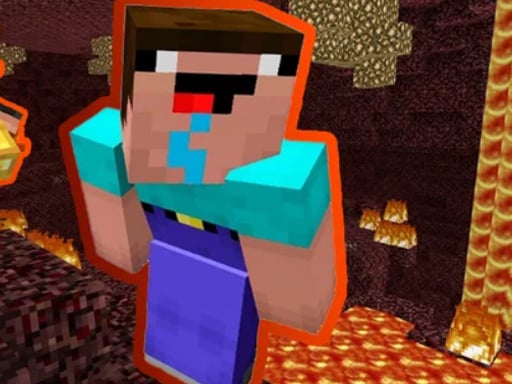
About Noob Parkour : Nether
Noob Parkour : Nether is a 3D browser platformer that challenges players to guide a block-style character across treacherous Nether terrain. Taking inspiration from voxel exploration worlds, the game tasks you with leaping between hazardous footholds, maintaining forward momentum, and surmounting consecutive environmental hurdles. To successfully escape the fiery dimension and reach safety back in the regular world, you must carefully balance movement speed, double-jump timing, and spatial awareness on every leap.
Set within a fiery Nether-inspired environment, Noob Parkour : Nether places your character in an active obstacle course filled with perilous leaps and narrow landing spots. The visual theme emphasizes fiery hazards and blocky 3D structures, establishing an atmospheric journey where a single misjudged step can interrupt your forward run.
The primary gameplay loop revolves around running, jumping, and sprinting through sequential movement tests. You navigate platforms using keyboard controls, triggering rapid double jumps whenever a standard leap cannot clear wide crevices. As you move from one obstacle to the next, maintaining control during high-speed approaches becomes essential to finishing the run and returning to the normal world.
Your goal
Your central goal is to navigate every obstacle along the course without falling into hazards, ultimately escaping the Nether dimension to complete the game. Rather than focusing on combat or open-ended building, progress is measured by successfully crossing each platform gap and reaching the finish. Improving your personal runs means refining the timing of your sprint leaps, understanding takeoff distances, and executing reliable double jumps on difficult terrain.
How to play Noob Parkour : Nether
1. Load into the obstacle course and survey the immediate platform layout to identify the safest landing zones ahead.
2. Press the WASD keys to guide your character forward, backward, and laterally along the path.
3. Hold Left Shift to sprint, building extra forward velocity when preparing for wider environmental gaps.
4. Tap the Space key to perform standard jumps across short hazards, or tap Space twice in rapid succession to activate a double jump.
5. Press Escape if you need to pause the active session to assess upcoming jumps or take a quick break.
6. Continue negotiating sequential platform hazards until you overcome all obstacles and escape the Nether.
Controls and device support
According to the official instructions, control your character on desktop using WASD for directional movement, Left Shift to sprint, Space to jump (press Space twice in a row for a double jump), and Escape to pause the game.
- Controls: See in-game controls
- Device support: Browser
- Game frame: 800 x 450
Rules to keep in mind
- All obstacles along the path must be successfully negotiated to escape the Nether and complete the game.
- Pressing the Space button twice consecutively triggers a mid-air double jump.
- Holding Left Shift engages a sprint, increasing forward traversal speed for demanding jumps.
- The Escape key halts ongoing action by pausing the game.
What makes the challenge interesting
The defining skill in Noob Parkour : Nether is momentum management under 3D spatial constraints. Because sprinting grants higher horizontal speed, approaching a ledge while holding Left Shift increases the distance you can cover. However, higher speed also reduces your margin of error on small landing surfaces, forcing you to choose between standard walking approaches and high-velocity running leaps.
The double jump mechanic introduces an important aerial decision point. Tapping Space immediately after takeoff provides maximum upward lift, which helps when scaling elevated ledges. Delaying the second press until the peak or slight descent of the first arc extends your horizontal travel across long drops. Mastering these distinct jump profiles allows players to negotiate varied obstacle placements with confidence.
Tips for Noob Parkour : Nether
- Reserve your sprint key for broad chasms rather than tight stepping stones. Maintaining full sprint on tiny blocks often leads to overshoot errors, so revert to normal WASD walking speeds for narrow landings.
- Space out your double taps when crossing horizontal chasms. Tapping Space twice instantly gives vertical height but limits reach; waiting until mid-flight extends forward glide across deep drops.
- Align your camera with the target landing pad before launching into a jump. Misaligned running angles force mid-air drift corrections that frequently cause players to slip off narrow edges.
- Take advantage of the Escape key pause feature when encountering unfamiliar sections. Freezing the run gives you time to study platform heights and plan your jump timing without unnecessary pressure.
Stages and progression
Progress in Noob Parkour : Nether is defined by advancing through successive obstacle sections until you ultimately complete the Nether escape. While specific checkpoint configurations and numbered stages are not itemized, the course naturally tests endurance and consistency over increasingly demanding platform layouts.
A practical approach to clearing the course involves breaking your run into mental phases. During initial attempts, prioritize memorizing jump distances and identifying which gaps strictly require sprinting or double jumping. As your familiarity with the block layouts grows, focus on stringing jumps together smoothly without pausing between landings to achieve a steady, confident rhythm.
Playing on different devices
Noob Parkour : Nether is designed around desktop keyboard navigation, utilizing WASD for directional travel, Space for single and double jumps, Left Shift for sprinting, and Escape for pausing. The 800 x 450 native aspect ratio fits standard web browsers cleanly, offering a crisp view of platform edges and fiery environmental hazards.
Because the control scheme relies on multi-key inputs—such as simultaneously pressing W, Left Shift, and double-tapping Space—playing on a reliable keyboard with clear key registration is recommended to avoid missed jump inputs during high-speed parkour sequences.
The skills behind the game
Categorized under Adventure with strong 3D arcade elements, Noob Parkour : Nether emphasizes dynamic platforming over narrative questing. Adventure platformers in the web space frequently challenge players to traverse hostile landscapes where spatial awareness and reactive key presses dictate success.
By stripping away resource gathering and complex inventory management, this title focuses purely on athletic movement drills. Players who enjoy precision jumping, obstacle courses, and simulator-styled block environments will appreciate the straightforward athletic challenge of charting a clean path through a dangerous setting.
Who will enjoy this game
Players searching for an adventure game online or looking specifically for noob parkour : nether game experiences often want accessible browser challenges that test timing and agility without long installation times. This title delivers quick sessions centered on rapid obstacle navigation and linear course mastery.
Whether you are looking to practice mid-air jump timing or simply seeking a fun voxel-styled obstacle sprint during a quick break, understanding the mechanics of noob parkour : nether provides a rewarding physical challenge. Honing the coordination between sprinting and double jumping offers satisfying personal progression with every completed leap.
Games with a similar feel
Minecraft: Minecraft is a massive sandbox game celebrated for open-ended exploration, crafting, and block building. In contrast, Noob Parkour : Nether borrows the blocky aesthetic and Nether setting but channels them entirely into a dedicated linear platforming obstacle course. While Minecraft players construct their own worlds and manage survival systems, players here focus purely on athletic sprint timing and double-jump execution to escape the Nether.
Frequently asked questions
How do you perform a double jump in Noob Parkour : Nether? To execute a double jump, press the Space button twice in rapid succession. The second press activates in mid-air, allowing you to gain extra height or stretch your distance across wide gaps.
What is the ultimate objective of the game? The primary objective is to guide your character through every obstacle along the 3D course, escaping the hazardous Nether dimension to safely return to the normal world.
Can you sprint to jump farther across gaps? Yes, pressing Left Shift engages a sprint. Running at sprint speed builds additional forward momentum, which helps you clear large chasms when combined with timed jumps.
Is it possible to pause during a parkour run? Yes, you can pause your session at any moment by pressing the Escape key, allowing you to rest or plan your path across the upcoming terrain.
Something not right?
Tell us if the game does not load, the information is wrong or the content needs review.
Report a problem ›