Official listing
Game description
Sky Runner is a fun game, simple, easy to play and a great time killer. You are in an infinity playground.
Adventure game
Ninja Runner Fighter combines continuous traversal with active combat in an open arena environment. Players navigate an endless playground using precise movement, jumping over obstacles, managing bursts of speed, and executing strikes against potential threats. The game emphasizes quick reflexes and real-time coordination to maintain momentum across challenging terrain.
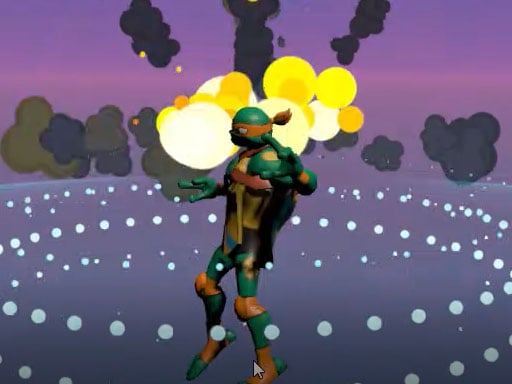
Choose Play now to load the game.
Official listing
Sky Runner is a fun game, simple, easy to play and a great time killer. You are in an infinity playground.
From the game listing
Move WASD Jump Space Speed Shift Attack Enter Or Q
Open this card to load the gameplay video.
Ninja Runner Fighter combines continuous traversal with active combat in an open arena environment. Players navigate an endless playground using precise movement, jumping over obstacles, managing bursts of speed, and executing strikes against potential threats. The game emphasizes quick reflexes and real-time coordination to maintain momentum across challenging terrain.
Set within an expansive, continuous obstacle course, Ninja Runner Fighter places you in an infinity playground designed for continuous action and testing navigation instincts. Rather than confining the experience to a static combat arena or a rigid single-track lane, the setting allows players to blend agile platforming moves with martial offense.
The core gameplay loop centers on managing forward momentum while remaining alert to threats. Using directional controls alongside dedicated speed boosts, jumps, and attack inputs, you must negotiate terrain irregularities and eliminate obstructions in your path. This blend of running mechanics and strike actions provides an accessible, fast-paced arcade experience suitable for quick practice sessions or longer endurance runs.
The primary goal is to sustain continuous movement throughout the infinity playground while successfully executing attacks and clearing terrain gaps. Players aim to refine their control timing, smoothly transitioning between high-speed sprints, elevation jumps, and offensive strikes without losing pace or stumbling against hazards.
1. Start the session and familiarize yourself with the open layout of the running area.
2. Use the WASD keys to steer your character smoothly across the ground in any direction.
3. Activate the Shift key when you need extra speed to clear open stretches quickly.
4. Press the Spacebar to jump over environmental gaps, barriers, or low hazards.
5. Press Enter or Q to perform attacks whenever targets or barriers appear in your path.
6. Maintain your rhythm by alternating between sprinting, jumping, and striking as terrain demands.
Move with WASD, jump using Space, increase speed with Shift, and attack using either Enter or Q.
Ninja Runner Fighter demands quick decision-making under constant motion. The central gameplay dynamic revolves around the trade-off between top speed and offensive readiness. Activating speed boosts allows you to traverse open grounds rapidly, but moving faster narrows your reaction window when an obstacle or adversary requires an immediate jump or attack.
Success comes from mastering control transitions. Switching fluidly between the jump key and attack triggers while maintaining steering inputs ensures you never lose control of the runner. Developing this mechanical rhythm turns chaotic encounters into a smooth, satisfying flow of martial traversal.
Because the game is structured around an infinity playground, progression relies primarily on personal endurance and skill mastery rather than fixed stage milestones. As you spend more time in the arena, aim to increase the duration of continuous runs without breaking stride or missing an attack.
A structured practice plan involves setting self-directed milestones: start by mastering basic WASD steering and jumping, progress to maintaining continuous Shift sprinting, and finally integrate regular combat strikes seamlessly into high-speed navigation.
Ninja Runner Fighter operates in a 960 by 600 canvas resolution, optimized for standard desktop web browsers. The game utilizes a full keyboard layout with WASD for directional travel, Space for jumps, Shift for sprinting, and Enter or Q for offensive attacks.
For the most ergonomic setup on desktop, resting your left hand across WASD, Space, and Q allows you to handle movement, vertical hops, and combat strikes simultaneously without needing to reach across to Enter.
Categorized under Adventure and Action, Ninja Runner Fighter fits into the fast-paced runner subgenre that blends traditional platforming mobility with active combat inputs. Rather than testing passive reflexes alone, adventure-action titles in this space challenge players to manipulate spatial awareness, verticality, and strike timing simultaneously.
This combination appeals to fans of running games who want more engagement than simple obstacle dodging. Integrating attack mechanics gives players direct agency over threats, creating an active play style where overcoming barriers involves martial timing as well as jump precision.
Players looking for a lightweight ninja runner fighter game online can jump straight into the action without extensive setup. Casual action enthusiasts often seek titles that provide immediate responsiveness, where core mechanics can be understood in seconds yet still offer room for mechanical coordination.
As an adventure game online, it serves as an effective casual warm-up tool to practice hand-eye coordination, keyboard dexterity, and fast reaction times across open, obstacle-laden courses.
Street Fighter: Street Fighter centers on dedicated martial arts duels with intricate spacing and tactical counter-attacks. Ninja Runner Fighter shares the core martial arts strike concept, but shifts the focus entirely onto continuous forward traversal across an infinity obstacle playground rather than competitive one-on-one ring combat.
Mortal Kombat: Mortal Kombat emphasizes intense one-on-one combat and defensive timing against rival fighters. While Ninja Runner Fighter includes martial attacks, it incorporates them into an ongoing runner format, appealing to players who prefer rapid obstacle navigation over deep fighting game command inputs.
What keys are used to play Ninja Runner Fighter? Movement is controlled with WASD keys, jumping is mapped to Space, acceleration uses Shift, and attacks are triggered with either Enter or Q.
Is Ninja Runner Fighter divided into separate levels? The official game description presents the environment as an infinity playground, focusing on continuous running and combat rather than distinct level stages.
Which attack key is more effective during fast gameplay? Both Q and Enter trigger attacks. Using Q is typically more convenient for desktop players because it sits directly adjacent to the WASD movement cluster.
Tell us if the game does not load, the information is wrong or the content needs review.
Report a problemExplore popular games by category, shared tags and site-wide activity.





















