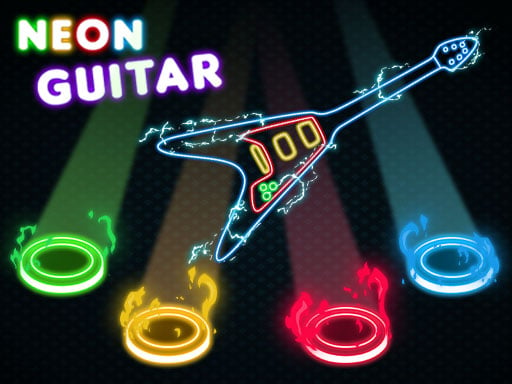
About Neon Guitar
Neon Guitar is a colorful hypercasual music game about timing and reflexes. Notes fall on the screen, and your job is to hit as many as possible to build points and beat your highscores while enjoying the bright neon presentation.
Neon Guitar is described by its listing as an inspired musical game in the spirit of Guitar Hero, made for broad, accessible enjoyment rather than complex simulation. The play idea is direct: notes fall on the screen, you hit them with the supported inputs, and each successful hit helps accumulate points. The main challenge is keeping your reflexes sharp enough to maintain accuracy as the notes continue. Its neon-style designs are presented as colorful and beautiful, giving the simple score chase a lively arcade feel. As a hypercasual HTML5 music title tagged for 1 Player, 2D and Action, it fits quick sessions where the fun comes from improving timing, beating a previous highscore and staying focused on the falling notes.
Your goal
The objective is to hit as many falling notes as you can so your score keeps climbing. Each run is a reflex test: watch the screen, respond with the listed controls, accumulate points and try to beat your highscores rather than simply finishing a stage.
How to play Neon Guitar
1. Start the game and use an input listed in the instructions: desktop keyboard A-S-K-L, desktop gamepad LT-LB-RB-RT, mouse where shown, or mobile touch buttons on screen.
2. Watch the notes as they fall on the screen and keep your attention on the next incoming note rather than only the one you just hit.
3. Press the listed keys, gamepad buttons or on-screen touch buttons to hit notes as they fall.
4. Continue hitting notes to accumulate points; missed timing reduces your chance to build a stronger score, so steady rhythm matters.
5. When the run ends, compare the result with your highscore and replay to improve reflexes and set a better mark.
Controls and device support
The official instructions list desktop keyboard, mouse, desktop gamepad and mobile touch buttons, but they do not explain a separate mouse function or a per-button note map.
A-S-K-L: Hit falling notes
LT-LB-RB-RT: Hit falling notes
Mouse: Listed in the instructions; no specific gameplay action is stated
Touch Buttons on Screen: Hit falling notes
- Controls: Keyboard
- Device support: Desktop + mobile
- Game frame: 1280 x 720
Rules to keep in mind
- Notes fall on the screen, and the scoring loop is built around hitting as many of them as possible.
- Points accumulate from successful hits, and the stated target is to beat your highscores.
- The listing frames the game as a single-player reflex and music experience rather than a multiplayer mode.
What makes the challenge interesting
The focus is fast recognition and clean timing. Because the source only establishes falling notes, point accumulation and highscore chasing, the safest way to play is to treat every run like a reflex drill: keep your eyes ahead of the next note, use the input that feels most reliable, and avoid overcommitting after a mistake. The neon presentation is part of the appeal, but the core challenge remains simple and repeatable—respond accurately, keep the score moving upward and try again when a run ends.
Tips for Neon Guitar
- Pick one listed input and stay with it for a few runs; consistency usually helps reflex timing more than switching devices mid-session.
- Look slightly ahead of the falling notes so your hands can prepare instead of reacting at the last instant.
- If a run breaks down, restart calmly; the stated goal is beating highscores, so short focused attempts are useful practice.
Playing on different devices
The listing gives a 1280 x 720 presentation and separates desktop inputs from mobile touch buttons on screen. On desktop, the instructions name keyboard A-S-K-L, mouse and gamepad LT-LB-RB-RT; on mobile, use the on-screen buttons. No extra device requirements are stated.
The skills behind the game
As a Hypercasual title tagged 1 Player, 2D, Action, HTML5 and Music, Neon Guitar sits in the quick-session rhythm-reflex space. The appeal is immediate: a readable falling-note pattern, a score target and bright neon feedback. It is best presented as accessible arcade practice rather than a deep instrument simulator.
Who will enjoy this game
Natural phrases such as “neon guitar” and “neon guitar game” fit the exact title and the music-reflex idea without implying measured demand. Useful context should connect the name to hitting falling notes, scoring points and chasing highscores in a colorful neon style.
Frequently asked questions
What do you do in Neon Guitar? You watch notes fall on the screen and hit as many as possible with the listed controls. Successful hits accumulate points, and the goal is to beat your highscores through sharper reflexes.
Which controls can I use? The instructions list desktop keyboard A-S-K-L, desktop gamepad LT-LB-RB-RT, mouse, and mobile touch buttons on screen. The exact mouse function is not specified, so use the clearly mapped note inputs first.
Is Neon Guitar about levels or highscores? The source supports a highscore chase rather than stated levels or unlocks. Your progress is measured by accumulating points and trying to beat earlier scores in repeat runs.
Something not right?
Tell us if the game does not load, the information is wrong or the content needs review.
Report a problem ›