About Mobile Phone Case Diy
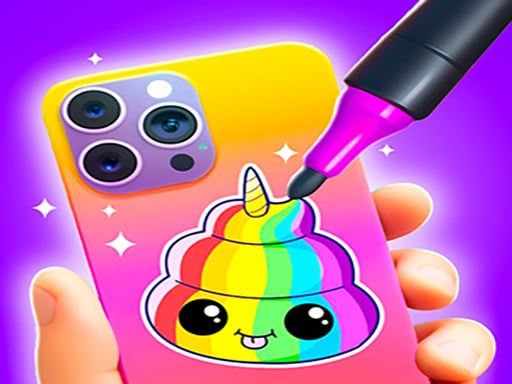
Mobile Phone Case Diy is a creative styling game where players design personalized smartphone covers using an array of crafting techniques. You can pick your favorite colors, sketch custom drawings, blend paints, and apply smooth spray coatings to create eye-catching phone cases. Built around straightforward interactions, the experience invites anyone who enjoys hands-on crafting and visual customization to experiment with fashion-forward case designs at their own pace.
In Mobile Phone Case Diy, the central gameplay loop revolves around crafting and customizing mobile covers from start to finish. Starting with a blank or evolving canvas, players engage directly in hands-on decoration. You explore creative choices by selecting tailored color schemes, drawing original shapes or patterns, mixing distinct shades, and applying spray paint to achieve distinctive finishes.
The game provides an approachable, visual crafting workshop environment tailored for casual play. Rather than imposing complex management systems, the design concentrates entirely on the tactile satisfaction of transforming an ordinary device cover into a personalized accessory. Each creative action directly modifies the appearance of the case, allowing you to watch the design evolve step by step as you apply fresh layers and custom details.
Your goal
Your main objective is to craft stylish, personalized phone cases by expressing your creative vision through color selection, drawing, paint mixing, and spray application. The goal is to experiment with different visual aesthetics, refine your decorative techniques, and enjoy seeing a plain mobile case transform into a finished fashion piece that matches your personal taste.
How to play Mobile Phone Case Diy
1. Start a new styling project by examining the plain phone case ready for customization.
2. Select your favorite colors from the available palette to establish a base visual theme.
3. Draw creative linework, motifs, or accent details directly onto the case surface.
4. Mix and blend complementary shades to produce unique color gradients and tones.
5. Use the spray paint tool to evenly coat areas or add soft atmospheric textures across the shell.
6. Review your finished DIY creation to see how the overall design comes together.
Controls and device support
Use a mouse click on desktop or tap directly on the screen on mobile devices to select tools, apply colors, and craft your designs.
- Controls: Mouse or touch
- Device support: Desktop + mobile
- Game frame: 504 x 800
What makes the challenge interesting
The primary appeal of Mobile Phone Case Diy lies in creative expression and sensory art simulation. Instead of testing high-speed reflexes or tactical decision-making, the experience rewards visual planning, color harmony, and steady tool application. Players navigate the creative balance between subtle minimalist palettes and bold, multi-layered spray designs. Because every action alters the visual layout immediately, the game offers a calm, satisfying rhythm where you can test different artistic combinations freely.
Tips for Mobile Phone Case Diy
- Plan your base colors before adding fine line work. Applying background tones first ensures that your drawn details stand out clearly rather than getting covered up.
- Experiment with gradual spray paint passes across the case surface. Controlled sweeping strokes help you avoid messy over-saturation and create smoother color blends.
- Try mixing contrasting light and dark shades. Combining varied tones gives your custom design greater visual depth instead of looking flat.
- Keep your drawn motifs simple and readable. Overcrowding the case with too many competing shapes can detract from the overall fashion aesthetic.
Playing on different devices
Mobile Phone Case Diy is formatted with a portrait display profile of 504 by 800 pixels. This vertical orientation mirrors the realistic proportions of modern smartphones, making mobile touchscreen play feel natural and direct. On desktop browsers, the interface functions identically using mouse clicks, though handheld touchscreens provide a more organic feel when spraying and drawing.
The skills behind the game
Classified under hypercasual simulation, Mobile Phone Case Diy belongs to the popular category of DIY crafting and tactile styling games. These titles emphasize immediate creative satisfaction and straightforward input methods over intricate rules or heavy progression requirements. By simulating everyday artistic hobbies—such as stencil spraying, color blending, and accessory customization—the genre offers an accessible digital outlet for quick artistic expression.
Who will enjoy this game
Players looking for a relaxing mobile phone case diy game or casual dress up game often seek hands-on customization without complicated setup. Whether you want to test color combinations, try virtual spray painting, or design a stylish phone accessory during a brief break, this title delivers a focused creative sandbox that requires no special drawing background to enjoy.
Games with a similar feel
Love Nikki-Dress UP Queen: Like Love Nikki-Dress UP Queen, Mobile Phone Case Diy appeals to players who enjoy fashion coordination and visual personalization. However, while Love Nikki centers on selecting full garments and styling outfits, Mobile Phone Case Diy focuses specifically on the craft-oriented process of painting, drawing, and spray-finishing an individual phone accessory.
Frequently asked questions
What tools can you use to customize phone cases? You can select custom color palettes, draw freehand lines and shapes, mix custom color shades, and spray paint the case to create smooth finishes.
How do you control the styling tools in the game? You control all painting, drawing, and color tools using simple mouse clicks on desktop or direct taps on touchscreen mobile devices.
Is this game suitable for players who enjoy fashion and styling? Yes. Players who enjoy customizing accessories and coordinating visual fashion styles can freely express their aesthetic ideas by designing unique smartphone covers.
Something not right?
Tell us if the game does not load, the information is wrong or the content needs review.
Report a problem ›