Official listing
Game description
Mini Golf 2D it is a very fun and accurate game. Your goal is to get the ball to the hole !. Will you be able to complete the 20 levels in just one move?
Sports game
Mini Golf 2D is a casual putting game built around one clear aim: get the ball into the hole. The listing describes it as fun and accurate, and asks whether you can complete its 20 levels in just one move. Mouse or touch is all you need to interact.
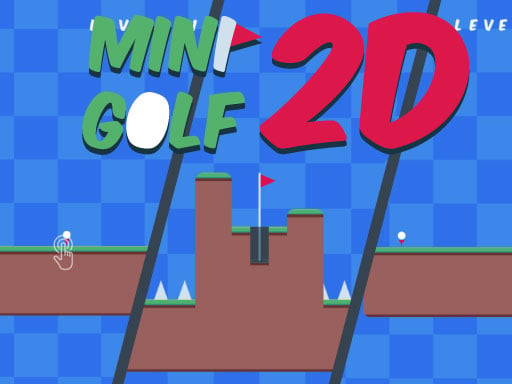
Choose Play now to load the game.
Official listing
Mini Golf 2D it is a very fun and accurate game. Your goal is to get the ball to the hole !. Will you be able to complete the 20 levels in just one move?
From the game listing
Use the mouse or touch to interact
Open this card to load the gameplay video.
Mini Golf 2D is a casual putting game built around one clear aim: get the ball into the hole. The listing describes it as fun and accurate, and asks whether you can complete its 20 levels in just one move. Mouse or touch is all you need to interact.
As the game listing describes it, Mini Golf 2D is a casual golf-style game focused on accuracy. Each level asks you to move the ball from where it sits into the hole, and the description sums up the goal in a single line: get the ball to the hole. Calling the game fun and accurate points to short precision attempts rather than elaborate course management.
The listing also frames the game as a challenge by asking whether you can complete the 20 levels in just one move. That question shapes the experience, putting the emphasis on clean, considered attempts instead of trial and error. It is listed as a 1 Player game and tagged Casual, Arcade and Sports, a mix that fits a quick single-player putting session.
Your objective in Mini Golf 2D is straightforward: get the ball into the hole. On top of that single aim, the listing sets a longer goal by asking whether you can complete its 20 levels in just one move. Accuracy, not speed, is what the description highlights, so line up each attempt and finish the level cleanly.
Mini Golf 2D keeps its interaction model minimal, and the source instructions are equally short.
1. Start a level. The listing describes Mini Golf 2D as a set of 20 levels, so each screen is one hole to solve.
2. Locate the ball and the hole on the screen. The goal stated in the description is to get the ball into the hole.
3. Use the mouse or touch to interact. That single instruction is the only control method the source mentions.
4. Plan the line from ball to hole before you act. The description highlights accuracy, so a considered attempt suits the game.
5. Sink the ball, then keep working through the 20 levels the listing describes and chase the one-move challenge it poses.
Use the mouse or touch to interact. The source lists no key bindings or separate input schemes, so pointer and touchscreen input are the only controls described.
Mini Golf 2D sits in the casual golf space: short holes, one ball, one hole and a single input method. The description mentions no timers, opponents, lives or penalties, so the pressure comes from accuracy and from the question of whether all 20 levels can be finished in just one move. The loop stays simple — read the hole, judge the attempt, interact — with the challenge living in how carefully you judge each one.
The listing gives a frame size of 1280 x 720, a widescreen 16:9 area, and it carries an Android tag alongside its browser-oriented tags. No separate mobile or desktop layouts are described, so treat the game as one browser page played with a mouse or with touch.
Mini Golf 2D is listed under Sports and carries tags for Golf, Sport, Sports, Casual, Arcade and 1 Player, plus Adventure and Android. Those labels place it in the broad browser-sports category, where golf-style titles share a focus on aiming and finishing a hole. The Casual and Arcade tags suggest short sessions, and the 1 Player tag confirms the single-player framing the listing describes.
Someone looking for a mini golf 2d game is likely after exactly what this listing offers: a compact putting challenge with a clear goal. Phrasing such as mini golf 2d, mini golf 2d game and sports game online are natural ways people describe a title like this. They are used here as descriptive wording, not as measured search data.
What is the goal in Mini Golf 2D? The goal is to get the ball into the hole. The listing adds a longer aim on top of that by asking whether you can complete all 20 levels in just one move.
How do you control Mini Golf 2D? The instructions say to use the mouse or touch to interact. No keyboard controls or alternative input methods are described, so pointer and touchscreen input are what the listing supports.
Is Mini Golf 2D multiplayer? No multiplayer mode is described. The listing tags the game as 1 Player and mentions no opponents or online play, so it is presented as a single-player putting challenge.
Tell us if the game does not load, the information is wrong or the content needs review.
Report a problemExplore popular games by category, shared tags and site-wide activity.

















