About MineBlocks: Building
MineBlocks: Building is a browser-based creative sandbox game set in a vibrant pixelated world where players gather materials and construct custom architectural projects. Designed with accessible click and tap controls, it invites builders of all skill levels to explore unique landscapes and turn raw terrain into customized homes, towers, or sprawling urban settlements.
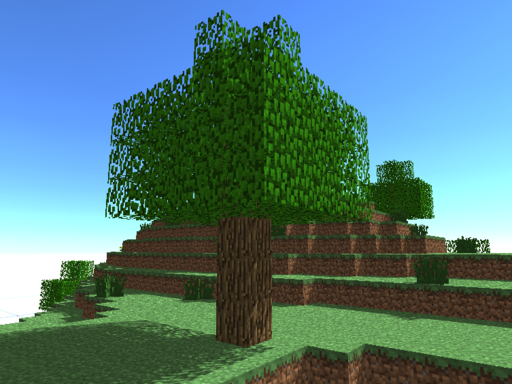
MineBlocks: Building drops players directly into an open, pixelated landscape focused entirely on crafting, building, and environmental exploration. Instead of facing rigid mission structures or strict linear paths, you are given the creative freedom to shape the terrain according to your own architectural vision. The world is rendered in colorful block aesthetics, providing a clear visual grid for assembling complex structural designs.
The core gameplay loop centers on surveying your surroundings, gathering necessary resources, and placing materials block by block to construct whatever you imagine. Whether you intend to assemble a modest cozy shelter or engineer a complex network of structures across the map, the game accommodates projects of any scale. Its approachable interface ensures players of all ages can quickly start shaping their personal environment.
Your goal
The primary objective in MineBlocks: Building is self-directed creation and environmental design. Players aim to gather resources from the surrounding landscape and use them to construct imaginative architectural works, progressing from simple standalone shelters to expansive, intricate structures and connected cities.
How to play MineBlocks: Building
1. Launch the game in your web browser and click or tap the screen to begin interacting with the sandbox environment.
2. Survey the local pixelated landscape to identify open areas suitable for building your planned structure.
3. Gather necessary building resources from the surrounding environment to build your inventory of materials.
4. Select your collected materials and place blocks deliberately to lay down foundations, walls, and structural frameworks.
5. Expand your initial build by adding decorative elements, multi-tier rooms, or additional connected buildings across the map.
Controls and device support
MineBlocks: Building is played using direct mouse click or tap inputs to navigate the world, interact with resources, and place building blocks.
- Controls: Mouse or touch
- Device support: Desktop + mobile
- Game frame: 800 x 600
What makes the challenge interesting
The central appeal of MineBlocks: Building lies in spatial planning, patient block placement, and creative freedom. Because the game provides an open sandbox without rigid timers or forced survival hazards, your primary challenge is translating conceptual architectural ideas into tidy, aligned voxel geometry. Successful builders often balance scale with structural detail, ensuring that large foundations leave enough room for practical layout adjustments as their creations expand.
Tips for MineBlocks: Building
- Flatten or clear your chosen building site before laying walls. Starting on irregular terrain can cause alignment errors that make expanding the perimeter difficult later.
- Gather a surplus of fundamental construction resources before beginning a large project. Running short mid-build disrupts your rhythm and forces unnecessary exploration trips.
- Outline your floor plan with a single layer of base blocks before constructing tall walls. This helps you verify room dimensions without wasting time dismantling misplaced blocks.
- Vary the heights and depths of your exterior surfaces rather than making flat rectangular walls. Adding porches, overhangs, and layered pillars creates more appealing architecture.
Stages and progression
Progression in MineBlocks: Building is self-paced and driven by player ambitions rather than scripted mission milestones. Players typically start by gathering basic resources to erect small, practical homes, gradually expanding their techniques toward complex multi-story complexes or large community layouts as they master the building mechanics.
The skills behind the game
Within the arcade and casual sandbox space, block-building games emphasize low-pressure creativity and immediate constructive feedback. MineBlocks: Building fits naturally into this category by offering an unconstrained environment where players can jump straight into harvesting and building without tedious setup phases.
Who will enjoy this game
Players looking for a lightweight browser-based building experience often seek accessible sandbox titles that run smoothly without heavy client installations. MineBlocks: Building serves this casual practice interest well, providing an instant digital canvas for testing structural concepts, practicing voxel layouts, or simply unwinding with relaxing construction sessions.
Games with a similar feel
Minecraft: MineBlocks: Building shares the familiar block-based visual aesthetic and freeform building spirit of Minecraft. However, MineBlocks: Building delivers a streamlined browser experience designed for immediate click-and-play crafting sessions, making it ideal for casual players wanting quick creative construction without extensive installation setups.
Frequently asked questions
What is the primary goal in MineBlocks: Building? The main focus is open-ended sandbox creation. You explore the pixelated world, collect various building resources, and construct custom structures ranging from simple homes to large-scale settlements.
How do you control actions in the game? The game uses standard mouse clicks or screen taps to interact with the environment, harvest materials, and place structural blocks across the landscape.
Can younger players easily pick up MineBlocks: Building? Yes. The intuitive click and tap control scheme and colorful block-based visuals make the sandbox accessible and enjoyable for builders of all ages.
Something not right?
Tell us if the game does not load, the information is wrong or the content needs review.
Report a problem ›