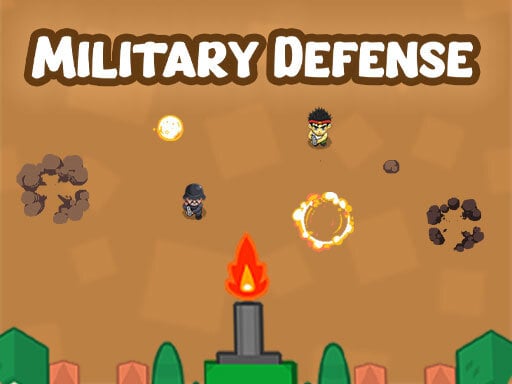
About Military Defense
Military Defense puts you in command of a stationary defensive cannon tasked with protecting a military base from incoming hostiles. Enemies advance along separate left and right lanes, forcing you to make split-second targeting decisions while holding back the invasion. Because innocent civilians are caught in the crossfire, rapid identification is just as vital as fast reflexes to prevent catastrophic errors.
Military Defense is a lane-based reaction shooter focused on perimeter security and threat identification. Players oversee two primary approach paths leading directly to their base entrance. Controlling a central cannon, your primary mission is to blast hostile intruders before they breach your defensive line. However, the battlefield is shared with unarmed civilians who travel along the very same routes toward safety.
The core loop revolves around continuous target discrimination and rhythmic lane switching. Whenever a figure appears on the left or right side of the screen, you must instantly verify whether the target is an armed enemy or an innocent bystander. Firing down the correct lane repels the threat, but striking a civilian or permitting any enemy to slip through ends your defensive run immediately.
Your goal
Your objective in Military Defense is to protect your outpost for as long as possible by neutralizing all approaching enemies while granting safe passage to civilians. Success requires eliminating hostiles before they reach the base boundary while avoiding accidental friendly fire, challenging you to sustain focus and improve your personal survival record across repeated attempts.
How to play Military Defense
1. Observe both the left and right approach lanes as characters begin moving toward your base perimeter.
2. Quickly inspect each incoming figure to distinguish hostile combatants from non-combatant civilians.
3. Trigger a shot down the left lane when an enemy advances along the left side of the screen.
4. Fire down the right lane when hostile targets approach along the right side of the corridor.
5. Hold your fire whenever a civilian approaches to allow them to pass safely without taking damage.
6. Maintain your defensive rhythm and react promptly to sustain your defense as incoming traffic continues.
Controls and device support
On desktop computers, use the Left Arrow key to shoot the left lane and the Right Arrow key to shoot the right lane, or click the left mouse button on the corresponding side. On touch displays, tap the left side of the screen to shoot left or tap the right side to shoot right.
- Controls: Keyboard
- Device support: Desktop + mobile
- Game frame: 800 x 600
Rules to keep in mind
- Hitting a civilian immediately causes a defensive failure and ends the game.
- Allowing an enemy soldier to reach the base perimeter results in an immediate game over.
- Shooting down the left side only impacts targets traveling along the left approach path.
- Shooting down the right side only impacts targets traveling along the right approach path.
What makes the challenge interesting
The defining dynamic of Military Defense is the tension between rapid visual processing and disciplined impulse control. Because the controls are streamlined to two directional choices, raw input speed is rarely the primary barrier to survival. Instead, the real test lies in suppressing the instinct to shoot automatically whenever movement catches your peripheral vision.
Every incoming character demands an instant mental classification before your fingers commit to an action. Firing prematurely risks striking an innocent bystander, while hesitating too long allows an armed intruder to breach the base. Finding a steady scanning rhythm—shifting focus fluidly between both corridors—enables players to balance high-speed reaction with target precision under continuous pressure.
Tips for Military Defense
- Anchor your visual attention near the top of the approach lanes rather than the bottom. Spotting target silhouettes early grants valuable extra milliseconds to confirm whether they are hostile before committing to a shot.
- Avoid rhythm-tapping or predicting alternating patterns between lanes. Approaching entities appear independently, so blindly alternating inputs will inevitably cause you to blast a civilian or miss an adjacent enemy.
- Prioritize keyboard arrow controls on desktop setups if mouse clicking feels loose. Dedicated left and right keys provide tactile feedback that helps eliminate accidental misclicks during rapid encounters.
- Treat civilian sightings as mandatory pauses to reset your timing. Deliberately withholding fire when a non-combatant crosses allows you to re-center your focus before the next hostile wave arrives.
- Keep your fingers resting comfortably over both designated inputs simultaneously. Shifting a single finger between buttons creates avoidable input lag when enemies appear in rapid succession.
Stages and progression
Military Defense emphasizes an arcade-style endurance structure where personal mastery drives longevity. As rounds continue, players face ongoing streams of mixed targets that demand sustained concentration. Rather than relying on complicated gear upgrades, progression in this style of defense game is measured by how consistently you can maintain your threat-recognition speed without committing fatal mistakes.
To build an effective practice routine, focus initial sessions entirely on visual accuracy and civilian preservation rather than outright speed. Once you can reliably identify friendly figures under moderate pacing, gradually increase your reaction tempo to intercept distant threats closer to their spawn point.
Playing on different devices
Military Defense supports both keyboard and mouse controls on desktop web browsers alongside native touch interaction on mobile devices. Desktop users can choose between clicking the left and right halves of the screen with a mouse or pressing the physical Left and Right Arrow keys on a standard keyboard.
On smartphones and tablets, the gameplay area divides naturally into two touch zones. Tapping the left half triggers a cannon blast down the left corridor, while tapping the right half fires to the right. Holding the device securely with two thumbs generally provides the most responsive setup for fast dual-lane defense.
The skills behind the game
Within the broader realm of browser-based action and shooting games, base defense titles occupy a distinct niche centered on position management and threat triage. While conventional shooters often focus on free roaming and manual crosshair tracking across vast arenas, lane defense titles distill the shooting mechanic into fundamental timing and decision-making challenges.
By integrating civilian preservation into a dual-corridor defense structure, Military Defense combines classic arcade twitch reflexes with cognitive discrimination. This blend appeals to players who enjoy tactical vigilance and rapid response mechanics without needing complex navigation or inventory management.
Who will enjoy this game
Players looking for an engaging military defense game online often seek straightforward, fast-loading browser experiences that test pure reaction speed. Military Defense delivers an accessible arcade challenge tailored for quick gaming sessions during short breaks, offering instant action directly in any standard web browser without cumbersome downloads.
As a casual shooting game online, it serves as excellent practice for developing sharper hand-eye coordination and disciplined trigger restraint. The clear dual-lane visual layout allows newcomers to jump straight into the action while presenting enough cognitive friction through civilian avoidance to challenge experienced reflex enthusiasts.
Games with a similar feel
DOOM: Classic first-person shooters like DOOM emphasize three-dimensional combat movement, active aiming, and exploration across hostile environments. In contrast, Military Defense strips away physical traversal in favor of stationary, two-lane perimeter protection. While DOOM caters to players seeking intense combat navigation and weapon switching, Military Defense is built for quick-reaction target discrimination within a fixed defensive boundary.
Frequently asked questions
What happens if I accidentally shoot a civilian in Military Defense? Striking a civilian ends your match immediately. Safe defensive operation requires identifying every target before pulling the trigger, meaning you must allow all innocent bystanders to reach safety unharmed.
How do the cannon controls work across different lanes? The battlefield is split into two distinct paths. Activating your left input fires down the left line, while activating your right input targets the right line, using either arrow keys, mouse clicks, or touch taps.
Can enemies breach the base without causing a game over? No. If even a single hostile soldier reaches your defensive base line, the game terminates on the spot. You must eliminate all incoming hostiles before they cross into your perimeter.
Is Military Defense playable on mobile touchscreen devices? Yes. On mobile browsers, the screen supports direct touch input. Tapping anywhere on the left half fires the left lane cannon, and tapping on the right half fires the right lane.
Something not right?
Tell us if the game does not load, the information is wrong or the content needs review.
Report a problem ›