Official listing
Game description
Ever wanted to be a captain? Ever wanted to be an air giant? Take control of your very own parking apron and airline.
Racing game
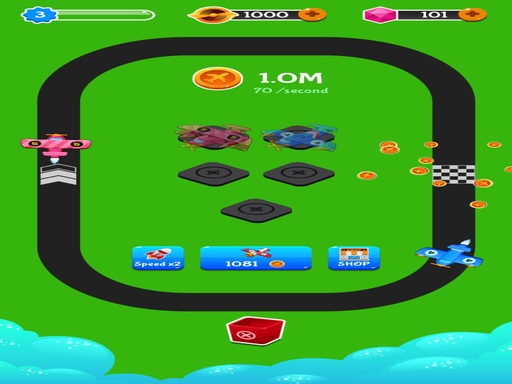
Merge Aircraft places players in control of their own airline and parking apron in a casual arcade setting. Designed around simple screen tap inputs, the game invites aspiring flight captains to organize aircraft across the tarmac and oversee their fleet. Whether you have a few spare minutes or enjoy relaxing vehicle organization, this title offers an approachable aviation-themed management experience directly in your web browser.
Choose Play now to load the game.
Official listing
Ever wanted to be a captain? Ever wanted to be an air giant? Take control of your very own parking apron and airline.
From the game listing
Tab to screen
Open this card to load the gameplay video.
Merge Aircraft places players in control of their own airline and parking apron in a casual arcade setting. Designed around simple screen tap inputs, the game invites aspiring flight captains to organize aircraft across the tarmac and oversee their fleet. Whether you have a few spare minutes or enjoy relaxing vehicle organization, this title offers an approachable aviation-themed management experience directly in your web browser.
In Merge Aircraft, you step into the role of an aviation captain aiming to oversee a growing airline. The central activity revolves around managing your tarmac and parking apron, where various planes arrive and await your command. The game combines familiar arcade pacing with hands-on plane coordination, presenting a clean layout that keeps the apron front and center.
The core loop focuses on interacting directly with the apron to handle aircraft smoothly. By tapping or clicking across the active screen area, players direct their operational fleet and maintain order across the parking bays. The overall atmosphere remains lighthearted and casual, offering an accessible entry point for anyone interested in aviation management and quick-session arcade play.
Your primary goal in Merge Aircraft is to run an efficient parking apron and expand your airline operations as an ambitious captain. Players strive to keep their tarmac well-organized, coordinate available aircraft effectively, and maintain steady activity across their parking bays. Success comes from consistent management habits, making thoughtful use of open apron space, and keeping your fleet operating without unnecessary clutter or delays.
1. Launch the game in your browser window and examine the layout of your starting parking apron.
2. Tap or click on the screen to interact with incoming aircraft and active parking spots.
3. Organize your planes systematically across open tarmac bays to maintain clear operational space.
4. Continue managing your airline fleet steadily as new planes become available on the apron.
The official game instructions specify tapping the screen to interact with the parking apron and aircraft. On desktop web browsers, mouse clicks serve the same function.
The central appeal of Merge Aircraft lies in the steady rhythm of tarmac organization and fleet oversight. Rather than demanding rapid reflex maneuvers, the experience emphasizes calm spatial awareness and thoughtful allocation of parking bays. Players must balance active aircraft handling against the physical space available on the apron, deciding how best to position their planes for efficient oversight.
This creates a satisfying casual flow where simple tap interactions translate into noticeable operational progress. The arcade framing keeps the barrier to entry minimal, allowing players to jump in immediately while still enjoying the thematic fantasy of leading an airline fleet.
Merge Aircraft is built with a native portrait resolution of 720 x 1280 pixels, making it especially well-suited for smartphones and tablets held vertically. The direct tap input feels natural on touchscreen devices, offering convenient one-handed play during short breaks.
On desktop monitors or laptops, the game displays within a centered vertical frame. Standard left mouse clicks seamlessly replace touchscreen taps, providing accurate pointer control across the parking apron without requiring special keyboard remapping.
Aviation and vehicle organization games occupy an enjoyable niche in casual arcade gaming. While traditional flight simulations demand complex instrument management and precise aerodynamic handling, arcade plane titles focus on accessible organization, visual clarity, and steady fleet growth. They provide a relaxed environment where players can enjoy the ambiance of hangars, runways, and parking aprons without navigating steep learning curves.
By shifting the focus toward tarmac coordination, titles like Merge Aircraft appeal to players who enjoy steady organizational puzzles alongside vehicular themes. The satisfaction stems from turning a busy apron into an orderly, efficient aviation hub through straightforward, accessible actions.
Players looking for a merge aircraft game typically seek a lighthearted, low-pressure title that can be played in quick sessions. This genre fits naturally into everyday routines, offering a satisfying way to organize a collection of planes, streamline apron parking, and unwind without complex setup requirements.
Whether you want to practice efficient space planning across open parking bays or simply enjoy managing an expanding fleet of planes, Merge Aircraft delivers a streamlined aviation loop centered entirely on responsive tap controls and continuous tarmac oversight.
What type of game is Merge Aircraft? Merge Aircraft is a casual arcade management game where players look after an airline fleet and organize planes on a dedicated parking apron using simple tap inputs.
How do you control planes in Merge Aircraft? You interact with the game by tapping or clicking directly on the screen to manage your aircraft and coordinate parking spots across the tarmac.
Can I play Merge Aircraft on both mobile and desktop browsers? Yes. The game features a 720 x 1280 portrait layout that works naturally on mobile touchscreens and runs on desktop browsers using standard mouse clicks.
Tell us if the game does not load, the information is wrong or the content needs review.
Report a problemExplore popular games by category, shared tags and site-wide activity.



















