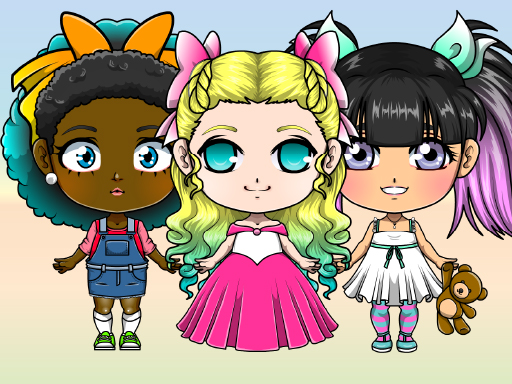
About Mega Kawaii Chibi Avatar Maker
Mega Kawaii Chibi Avatar Maker is a creative browser dress up game where players style petite anime figures from head to toe. You can design both chibi boy and girl personas, choosing garments, hair ornaments, jewelry, and companion pets. With a dual-tone palette spanning eighty shades and multiple portrait export modes, the game provides a flexible digital canvas for crafting original anime avatars.
The core experience centers on building expressive anime characters using an intuitive styling menu. Players start by selecting base character traits before browsing through an extensive wardrobe filled with tops, bottoms, skirts, socks, footwear, and neckties. In addition to clothing, styling options include earrings, necklaces, headwear, hair clips, and small animal companions that accompany your figure.
Visual customization goes beyond simple item swaps thanks to a versatile coloring toolkit. Clicking the brush icon opens an eighty-color selection menu, where you can apply distinct shades across two separate zones labeled Color 1 and Color 2. Once your styling session is complete, the title lets you preserve the finished character in either a full-body view or an avatar mode suitable for profile pictures.
Your goal
The primary goal is styling a personalized chibi character that captures a specific aesthetic, theme, or original concept. Players aim to harmonize color schemes across garments and accessories, balance decorative accents like jewelry and pets, and output clean character art in full-body or avatar framing.
How to play Mega Kawaii Chibi Avatar Maker
1. Decide whether you want to style a chibi boy or chibi girl character to establish your initial concept.
2. Click through wardrobe tabs to try on garments including blouses, pants, skirts, shoes, socks, and ties.
3. Layer decorative details onto your character by browsing hats, hair clips, necklaces, earrings, and companion pets.
4. Click the brush icon to display the eighty-color palette and tint the active wardrobe selection.
5. Toggle between Color 1 and Color 2 to tint primary and accent sections of your selected item independently.
6. Select either avatar mode or full body view to frame and save your finished chibi creation.
Controls and device support
Interact with all customization menus, wardrobe categories, color selectors, and framing tools by clicking through the on-screen options.
- Controls: See in-game controls
- Device support: Browser
- Game frame: 800 x 600
Rules to keep in mind
- Customization covers both chibi girl and chibi boy character types.
- The color system provides eighty individual color options accessed via the brush button.
- Selected clothing and accessory parts divide into Color 1 and Color 2 zones for independent palette adjustments.
- Final character exports can be saved in either full body or avatar framing.
What makes the challenge interesting
The core appeal of this character maker lies in precise visual coordination rather than quick reflexes or score chasing. Because clothing pieces are split into dual color channels, players enjoy substantial creative control over how trims, bases, and fabrics match. A common styling challenge is managing visual contrast across complex outfits; selecting contrasting tones for Color 1 and Color 2 helps distinct layers like ties, collars, and socks stand out without clashing against ornate jewelry or hair clips.
Tips for Mega Kawaii Chibi Avatar Maker
- Pick a primary palette before coloring clothing. Establishing two or three central shades prevents intricate outfits with many accessories from looking chaotic.
- Use the dual-color system to highlight small details. Assigning a bright contrast shade to Color 2 on ties or blouses helps subtle seams and trims remain visible.
- Select your companion pet early in the styling process. Matching your character's hat or clothing tones to the pet creates a unified theme across the entire portrait.
- Consider your planned output format when detailing accessories. If you plan to save in avatar mode, focus decorative energy on earrings, hair clips, and hats.
The skills behind the game
Within the dress up genre, avatar makers emphasize deliberate personalization and aesthetic expression over competitive timing or skill-based hurdles. Players spend time auditioning combinations of skirts, blouses, hats, and companion animals to produce a distinct visual character. The open-ended sandbox structure encourages experimentation, letting players freely explore color variations and accessory pairings at their own pace.
Who will enjoy this game
For enthusiasts searching for a mega kawaii chibi avatar maker game or a relaxed dress up game, this title offers an accessible outlet for designing stylized original personas. It serves as a handy casual tool for sketching character concepts, testing color combinations across garments, or crafting friendly profile icons. Because all customization tools are available immediately through simple clicks, players can jump straight into testing outfits and exporting cute chibi illustrations.
Games with a similar feel
Love Nikki-Dress UP Queen: Like Love Nikki-Dress UP Queen, this game focuses on garment selection and coordinating expressive fashion items. While Love Nikki emphasizes structured campaign challenges, narrative progression, and scoring criteria, Mega Kawaii Chibi Avatar Maker offers a freeform, sandbox character design experience centered purely on personal aesthetic choices and dual-tone color customization.
Frequently asked questions
Can you design both male and female characters? Yes. The character maker includes options to style both chibi girl and chibi boy avatars, providing flexible clothing and accessory choices for either concept.
How does the coloring system work? Clicking the brush icon opens a menu featuring eighty colors. You can select Color 1 or Color 2 to paint separate sections of an item independently.
What options are available when saving an avatar? You can save your finished design using either avatar mode for a portrait crop or full body mode to capture the complete outfit from head to toe.
Something not right?
Tell us if the game does not load, the information is wrong or the content needs review.
Report a problem ›