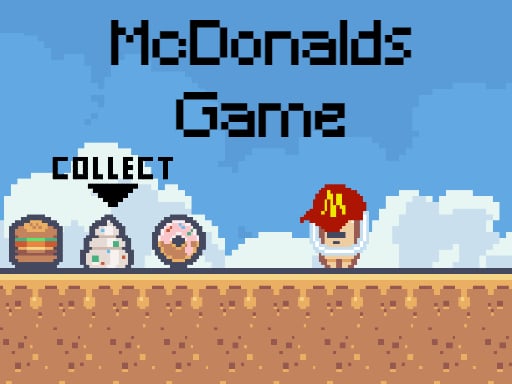
About McDonalds Collect Foods
McDonalds Collect Foods is a single-player 2D pixel-art platformer where you step into the shoes of a restaurant employee on an errand. Your mission is to travel across the stage, gather scattered food items, drinks, and desserts, and deliver them safely back to the store while leaping over hazardous obstacles.
In McDonalds Collect Foods, players control a diligent worker navigating a vibrant two-dimensional environment presented in classic pixel art. The playing field is littered with various menu items including full meals, beverages, and sweet treats that must be rounded up and returned to the shop. Running and jumping across platforms form the core movement loop as you explore every corner of the layout.
Hazards and environmental obstacles stand between you and your collection goals. Successfully clearing gaps and reaching elevated platforms requires steady movement and timely aerial maneuvers. With the inclusion of a built-in double jump mechanic, you have the vertical reach needed to maneuver around tricky terrain, collect high-floating items, and complete your delivery run cleanly.
Your goal
Your primary goal is to collect all the scattered food, drinks, and desserts distributed throughout the area and bring them safely back to your store. To succeed, you must guide your worker through platform layouts while dodging every obstacle along your path.
How to play McDonalds Collect Foods
1. Start the stage and assess the platform layout to spot where food items, drinks, and desserts are located.
2. Use the Left and Right Arrow keys to run across flat ground and position yourself beneath platforms.
3. Press the Up Arrow key to jump over low gaps and reach lower ledges.
4. Press the Up Arrow key a second time in mid-air to activate your double jump for extra height across wide hazards.
5. Collect every scattered meal, beverage, and dessert item before returning back to the store.
Controls and device support
Control your worker using keyboard arrow keys: Arrow Left to move left, Arrow Right to move right, and Arrow Up to jump. Double jumping is active by pressing Arrow Up again while airborne.
- Controls: Keyboard
- Device support: Browser
- Game frame: 540 x 270
Rules to keep in mind
- Gather all scattered food items, drinks, and desserts before completing the delivery to the store.
- Avoid colliding with stage obstacles while moving through the level.
- Double jumping can be performed while airborne by pressing the jump key a second time.
What makes the challenge interesting
The heart of McDonalds Collect Foods lies in precise platform traversal and spatial navigation. Because items are spread out across vertical and horizontal planes, players must plan clean jump trajectories rather than rushing blindly ahead. The double jump feature provides a forgiving safety net for airborne adjustments, but mistimed leaps can still put the worker directly into hazardous terrain.
Balancing speed with caution is the main skill test. Moving quickly lets you scoop up food items in rapid succession, but slowing down to observe obstacle placements helps prevent careless collisions on the way back to the store.
Tips for McDonalds Collect Foods
- Delay your second jump input near the apex of your first leap. Triggering the double jump too early limits your total reach and makes clearing wide gaps much harder.
- Scan the perimeter before committing to a route. Planning which food items and drinks to collect first prevents unnecessary backtracking across tricky obstacles.
- Keep horizontal momentum steady when jumping toward elevated ledges. Abruptly releasing movement keys mid-flight can cause your character to fall short of the platform.
- Watch obstacle positions carefully rather than focusing solely on the collectibles. Focusing only on food sprites often leads to running straight into hazards.
The skills behind the game
Belonging to the arcade and action platformer tradition, this title combines side-scrolling navigation with item gathering. In classic 2D pixel platformers, gameplay centers on mastering physical spacing, reading ledge layouts, and timing jumps over hazardous obstacles.
The addition of collectible objectives like food, drinks, and desserts gives players a clear directional purpose on each screen, encouraging thorough exploration of both ground paths and elevated ledges.
Who will enjoy this game
Players looking for a lighthearted arcade game online can enjoy the straightforward platforming loop in McDonalds Collect Foods. It offers quick, accessible jumping challenges suitable for casual warm-ups or practicing aerial timing.
Fans searching for the McDonalds Collect Foods game will find a retro-styled experience focused on obstacle avoidance, double jumping, and completing restaurant retrieval tasks in a compact format.
Frequently asked questions
How do you perform a double jump in McDonalds Collect Foods? Press the Arrow Up key to initiate a regular jump, and then press the Arrow Up key a second time while your character is in mid-air to gain additional vertical height.
What items must the player collect during gameplay? You need to collect all the scattered food items, drinks, and desserts spread around the environment and deliver them back to the store.
What hazards should players watch out for? Players must navigate carefully around obstacles placed throughout the stages, using well-timed jumps to avoid running into them while gathering items.
Something not right?
Tell us if the game does not load, the information is wrong or the content needs review.
Report a problem ›