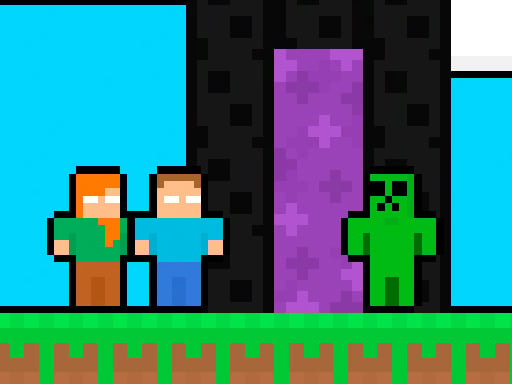
About MCCraft 2 Player
MCCraft 2 Player is a cooperative 2D platforming adventure where two characters—a boy in a blue shirt and a girl in a green shirt—must explore hazardous stages together. Players coordinate movement across obstacle-filled layouts, stomping enemy monsters, finding hidden chests, and picking up every coin before both partners step into the exit portal.
Set across blocky pixel landscapes, MCCraft 2 Player challenges two partners to navigate side-scrolling levels filled with wandering monsters and platform hazards. Success relies on active teamwork, as each level requires both the blue-shirted boy and the green-shirted girl to complete mandatory objectives rather than rushing ahead individually.
Throughout each stage, partners must defeat menacing creatures by leaping atop them to crush them safely. While dealing with these roaming threats, players explore the environment to discover chests and gather every available coin. Once all items are secured, both characters must arrive at the portal together to advance to the next level.
Your goal
The primary objective in MCCraft 2 Player is to clear each stage by collecting every coin, locating the chests, and bringing both characters safely to the exit portal. Because a level cannot be completed with only one explorer at the goal, teammates must protect one another, eliminate hostile monsters by stomping them, and confirm that all required pickups are collected before exiting.
How to play MCCraft 2 Player
1. Assign each player a character: one controls the boy in the blue shirt, and the other manages the girl in the green shirt.
2. Navigate through the 2D stage using the designated keyboard split or mobile touch inputs.
3. Engage dangerous monsters by jumping on top of them to crush and defeat them.
4. Search the platforms thoroughly to uncover chests and gather all scattered coins.
5. Guide both characters to the destination portal simultaneously to unlock the next level.
Controls and device support
The game is played using WASD and Arrow Keys for two-player keyboard coordination on desktop, and mobile touch control is also supported.
- Controls: WASD + arrow keys
- Device support: Desktop + mobile
- Game frame: 800 x 600
Rules to keep in mind
- Both players must reach the portal to successfully complete the level and move forward.
- Monsters are defeated by jumping onto them from above and crushing them.
- Players must discover the chests and collect all coins located across the stage.
What makes the challenge interesting
The core dynamic of MCCraft 2 Player is synchronization. Rather than treating the adventure as a solo sprint, both participants must match each other's pace. Engaging powerful monsters head-on is perilous, meaning players must carefully time their jumps to land directly on enemy heads. At the same time, maintaining spatial awareness helps ensure neither player leaves coins or chests behind.
This setup creates a cooperative rhythm where players balance combat and exploration. One partner might secure higher ledges while the other clears ground-level obstacles, reinforcing mutual support until both meet at the exit.
Tips for MCCraft 2 Player
- Time downward jumps carefully when attacking monsters. Landing directly on top of an enemy crushes it, whereas running into it from the side risks taking unnecessary damage.
- Check every route for missed coins before approaching the exit. Leaving even a single coin behind prevents a complete stage clear and wastes time backtracking.
- Stay close together across vertical sections. If one player climbs too far ahead, the lagging partner might struggle with off-screen navigation or newly spawned threats.
- Communicate chest discoveries aloud so both partners know the objective status and can converge on the exit portal smoothly.
Stages and progression
Progression in MCCraft 2 Player occurs stage by stage as both characters reach the portal. Advancing to the next level requires fulfilling all collection goals and keeping both the boy and the girl alive until they enter the exit together.
As players move forward through new layouts, developing a steady communication habit and dividing search routes efficiently will help maintain a consistent clearing pace across increasingly complex platform environments.
Playing on different devices
Desktop users can share a single keyboard comfortably, with one player utilizing the WASD cluster and the other operating the Arrow Keys. On mobile devices, on-screen touch controls provide an alternative input method for portable play.
The skills behind the game
Belonging to the arcade and 2D adventure genres, MCCraft 2 Player draws on traditional platforming fundamentals: obstacle avoidance, precise jump timing, and environmental item gathering. Shared-screen cooperative games in this space emphasize direct collaboration, making coordination between players just as vital as individual mechanical execution.
Who will enjoy this game
Players looking for an engaging arcade game online or seeking dedicated two-player cooperative challenges will appreciate MCCraft 2 Player. Its pick-up-and-play format makes it well-suited for quick casual sessions where friends can practice communication and jump timing across compact platforming courses.
Games with a similar feel
Minecraft: While Minecraft is an open-ended 3D sandbox centered on freeform building and resource exploration, MCCraft 2 Player adopts a stylized pixel aesthetic for a structured 2D arcade platformer. Players wanting expansive crafting prefer the sandbox original, whereas those seeking focused, two-player level-clearing obstacle courses will enjoy this arcade title.
Frequently asked questions
Can one player finish the level alone in MCCraft 2 Player? No. The game explicitly requires both the boy in the blue shirt and the girl in the green shirt to reach the portal together to advance to the next level.
How do you defeat monsters in this game? Monsters are eliminated by jumping directly on top of them from above to crush them, clearing the path for both adventurers.
What items must players collect before exiting? Players must explore the stage to discover all hidden chests and pick up every available coin before heading into the portal.
What control setups are supported? Desktop play supports simultaneous keyboard inputs using WASD and Arrow Keys, while mobile touchscreen controls are available for handheld devices.
Something not right?
Tell us if the game does not load, the information is wrong or the content needs review.
Report a problem ›