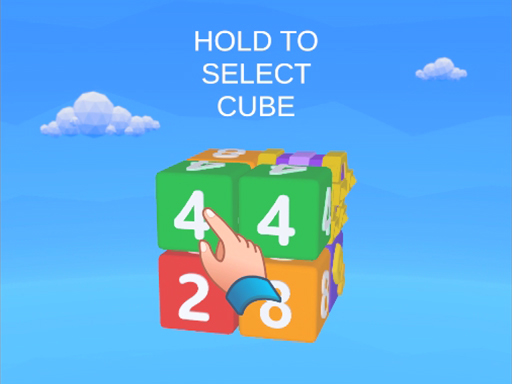
About Match Away 3D Cube
Match Away 3D Cube is a spatial logic challenge where players dismantle floating geometric structures block by block. Each individual cube in the cluster can only fly away in a single predetermined direction, requiring you to carefully inspect every side before selecting a piece. By orbiting around the formation and identifying unblocked departure routes, you systematically peel away outer layers to clear the screen and unlock progressively larger volumetric shapes.
At its heart, Match Away 3D Cube presents an intricate spatial disentanglement test built around three-dimensional geometry. Rather than sliding flat tiles across a fixed plane, you interact with a clustered multi-layered structure suspended in open space. Each block within the structure possesses a directional orientation and will only launch away from the cluster if its direct trajectory is completely unobstructed by neighboring pieces.
Because blocks launch in set directions, the core loop alternates between inspecting the shape from varying viewpoints and selecting accessible pieces. You constantly rotate the main assembly to peer behind facades, find exposed pathways, and identify which cubes have clear departure corridors. Clearing a single exterior block often unblocks the path for several deeper pieces, creating an engaging cascade of logical deductions as the remaining construction shrinks down to nothing.
Your goal
The primary objective is to clear every single block from the screen across successive puzzle stages. You achieve this by discovering the precise dismantling order that allows each directional piece to fly away without colliding with remaining neighbors. As stages advance and formations expand in size, success depends on maintaining methodical visual discipline, systematically clearing exterior perimeters, and avoiding wasted moves on blocked pieces.
How to play Match Away 3D Cube
1. Survey the starting 3D shape thoroughly before interacting with any single block to understand how the overall assembly is grouped.
2. Rotate the formation around its central axes using mouse movement or swipe gestures to inspect all faces, corners, and hidden recesses.
3. Examine the directional indicators on exterior blocks to verify which cubes have open flight paths away from the cluster.
4. Tap or click an unobstructed cube to launch it outward and remove it from the playfield.
5. Re-examine freshly exposed interior layers as previously blocked paths open up, continuing until the entire formation is cleared.
Controls and device support
The game feed lists desktop input as Mouse LMB, RMB, and Scroll. Players use left and right mouse buttons alongside the scroll wheel to manipulate view orientation and interact with blocks, while touch screen devices support direct swiping to rotate the shapes and tapping to activate pieces.
- Controls: Mouse or touch
- Device support: Desktop + mobile
- Game frame: 1280 x 1024
Rules to keep in mind
- Each block moves exclusively in its designated single direction when triggered.
- A block will not successfully clear if its flight trajectory is obstructed by an adjacent block.
- Completing a level requires clearing every block comprising the 3D structure from the screen.
What makes the challenge interesting
Match Away 3D Cube tests spatial reasoning rather than rapid reflexes. The critical mental challenge involves projecting outward linear paths across three separate dimensions. A piece pointing outward on what looks like an edge may still collide with an overlapping corner piece when viewed from a tilted vantage point. This demands deliberate perspective shifting, encouraging players to rotate the object several times before making an input. The rhythm is naturally thoughtful and contemplative, rewarding patience and visual planning over hasty trial-and-error tapping.
Tips for Match Away 3D Cube
- Rotate the cluster continuously instead of tapping from a static view. Checking multiple angles prevents mistaken clicks on blocks whose flight paths are blocked by subtle corner overhangs.
- Target corner and tip blocks first. These edge elements usually have fewer neighboring faces, making them the most reliable candidates to escape cleanly and expose interior layers.
- Trace outgoing trajectories visually before clicking. Confirming clear airspace behind a directional arrow saves time and keeps your dismantling sequence orderly.
- Work systematically through one face or hemisphere before switching sides. Methodical dismantling preserves a clear overview of remaining obstacles better than random probing across opposite sides.
Stages and progression
Progression in Match Away 3D Cube unfolds across an escalating sequence of puzzle layouts. Early stages introduce compact, easily readable geometric formations that allow players to grasp the directional movement mechanics. As you advance through levels, the clusters grow noticeably larger in volume and complexity, forming more intricate sculptural shapes with diverse block variations.
Along with increasing structural scale, the game features unlockable cosmetic skins and visual themes that alter the appearance of your puzzle journey. For sustained advancement, players should establish a steady scanning habit, maintaining composure even as multi-tiered block shapes become denser.
Playing on different devices
Match Away 3D Cube runs in modern web browsers via WebGL and Unity3D rendering, offering distinct control profiles on desktop and mobile. Desktop setups utilize mouse input, where left and right clicks combine with scrolling to inspect shapes and target blocks precisely. Mobile and touch displays rely on direct finger swipes to tumble the puzzle in 3D space, alongside tap selections to launch individual pieces.
The skills behind the game
Categorized under Puzzles and Logic, Match Away 3D Cube emphasizes volumetric deconstruction rather than grid-bound matching. Standard logic titles often demand line matching or arithmetic deductions on two-dimensional boards. By shifting the arena into Unity3D space with freeform camera rotation, this title tests rotational awareness and geometric visualization. Players must mentally translate flat screen inputs into three-dimensional vectors, offering a distinct workout for spatial problem-solving skills.
Who will enjoy this game
For players searching for a casual puzzle game online, Match Away 3D Cube offers an approachable yet brain-stimulating format. It suits individuals who enjoy methodical dismantling tasks and unhurried visual deduction during short study or work breaks. Because each stage presents a distinct standalone structure, you can engage in quick sessions to practice spatial precision without managing complex inventory systems or narrative commitments.
Games with a similar feel
Happy Color: While Happy Color focuses on the calming, two-dimensional task of filling pre-segmented numbered drawings with set color palettes, Match Away 3D Cube uses vibrant coloring purely as structural accents across a 3D physical dismantling puzzle. Happy Color appeals to players seeking guided creative coloring without spatial obstacles, whereas Match Away 3D Cube suits those who prefer testing spatial logic and clearing directional blocks in three dimensions.
Frequently asked questions
Why won't a block fly away when I click or tap it? Each block only travels in one specific direction. If another cube sits anywhere along that outgoing path, the targeted block cannot launch. Rotate the puzzle to check its escape vector and clear the blocking piece first.
Can Match Away 3D Cube be played on both desktop and mobile browsers? Yes. The WebGL build operates on desktop setups using mouse controls including left click, right click, and scroll wheel, while also supporting touch devices through swipe rotation and tap interactions.
How do higher levels increase the puzzle difficulty? Later stages construct larger, denser arrangements where the blocks themselves adopt varying forms. These larger shapes obscure interior layers and require more rotations to discover open clearing routes.
Something not right?
Tell us if the game does not load, the information is wrong or the content needs review.
Report a problem ›