About MAKE5
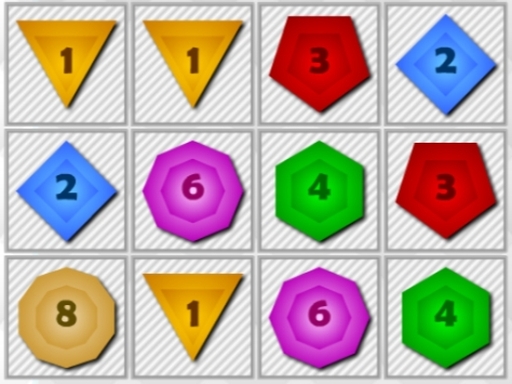
MAKE5 is an engaging number-merging puzzle game where players arrange colorful numbered blocks across a grid. By aligning three blocks sharing the identical color and number horizontally, vertically, or both, pieces merge into an upgraded tile. Players rotate incoming blocks strategically to advance tile values from one to five and earn higher scores.
In MAKE5, gameplay centers on placing and merging numbered blocks on the game board. Each piece displays a specific number and color, and positioning three identical blocks adjacent to each other initiates an immediate merge. These combinations can occur in horizontal, vertical, or intersecting directions, upgrading the resulting block value from 1 up to 5. Before dropping pieces onto the grid, players can rotate them to fit open spaces cleanly. Because higher-value blocks provide greater point rewards, managing board space and setting up efficient merges is key to maximizing scores.
Your goal
The main objective in MAKE5 is to combine three matching numbered tiles to produce higher-value blocks reaching up to the value of 5. Players strive to continually clear space, rotate pieces for optimal placement, and merge tiles to rack up the highest possible score before the grid fills up.
How to play MAKE5
1. Observe the incoming colored number blocks and review open spaces on the board.
2. Rotate the pieces before placement using mouse clicks or touch taps to achieve the best orientation.
3. Place three blocks of identical color and number next to each other horizontally or vertically.
4. Watch the adjacent matching blocks merge together and advance in value from 1 toward 5.
5. Earn more points as merged block values rise and keep organizing new tiles to sustain the game.
Controls and device support
Mouse: Move and rotate blocks on the grid
Tap: Move and rotate blocks on the grid
- Controls: Mouse or touch
- Device support: Desktop + mobile
- Game frame: 800 x 600
Rules to keep in mind
- Three blocks sharing the exact same number and color merge when placed next to each other horizontally, vertically, or both.
- Each successful merge increments the resulting block's value step-by-step from 1 to 5.
- Higher-value merged blocks grant larger point bonuses upon creation.
- Blocks can be rotated to different angles prior to being placed on the grid.
What makes the challenge interesting
Mastering MAKE5 requires balancing proactive tile rotation with disciplined board management. Because merging occurs only when three identical numbers and colors connect, every block placement directly impacts future options. Setting up combinations that trigger merges in both horizontal and vertical directions simultaneously allows players to clear multiple pieces at once, maintaining valuable open space. As tiles increase in number from 1 to 5, grouping similar values close together helps avoid isolated tiles that block subsequent placements.
Tips for MAKE5
- Rotate blocks before placing them on the grid to ensure they align neatly with existing matching colors and numbers.
- Look for positions that allow three matching tiles to connect both horizontally and vertically to clear more space in one move.
- Group lower-numbered blocks near matching tiles so they can steadily upgrade toward the maximum value of 5.
The skills behind the game
Within the puzzle and hypercasual arcade genres, MAKE5 emphasizes approachable tile-laying mechanics combined with spatial strategy. Number-merging and match-style puzzle games challenge players to anticipate grid space, manage incoming tile configurations, and execute calculated combinations. Simple mouse and touch controls allow players to dive immediately into quick, thought-provoking sessions.
Who will enjoy this game
Players looking for a merge puzzle game or an engaging match 3 puzzle game online will find familiar matching mechanics in MAKE5. Featuring tile rotation, triple-block matching, and numerical upgrades up to 5, the MAKE5 game offers accessible HTML5 browser gameplay across both desktop and mobile platforms.
Games with a similar feel
Candy Crush Saga: Like Candy Crush Saga, MAKE5 relies on grouping matching colored elements to clear space and score. However, MAKE5 focuses on rotating and placing numbered tiles onto a grid to merge them up to value 5, rather than swapping adjacent candy pieces.
Bejeweled: Both MAKE5 and Bejeweled involve aligning matching items horizontally or vertically to clear tiles. While Bejeweled centers on swapping existing gems on a full board, MAKE5 challenges players to orient and drop incoming numbered blocks onto an open grid.
Frequently asked questions
Can blocks be rotated before placing them in MAKE5? Yes, you can rotate blocks using mouse clicks on desktop or screen taps on mobile before placing them on the board.
How do blocks merge in MAKE5? Placing three blocks with the identical number and color next to one another horizontally, vertically, or both merges them into a single upgraded tile.
What is the maximum block value in MAKE5? Block values increase through successful merges from 1 up to a value of 5, with higher-value blocks awarding more points.
Something not right?
Tell us if the game does not load, the information is wrong or the content needs review.
Report a problem ›