About Make All Happy
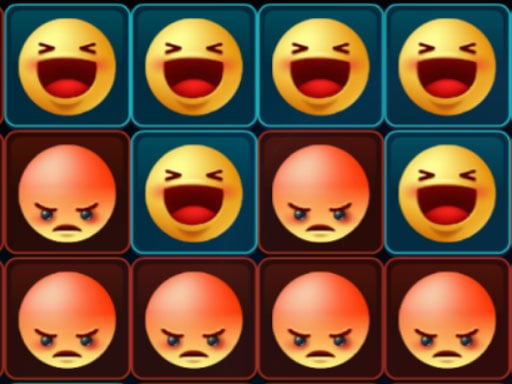
Make All Happy is a logic puzzle game where your goal is to turn every block on the board into a happy state. By tapping a single block, you toggle its expression along with its adjacent horizontal and vertical neighbors, challenging you to plan your sequence of moves carefully.
In Make All Happy, players face an engaging grid of interactive blocks that react dynamically to every move. The core challenge revolves around state switching: whenever you click or tap on a specific block, that tile as well as its immediate horizontal and vertical neighboring blocks change their current state. The overarching puzzle objective is to find the exact combination and order of toggles required to leave every single block smiling and happy. Because neighboring blocks flip states alongside the target block, every decision influences surrounding areas of the board, requiring thoughtful observation and strategic pattern resolution.
Your goal
Your central objective in Make All Happy is to transform every block on the board into a happy state. Because tapping any tile simultaneously switches the state of both the selected block and its adjacent horizontal and vertical neighbors, you must manipulate the puzzle grid systematically until all blocks reach their happy condition together.
How to play Make All Happy
1. Examine the starting puzzle board to identify which blocks are currently unhappy and observe their positions relative to one another.
2. Use your mouse or touch pad to select a block on the grid to tap.
3. Observe the toggling effect as the selected block and its direct horizontal and vertical neighbors switch states.
4. Continue selecting and toggling blocks strategically across the board to coordinate neighbor state changes toward the shared goal.
5. Complete the puzzle when all blocks across the entire layout are successfully switched into a happy state.
Controls and device support
Mouse / Touch pad: Click or tap a block to toggle its state and adjacent horizontal and vertical neighbors
Touch Screen: Tap a block to switch its state alongside horizontal and vertical neighbors
- Controls: Mouse or touch
- Device support: Desktop + mobile
- Game frame: 800 x 450
Rules to keep in mind
- Tapping a block always toggles the state of that block as well as its immediate horizontal and vertical neighbors.
- The board is cleared only when every block on the grid is switched into the happy state.
- Interactions are performed using standard mouse clicks, touch pad input, or tap gestures on supported devices.
What makes the challenge interesting
Make All Happy emphasizes classic toggle-grid mechanics similar to traditional flip and invert puzzles. The core challenge stems from the cross-shaped ripple effect produced by each tap, as vertical and horizontal neighbors react immediately. Solving the puzzle requires players to anticipate how changing one block will invert the condition of adjacent tiles. Instead of clicking randomly, successful problem-solving relies on analyzing corner and edge behaviors where fewer neighbors are affected, allowing you to gradually isolate stubborn tiles and align all blocks into the desired happy outcome.
Tips for Make All Happy
- Focus on corners and edges first, because these perimeter blocks have fewer adjacent neighbors and provide cleaner toggle control.
- Avoid clicking the exact same block repeatedly in succession, as toggling a tile twice typically cancels out your previous move.
- Plan multiple steps ahead by picturing how horizontal and vertical neighbor flips will alter neighboring clusters before making your next move.
Playing on different devices
Make All Happy is built on HTML5 technology, allowing it to run directly in modern web browsers at an 800 x 450 resolution with mouse, touch pad, or touch input support.
The skills behind the game
As a browser-based puzzle and board title, Make All Happy fits into the genre of spatial logic games that test deductive reasoning. Players who enjoy grid-based deduction and pattern coordination will appreciate the methodical pacing and simple interaction model, where calculating cascading neighbor reactions is central to resolving the overall board layout.
Who will enjoy this game
Players searching for a casual puzzle game online will find Make All Happy to be an accessible HTML5 block puzzle. The make all happy game focuses on clean toggle mechanics, challenging puzzle enthusiasts to coordinate state changes efficiently while enjoying a relaxing, board-style arcade experience directly in the browser.
Frequently asked questions
How do blocks change state in Make All Happy? When you click or tap on any block, it switches its state while simultaneously toggling the states of all directly connected horizontal and vertical neighbor blocks.
What is the winning condition in Make All Happy? You achieve victory by successfully manipulating the grid until all blocks across the entire puzzle board are concurrently switched into the happy state.
What controls are used to play Make All Happy? You can interact with the puzzle blocks using a standard mouse or touch pad on desktop, or tap directly on touch-enabled screens.
Something not right?
Tell us if the game does not load, the information is wrong or the content needs review.
Report a problem ›