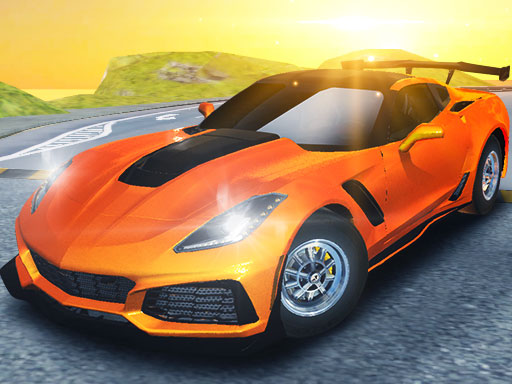
About Madness Driver Vertigo City
Madness Driver Vertigo City is a 3D supercar simulator where drivers navigate high-speed city courses, launch off ramps, and explore amusement park activity zones. Featuring both solo play and local split-screen two-player competition, the game lets players race against each other or explore open stunt grounds, gathering gems and customizing vehicles.
Set against a sprawling urban playground filled with elevated tracks, ramps, and amusement park attractions, Madness Driver Vertigo City delivers fast-paced 3D driving action. Players jump behind the wheel of cool super sport racing cars to test their vehicle handling across diverse environments. The city layout invites drivers to fly off high ramps, gather airborne gems, and participate in lively stunt challenges.
The game supports two core ways to play: single-player sessions and two-player shared keyboard action. You can jump directly into structured races to test your cornering and speed, or enter free-drive activities where the focus shifts toward exploring the city streets, testing jumps, and customizing your cars with unique visual designs.
Your goal
The primary objective in Madness Driver Vertigo City varies between competitive racing and open exploration. In race events, your aim is to outpace your opponent across city circuits using tactical nitro boosts. In free drive, your goal centers on gathering scattered gems, hitting ramp jumps, exploring amusement park features, and crafting custom visual looks for your supercar fleet.
How to play Madness Driver Vertigo City
1. Select your preferred play format, choosing between single-player mode or challenging a friend in local two-player mode.
2. Choose an event type, picking either competitive races or open free-drive activities across Vertigo City.
3. Steer your sports car through the streets, accelerating into straightaways and managing turns across tight urban corners.
4. Activate nitro boosts when heading straight toward high ramps to gain extra airtime and collect floating gems.
5. Explore specialized stunt areas, including amusement park installations, and use vehicle customization options to give your car a unique look.
Controls and device support
In 1-Player mode, drive using W, A, S, D or the Arrow Keys, trigger Nitro with Left Shift, reset your vehicle with R, and look behind with T. In 2-Player mode, Player 1 moves with W, A, S, D, while Player 2 steers with the Arrow Keys, activates Nitro with Right Shift, restarts with O, and looks back with P.
- Controls: Keyboard
- Device support: Browser
- Game frame: 800 x 450
Rules to keep in mind
- Drivers can choose either single-player or two-player competition across race and free-drive formats.
- Nitro activation provides a temporary speed surge for overtaking rivals or gaining momentum off stunt ramps.
- Floating gems can be collected throughout the environment, particularly when flying off ramps.
- Players can reset their car position at any time using their designated restart key if they get stuck or flip over.
What makes the challenge interesting
The core excitement of Madness Driver Vertigo City lies in balancing precise road handling with high-flying stunt maneuvers. Navigating the city streets requires steady steering to maintain racing lines, while the stunt ramps demand bold acceleration. Deciding when to tap your nitro boost is critical: deploying it on narrow corners risks crashing into city barriers, whereas unleashing it right before an incline sends your car soaring into airborne gem clusters.
Playing alongside a friend on the same keyboard adds an energetic layer of friendly rivalry. Because both players share the screen space, quick reactions and spatial awareness become paramount during tight overtaking maneuvers and synchronized ramp leaps.
Tips for Madness Driver Vertigo City
- Save nitro boosts for clean, open straights or ramp approaches rather than tight corners, avoiding unwanted barrier collisions.
- Line up your vehicle carefully before hitting ramps to ensure your mid-air flight path directly intersects aerial gem lines.
- Check behind you periodically using the rear-view key during two-player races to monitor rival positioning and protect your lead.
- Use the dedicated restart button promptly if your vehicle lands upside down after a wild stunt leap to resume driving immediately.
- Spend time in free-drive mode to memorize stunt ramp locations and amusement park activity layouts before entering competitive races.
Stages and progression
Progression in Madness Driver Vertigo City centers on mastering the city's terrain, refining your driving consistency, and customizing your sports cars with personal styling. As you spend time in both the competitive circuits and the open amusement park areas, you develop a stronger feel for handling high-speed turns and launching cleanly off vertical ramps.
A rewarding practice routine involves alternating between exploring the city to collect gems and competing in head-to-head races against another player. Setting personal goals, such as clearing every high ramp cleanly or perfecting your nitro timing, provides an ongoing sense of driving mastery.
Playing on different devices
Madness Driver Vertigo City is built for keyboard control on desktop browsers, offering full keybindings for both Player 1 and Player 2. With Player 1 mapped to WASD and Left Shift and Player 2 mapped to the Arrow Keys and Right Shift, two players can comfortably share a standard full-size keyboard without overlapping inputs.
The skills behind the game
As a 3D racing and supercar driving simulator, Madness Driver Vertigo City blends the high-stakes thrill of competitive circuit racing with the open-ended joy of stunt sandbox gameplay. Racing enthusiasts who appreciate urban environments will find a versatile mix of ramp jumps, boost mechanics, and amusement park features that keep driving sessions varied and engaging.
Who will enjoy this game
Players looking for an engaging online racing game will appreciate how quickly Madness Driver Vertigo City lets them jump into high-speed action without complex setups. Whether you want a casual solo stunt session or a competitive head-to-head showdown with a friend, the game provides accessible arcade controls and instant driving thrills suitable for quick gaming breaks.
Games with a similar feel
Asphalt: Like the popular Asphalt series, Madness Driver Vertigo City highlights high-speed supercar driving with prominent nitro acceleration and dramatic ramp jumps. However, while Asphalt emphasizes polished mobile tournament circuits and high-production arcade campaigns, Vertigo City provides a lightweight browser experience featuring open city stunt playgrounds, amusement park zones, and immediate local two-player shared-keyboard action.
Frequently asked questions
Can two people play Madness Driver Vertigo City on the same computer? Yes, the game features a dedicated two-player mode where both drivers share the same keyboard using independent control layouts for steering, nitro, vehicle resets, and rear cameras.
What activities are available in free-drive mode? In free drive, players can freely cruise through Vertigo City, jump across stunt ramps to collect floating gems, explore amusement park activity zones, and test customized cars without race pressure.
How do you activate nitro and recover after crashing? Player 1 uses Left Shift for nitro and R to restart their car. Player 2 uses Right Shift for nitro and O to reset their position instantly if overturned.
Can you customize your vehicles in the game? Yes, the game includes options to customize your super sport racing cars and create unique visual designs to showcase on the city streets.
Something not right?
Tell us if the game does not load, the information is wrong or the content needs review.
Report a problem ›