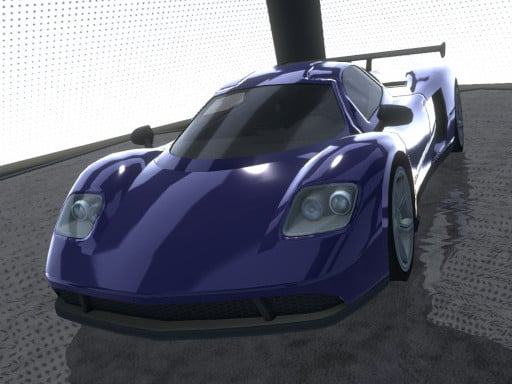
About Madalin Stunt Cars Pro
Madalin Stunt Cars Pro is a 3D driving game where players take the wheel of high-performance sports cars and police cruisers across three open stunt environments. The game centers on high-speed vehicle handling, allowing drivers to explore obstacle-filled arenas, execute controlled drifts, and test out aerial maneuvers using ramps and loops.
Madalin Stunt Cars Pro offers an open-ended driving experience set across three distinct 3D map areas built for high-speed exploration and stunt execution. Players can choose from a lineup of powerful vehicles, ranging from agile supercars to police cruisers, and immediately take them onto expansive courses filled with ramps, elevated structures, and open asphalt.
The core loop revolves around mastering car handling dynamics, experimenting with high-velocity nitro boosts, and finding optimal lines through complex stunt obstacles. Drivers can toggle rear-view mirrors, switch between different vehicles directly during their session, and engage emergency vehicle features when piloting police cars to tailor each driving run.
Your goal
The primary objective in Madalin Stunt Cars Pro is to hone precision driving skills across diverse terrain and intricate stunt structures. Players aim to execute clean drifts around sharp turns, maintain balance through high-flying aerial launches, and explore all three map areas to test the handling limits of each available vehicle.
How to play Madalin Stunt Cars Pro
1. Launch the game and select your starting vehicle from the available roster, such as a sports car or police cruiser.
2. Choose one of the three open stunt maps to begin your driving session.
3. Accelerate and steer through the arena using WASD or arrow keys to navigate obstacles and open tracks.
4. Engage the handbrake with Space to initiate slides around tight bends or line up for ramp approaches.
5. Press Shift to trigger nitro for sudden bursts of speed before tackling ramps or large jumps.
6. Press Ctrl to switch vehicles or press H to activate police lights when driving a patrol vehicle.
Controls and device support
Steer and accelerate using the Arrow keys or WASD. Apply the handbrake with Space, activate nitro using Shift, cycle to a new car with Ctrl, toggle the rearview mirror with M, and activate police lights using H when driving a police vehicle.
- Controls: WASD + arrow keys
- Device support: Browser
- Game frame: 960 x 600
What makes the challenge interesting
The gameplay experience in Madalin Stunt Cars Pro focuses on momentum control and spatial awareness. Navigating complex stunt arenas requires players to balance raw acceleration with calculated braking. Triggering nitro right before a ramp delivers maximum airtime, but entering angled jump pads without proper vehicle alignment can lead to uncontrolled spins upon landing.
Drifting forms another critical skill layer. Initiating a turn with the handbrake allows drivers to whip the rear end out and slide along wide bends. Managing throttle during a drift prevents the vehicle from oversteering or stalling, rewarding steady rhythm and measured steering inputs over frantic button presses.
Tips for Madalin Stunt Cars Pro
- Align your wheels straight before hitting steep launch ramps. Entering jumps at an angle often causes unpredictable mid-air rolls that ruin clean landings.
- Tap the handbrake briefly rather than holding it down during high-speed turns. A short tap initiates a smooth slide without killing your forward momentum.
- Reserve your nitro boost for straight runways and ramp approaches. Firing nitro in tight corners usually leads to understeer and hard wall collisions.
- Switch between sports cars and heavier cruisers using Ctrl to test how weight differences affect jump distance and drift stability across each arena.
- Check your rearview mirror with M when reversing out of tight structures to avoid getting snagged on hidden ramp supports and barriers.
Stages and progression
Madalin Stunt Cars Pro provides three diverse map environments for players to explore at their own pace. Rather than relying on rigid mission gates, progression comes through personal mastery of the stunt park layouts and vehicle mechanics across each arena.
A practical way to build skill is to start by practicing drift arcs in open flat sections before moving on to elevated loops, narrow bridges, and multi-tier jump ramps. Experimenting across all three maps allows drivers to discover unique stunt lines and master the handling quirks of different vehicles.
The skills behind the game
As part of the racing and 3D driving genre, Madalin Stunt Cars Pro emphasizes vehicle physics, drift handling, and freeform exploration. Instead of confining drivers to standard circuit laps, stunt-oriented car games give players immediate access to high-powered supercars inside large playgrounds packed with architectural obstacles.
This genre appeals to players who enjoy testing the limits of automotive control, practicing smooth drift transitions, and launching off massive ramps without the pressure of a fixed race timer.
Who will enjoy this game
Players searching for a drifting game or an accessible racing game online often look for responsive handling and immediate vehicle variety. Madalin Stunt Cars Pro caters to casual driving enthusiasts who want quick sandbox sessions where they can jump straight into the driver's seat and practice car control without complex menus.
Whether experimenting with nitro-boosted ramp launches or perfecting corner slides across three distinct map areas, the madalin stunt cars pro game provides an approachable environment for low-stress vehicle handling practice.
Games with a similar feel
Asphalt: Like Asphalt, this game highlights high-speed driving, nitro boosts, and dynamic vehicle drifting. However, while Asphalt focuses on fast-paced arcade racing across structured courses, Madalin Stunt Cars Pro emphasizes open sandbox driving across dedicated stunt arenas with ramps and loops, appealing to players who prefer free exploration over competitive circuit laps.
Need for Speed: Both games share a focus on responsive vehicle handling, sliding through turns, and driving exotic sports cars. Need for Speed is known for structured street racing, whereas Madalin Stunt Cars Pro strips away strict race constraints in favor of a three-map stunt playground where drivers can test car dynamics and aerial jumps at their own pace.
Frequently asked questions
How do you switch vehicles during gameplay? You can change your vehicle at any time by pressing the Ctrl key on your keyboard while driving in any map.
How do you turn on police lights in Madalin Stunt Cars Pro? Press the H key while driving a police cruiser to toggle the emergency lights on and off.
What is the best way to practice drifting? Build speed on an open straightaway, tap the handbrake with Space while initiating a turn, and use gentle counter-steering to maintain your slide angle.
Something not right?
Tell us if the game does not load, the information is wrong or the content needs review.
Report a problem ›