About Lucky Doll
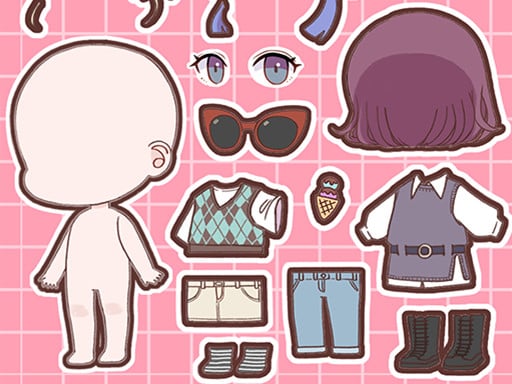
Lucky Doll is a lighthearted avatar design game that invites players to build expressive K-webtoon style characters from scratch. Focusing on personal aesthetics and creative expression, the title lets you fine-tune facial structures, skin tones, hair arrangements, and cosmetic touches. Once your figure is styled, you can arrange custom characters and adorable stickers across the canvas to compose lively digital scenes ready to showcase to friends.
Lucky Doll transports players into the visual realm of modern digital comics, offering a dedicated virtual studio for styling Korean webtoon avatars. Rather than rushing against a timer or following scripted puzzle mechanics, the experience centers entirely on relaxed personal creativity. You begin with a basic canvas and explore a selection of cosmetic elements to establish your avatar's personality, selecting distinct eye shapes, gentle or bold makeup palettes, diverse skin tones, and versatile hairstyles.
The creative loop extends beyond simple dressing. Players can position their finished model within the frame and embellish the backdrop with a variety of cute stickers. This scene-building component encourages you to imagine full character concepts, comic book panels, or decorative portraits. With its approachable click-and-tap interface, the game provides an accessible styling suite where you can iterate freely on different fashion trends and share snapshots of your finalized designs across social channels.
Your goal
Your main objective in Lucky Doll is to design attractive, cohesive webtoon-inspired figures and balance full screen compositions. Success is measured by your own creative satisfaction as you coordinate harmonious color schemes across makeup, hair, and clothing layers. As you practice styling, you can aim to craft distinct character archetypes, experiment with contrasting visual aesthetics, and decorate finished portraits with contextual stickers that bring your personal scenes to life.
How to play Lucky Doll
1. Inspect the default avatar model and browse through the introductory customization menus using your mouse or touch input.
2. Select your character's foundational appearance by choosing an appealing face shape and skin tone.
3. Browse the cosmetic options to apply eye makeup, blushes, lip colors, and suitable facial expressions.
4. Experiment with different hairstyles, checking front bangs and back lengths to complete the character's signature silhouette.
5. Add your styled character onto the main display area to begin framing the final visual layout.
6. Select and place cute decorative stickers around the screen to complement your avatar's mood and theme.
7. Review your finished scene composition and prepare snapshots to share with friends or social networks.
Controls and device support
The game uses universal mouse clicks on desktop and direct screen taps on mobile devices to browse cosmetic menus, select items, and place stickers.
- Controls: Mouse or touch
- Device support: Desktop + mobile
- Game frame: 504 x 800
What makes the challenge interesting
The appeal of Lucky Doll lies in visual harmony and personal design choices rather than reflexive dexterity. Because webtoon artwork emphasizes expressive eyes, nuanced makeup, and polished silhouettes, players must decide how individual cosmetic elements interact. A sharp, vibrant hairstyle might compete with delicate pastel makeup, requiring you to consider color balance and stylistic unity across every category.
A key tradeoff involves sticker placement and spatial arrangement. Filling the screen with adorable icons can create an energetic backdrop, but excessive clutter can distract from the avatar's custom features. Learning to place decorative accents intentionally around the character preserves visual clarity, allowing the central portrait to remain the primary focal point of your illustration.
Tips for Lucky Doll
- Establish skin tone and face shape before choosing makeup tones. Selecting foundational features early ensures lip and eye shades contrast cleanly rather than clashing with your avatar's undertones.
- Coordinate hairstyle volume with facial proportions. Bulky hair pieces can overpower delicate eyes or subtle blushes, so try adjusting hair outlines to keep facial expressions clearly readable.
- Limit decorative stickers to complementary accents around the canvas edges. Cluttering the immediate center can obscure fine makeup details and spoil an otherwise balanced webtoon composition.
- Iterate on one aesthetic archetype at a time, such as casual modern or dramatic fantasy. Mixing conflicting styling cues often produces muddy portraits, whereas committed themes create striking results.
Playing on different devices
Lucky Doll operates in a native portrait resolution of 504 x 800 pixels, matching the vertical reading orientation popular among digital webtoon comics. This vertical ratio renders cleanly on mobile phone screens, where single-touch taps offer natural control over menu selections and sticker placement. Desktop users can play comfortably using single mouse clicks, though maximizing browser height or adjusting window scaling helps keep all customization trays in easy view.
The skills behind the game
Sitting naturally within the dress-up, makeover, and creative design genres, Lucky Doll emphasizes personal self-expression over competitive objectives. Avatar dress-up titles traditionally give players full agency over clothing and cosmetics, letting enthusiasts explore contemporary fashion concepts without high-pressure challenges or timers.
By weaving webtoon aesthetics into classic makeover simulation gameplay, the experience provides a casual digital sketchpad for fans of stylized illustration. The inclusion of sticker decoration bridges the gap between individual character customizers and miniature scene creators, offering an enjoyable pastime for anyone who appreciates visual arts.
Who will enjoy this game
Anyone searching for a dedicated dress up game or an accessible avatar creator will find Lucky Doll an engaging option for short creative sessions. The game accommodates casual stylists who enjoy building custom characters from scratch, matching subtle makeup highlights to expressive hairstyles without needing complicated digital drawing tools.
Exploring the lucky doll game provides a calming routine for practicing color coordination and character design on a break. Because the interface relies on simple taps or clicks, it serves as a zero-stress digital workshop for hobbyists who appreciate cute aesthetic themes and want to prototype charming comic figures quickly.
Games with a similar feel
Love Nikki-Dress UP Queen: Both Lucky Doll and Love Nikki-Dress UP Queen center on the creative joy of styling characters with coordinated visual aesthetics. However, while Love Nikki features a vast fashion wardrobe alongside competitive outfit evaluations and stage progression, Lucky Doll provides a streamlined, freeform browser experience dedicated specifically to K-webtoon facial cosmetics, hairstyles, and sticker scene composition.
Project Makeover: Like Project Makeover, Lucky Doll revolves around the satisfying transformation of a character's hairstyle, facial features, and overall appearance. The key difference is that Project Makeover links its styling upgrades to puzzle mechanics and narrative client scenarios, whereas Lucky Doll functions as a pure sandbox makeover tool where players customize avatars and backdrops immediately at their own pace.
Frequently asked questions
What visual style does Lucky Doll use for avatar creation? Lucky Doll specifically utilizes a Korean webtoon illustration style, featuring clean line work, expressive facial shapes, contemporary hair aesthetics, and vibrant cosmetic palettes.
Can I decorate the background around my character in Lucky Doll? Yes. In addition to styling the doll's face, hair, and makeup, the game lets you add your character to the display and arrange cute decorative stickers across the screen.
Is Lucky Doll playable on both smartphones and desktop browsers? Yes. The title supports mouse clicking on personal computers and responsive touch tapping on mobile screens, functioning smoothly within its vertical 504 x 800 viewport.
Something not right?
Tell us if the game does not load, the information is wrong or the content needs review.
Report a problem ›